
Times Table by Jed Butler
Loading the math board and drawing, please wait…
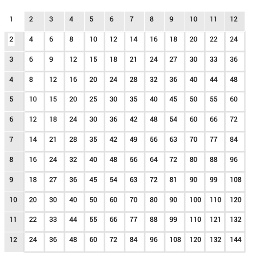
This example demonstrates a basic times table, useful for visualizing multiplication results. Core math concepts include multiplication, ratios, and fraction simplification. It is constructed using GeoGebra commands like Sequence, Polygon, and Element, with objects such as h_{01}, h_{02}, list1, etc. Suitable for elementary and middle school mathematics education, introducing basic multiplication and mathematical concepts.
GeoGebra Commands & Parameters
Sequence(Sequence[Text[(i * j), (i, (-j))], j, 1, 12, 1], i, 1, 12, 1) → list1Sequence(Sequence[Polygon[(i - 0.25, 0.5 - j), (i + 0.75, 0.5 - j), (i + 0.75, -0.5 - j), (i - 0.25, -0.5 - j)], i, 1, 12, 1], j, 1, 12, 1) → list2Sequence(Sequence[(i + 0.75, -0.5 - j), i, 0, 12, 1], j, 0, 12, 1) → list3Polygon((0.75, -3.5), (1.75, -3.5), (1.75, -4.5), (0.75, -4.5)) → R4, i, j, k, lPolygon((0.75, -1.5), (1.75, -1.5), (1.75, -2.5), (0.75, -2.5)) → R2, a, b, c, dPolygon((0.75, -2.5), (1.75, -2.5), (1.75, -3.5), (0.75, -3.5)) → R3, b_5, c_5, d_5, e_5Polygon((0.75, -4.5), (1.75, -4.5), (1.75, -5.5), (0.75, -5.5)) → R5, j_5, k_5, l_5, m_5Polygon((0.75, -5.5), (1.75, -5.5), (1.75, -6.5), (0.75, -6.5)) → R6, n_5, p_5, q_5, r_5Polygon((0.75, -6.5), (1.75, -6.5), (1.75, -7.5), (0.75, -7.5)) → R7, s_5, t_5, a_6, b_6Polygon((0.75, -7.5), (1.75, -7.5), (1.75, -8.5), (0.75, -8.5)) → R8, c_6, d_6, e_6, f_6Polygon((0.75, -8.5), (1.75, -8.5), (1.75, -9.5), (0.75, -9.5)) → R9, g_6, h_6, i_6, j_6Polygon((0.75, -9.5), (1.75, -9.5), (1.75, -10.5), (0.75, -10.5)) → R10, k_6, l_6, m_6, n_6Polygon((0.75, -10.5), (1.75, -10.5), (1.75, -11.5), (0.75, -11.5)) → R11, p_6, q_6, r_6, s_6Polygon((0.75, -11.5), (1.75, -11.5), (1.75, -12.5), (0.75, -12.5)) → R12, t_6, a_7, b_7, c_7Polygon((1.75, -0.5), (1.75, -1.5), (2.75, -1.5), (2.75, -0.5)) → C2, d_7, e_7, f_7, g_7Polygon((2.75, -0.5), (2.75, -1.5), (3.75, -1.5), (3.75, -0.5)) → C3, h_7, i_7, j_7, k_7Polygon((3.75, -0.5), (3.75, -1.5), (4.75, -1.5), (4.75, -0.5)) → C4, l_7, m_7, n_7, p_7Polygon((4.75, -0.5), (4.75, -1.5), (5.75, -1.5), (5.75, -0.5)) → C5, m, n, p, qPolygon((5.75, -0.5), (5.75, -1.5), (6.75, -1.5), (6.75, -0.5)) → C6, e, f, g, hPolygon((6.75, -0.5), (6.75, -1.5), (7.75, -1.5), (7.75, -0.5)) → C7, e_8, f_8, g_8, h_8Polygon((7.75, -0.5), (7.75, -1.5), (8.75, -1.5), (8.75, -0.5)) → C8, i_8, j_8, k_8, l_8Polygon((8.75, -0.5), (8.75, -1.5), (9.75, -1.5), (9.75, -0.5)) → C9, m_8, n_8, p_8, q_8Polygon((9.75, -0.5), (9.75, -1.5), (10.75, -1.5), (10.75, -0.5)) → C10, r_8, s_8, t_8, a_9Polygon((11.75, -0.5), (11.75, -1.5), (12.75, -1.5), (12.75, -0.5)) → C12, r, s, t, f_1Polygon((10.75, -0.5), (10.75, -1.5), (11.75, -1.5), (11.75, -0.5)) → C11, b_9, c_9, d_9, e_9Sequence(Sequence[Polygon[(0.75 + i, -0.5 - j), (1.75 + i, -0.5 - j), 4], i, 1, 11, 1], j, 2, 12, 1) → list4Sequence(Sequence[Polygon[(-0.25 + i, -0.5 - j), (0.75 + i, -0.5 - j), (0.75 + i, 0.5 - j)], j, 1, 12, 1], i, 2, 12, 1) → ColElement(Col, 1) → Col_{02}Element(Col, 2) → Col_{03}Element(Col, 3) → Col_{04}Element(Col, 4) → Col_{05}Element(Col, 5) → Col_{06}Element(Col, 6) → Col_{07}Element(Col, 7) → Col_{08}Element(Col, 8) → Col_{09}Element(Col, 9) → Col_{10}Element(Col, 10) → Col_{11}Element(Col, 11) → Col_{12}Sequence(Sequence[Polygon[(-0.25 + i, -0.5 - j), (-0.25 + i, 0.5 - j), (0.75 + i, 0.5 - j)], i, 1, 12, 1], j, 2, 12, 1) → RowElement(Row, 1) → Row_{02}Element(Row, 2) → Row_{03}Element(Row, 3) → Row_{04}Element(Row, 4) → Row_{05}Element(Row, 5) → Row_{06}Element(Row, 6) → Row_{07}Element(Row, 7) → Row_{08}Element(Row, 8) → Row_{09}Element(Row, 9) → Row_{10}Element(Row, 10) → Row_{11}Element(Row, 11) → Row_{12}
AI Drawing Prompt Reference
Draw a 12x12 multiplication table, starting from the top-left corner, and sequentially draw each cell with multiplication expressions like 1*1, 1*2, etc., separating each cell with small squares, and connect the bottom-left and top-right corners of each cell to adjacent cells to form a grid layout.
The prompt above was compiled from the original drawing commands and is for reference only.