
Dilation of Triangles
Loading the math board and drawing, please wait…
In collections
Transformations Stations
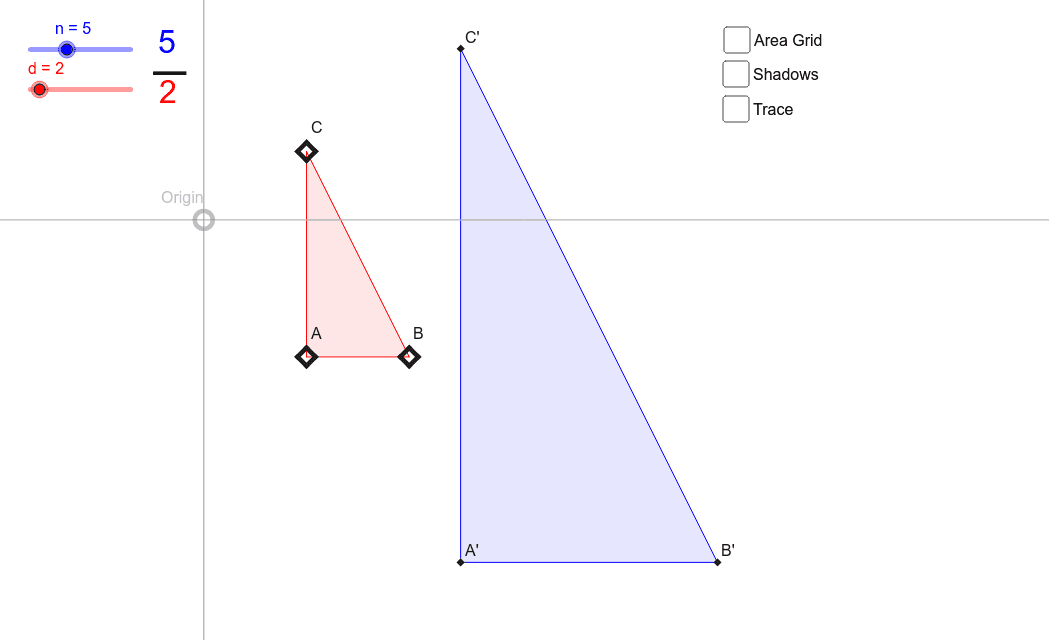
This example demonstrates the concept of dilation using triangles. It shows how to change the size of a triangle while keeping its shape unchanged by adjusting the scale factor. Commands used include Polygon, Dilate, Sequence, Segment, and are suitable for students in middle school and above learning geometric transformations.
GeoGebra Commands & Parameters
Polygon(A, B, C) → poly1, AB, BC, CADilate(A, n / d, Origin) → A'Dilate(B, n / d, Origin) → B'Dilate(C, n / d, Origin) → C'Polygon(A', B', C') → poly2, A'B', B'C', C'A'Sequence(Dilate[A, i / d, C], i, 1, d - 1) → list1Sequence(Dilate[C, i / d, B], i, 1, d - 1) → list2Sequence(Dilate[B, i / d, A], i, 1, d - 1) → list3Sequence(Dilate[A', i / n, C'], i, 1, n - 1) → list4Sequence(Dilate[C', i / n, B'], i, 1, n - 1) → list5Sequence(Dilate[B', i / n, A'], i, 1, n - 1) → list6Sequence(Segment[Element[list1, i], Element[list2, d - i]], i, 1, d - 1) → list7Sequence(Segment[Element[list1, i], Element[list3, d - i]], i, 1, d - 1) → list8Sequence(Segment[Element[list3, i], Element[list2, d - i]], i, 1, d - 1) → list9Sequence(Segment[Element[list4, i], Element[list5, n - i]], i, 1, n - 1) → list10Sequence(Segment[Element[list5, i], Element[list6, n - i]], i, 1, n - 1) → list11Sequence(Segment[Element[list6, i], Element[list4, n - i]], i, 1, n - 1) → list12Segment(Origin, C') → aSegment(Origin, B') → bSegment(Origin, A') → cSegment(Origin, C) → eSegment(Origin, A) → fSegment(Origin, B) → gSequence(Dilate[C, i / d, Origin], i, 1, d - 1) → list13Sequence(Dilate[A, i / d, Origin], i, 1, d - 1) → list14Sequence(Dilate[B, i / d, Origin], i, 1, d - 1) → list15Sequence(Dilate[C', i / n, Origin], i, 1, n - 1) → list16Sequence(Dilate[B', i / n, Origin], i, 1, n - 1) → list17Sequence(Dilate[A', i / n, Origin], i, 1, n - 1) → list18Sequence(Polygon[Element[list16, i], Element[list17, i], Element[list18, i]], i, If[d < n, d + 1, 1], n - 1) → list20Sequence(Polygon[Element[list13, i], Element[list14, i], Element[list15, i]], i, If[n < d, n + 1, 1], d - 1) → list19
AI Drawing Prompt Reference
Draw two triangles, one in original size and one scaled-up but maintaining the same shape, to demonstrate resizing by scaling from a center point. Connect the vertices of the original triangle to the corresponding vertices of the scaled triangle with lines to show a gradual transition from original to scaled. Also, draw multiple line segments extending from the vertices of the original triangle through the center point, showing different scaling factors. Finally, use these segments to form intermediate-sized triangles, creating a continuous scaling transition effect.
The prompt above was compiled from the original drawing commands and is for reference only.