
Construct Similar Triangles (SSS)
Loading the math board and drawing, please wait…
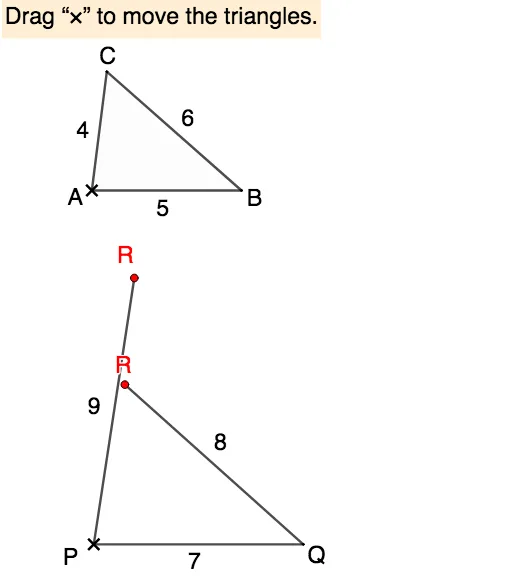
This example demonstrates how to construct similar triangles using the SSS (Side-Side-Side) condition. Key mathematical concepts include the properties of similar triangles and similarity transformations. It utilizes commands such as Intersect, Polygon, Textfield, Point, If, DynamicCoordinates, Segment, and Angle in GeoGebra. Suitable for middle school and above students to learn about similar triangles.
GeoGebra Commands & Parameters
Intersect(Circle[A, 4], Circle[B, 6], 1) → CPolygon(A, B, C) → t1, c, a, bTextfield(r) → InputBox1Textfield(p) → InputBox2Textfield(q) → InputBox3Intersect(Circle[P, q], Circle[Q, p]) → R_1, R_2, ,Point(Circle[P, q]) → R1Point(Circle[Q, p]) → R2If(Distance[R1, R_1] < δ, true, false) → close11If(Distance[R1, R_2] < δ, true, false) → close12If(Distance[R2, R_1] < δ, true, false) → close21If(Distance[R2, R_2] < δ, true, false) → close22DynamicCoordinates(R1, If[close11, x(R_1), If[close12, x(R_2), x(R1)]], If[close11, y(R_1), If[close12, y(R_2), y(R1)]]) → RDynamicCoordinates(R2, If[close21, x(R_1), If[close22, x(R_2), x(R2)]], If[close21, y(R_1), If[close22, y(R_2), y(R2)]]) → R'Segment(P, Q) → fSegment(P, R) → gSegment(Q, R') → hPolygon(P, Q, R_1) → t2, r_1, p_1, q_1Polygon(P, Q, R_2) → t3, r_2, p_2, q_2If(a / p ≟ b / q ≟ c / r, true, false) → proportionalIf(proportional ∧ (closed1 ∨ closed2), true, false) → doneAngle(B, A, C) → αAngle(C, B, A) → βAngle(A, C, B) → γAngle(Q, P, R_1) → εAngle(R_1, Q, P) → ζAngle(P, R_1, Q) → ηAngle(R_2, P, Q) → θAngle(Q, R_2, P) → ιAngle(P, Q, R_2) → κ
AI Drawing Prompt Reference
Draw two triangles, one fixed and one adjustable similar triangle. Start with a fixed triangle whose vertices are determined by the intersection of two circles with radii 4 and 6. Then place two movable points on circles to adjust the shape of the similar triangle. Use three input boxes to control the side length ratios. Connect the points to form the second triangle and display its three interior angles. When the corresponding sides are proportional and vertices coincide, show a completion message. Also label all angles and indicate whether the triangles are similar.
The prompt above was compiled from the original drawing commands and is for reference only.