
Construct Similar Triangles (AA Criterion)
Loading the math board and drawing, please wait…
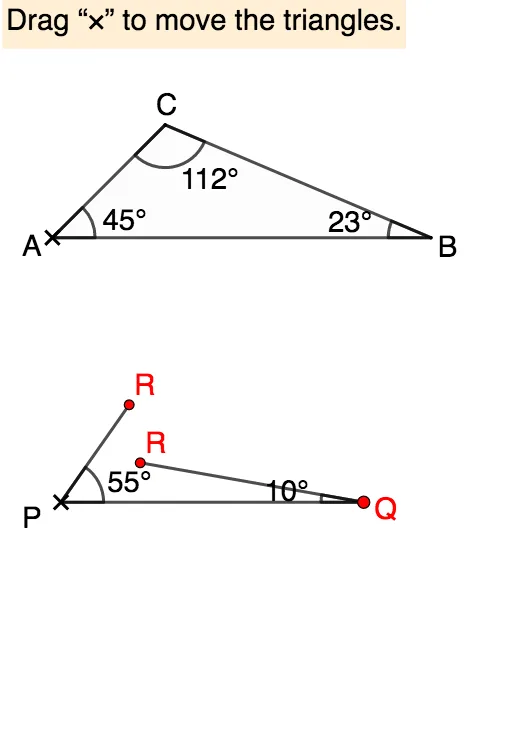
This example demonstrates how to construct similar triangles to understand the AA criterion. Key mathematical concepts include similar triangles and similarity transformations. Using GeoGebra commands such as Intersect, Polygon, Sequence, etc., you can dynamically adjust the angles and sides of the triangles to observe the properties of similar triangles. Suitable for students at the junior high school level and above.
GeoGebra Commands & Parameters
Intersect(Line[A, Rotate[A + (1, 0), 45°, A]], Line[B, Rotate[B - (1, 0), (-(23°)), B]]) → CPolygon(A, B, C) → t1, c, a, bSequence(P + ((i * c), 0), i, 0.2, 3, 0.05) → l1Angle(C, B, A) → βPoint(l1) → QAngle(B, A, C) → αPoint(Ray[Rotate[P + (1, 0), ε, P], Rotate[P + (2, 0), ε, P]]) → R1Intersect(Ray[P, Rotate[P + (1, 0), ε, P]], Ray[Q, Rotate[Q - (1, 0), (-ζ), Q]]) → R_1Point(Ray[Rotate[Q - (1, 0), (-ζ), Q], Rotate[Q - (2, 0), (-ζ), Q]]) → R2If(Distance[R1, R_1] < δ, true, false) → close11If(Distance[R2, R_1] < δ, true, false) → close21Segment(P, Q) → rPolygon(P, Q, R_1) → t2, r_1, p_1, q_1Angle(A, C, B) → γDynamicCoordinates(R1, If[Distance[R1, R_1] < δ, x(R_1), x(R1)], If[Distance[R1, R_1] < δ, y(R_1), y(R1)]) → RDynamicCoordinates(R2, If[Distance[R2, R_1] < δ, x(R_1), x(R2)], If[Distance[R2, R_1] < δ, y(R_1), y(R2)]) → R'Segment(P, R) → qSegment(Q, R') → pAngle(Q, P, R) → ηAngle(R', Q, P) → θIf(α ≟ ε ∧ β ≟ ζ, true, false) → AAAAngle(P, R, Q) → ιTextfield(angleP) → InputBox1Textfield(angleQ) → InputBox2
AI Drawing Prompt Reference
Draw two similar triangles to demonstrate the AA similarity criterion. Start with a base triangle having a horizontal base, a left base angle of 45 degrees, and a right base angle of 23 degrees, labeling all three interior angles. Then create a row of translated copies of this triangle along the horizontal direction. On one of these copies, adjust the apex so that the two base angles match those of the original triangle, forming a second similar triangle. Connect corresponding vertices between the two triangles, display corresponding sides and angles, and include input boxes for angle values to dynamically verify the similarity condition.
The prompt above was compiled from the original drawing commands and is for reference only.