
Constructing Similar Triangles by SAS (with Dynamic Sliders and Area Comparison)
Loading the math board and drawing, please wait…
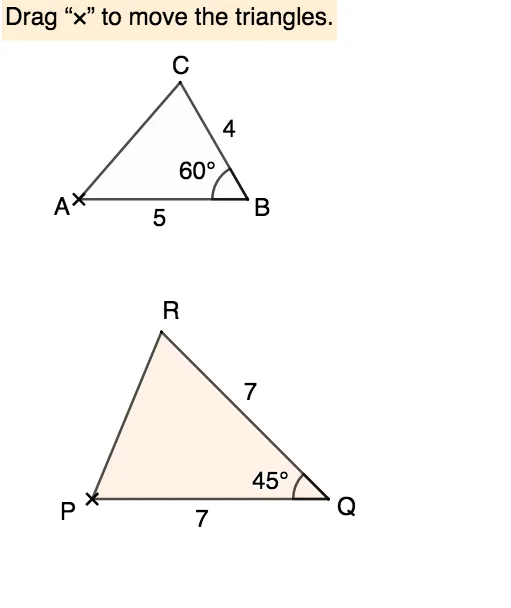
This GeoGebra example demonstrates how to construct similar triangles using the SAS (Side-Angle-Side) criterion, where two sides are proportional and the included angle is equal. It visually shows the correspondence of sides, angles, and the relationship between area ratio and the square of the similarity ratio. Core mathematical concepts include triangle similarity theorems, similarity ratio, area scaling, and geometric transformations such as rotation and scaling. The construction uses GeoGebra commands such as Rotate, Angle, Polygon, Sequence, Point, Intersect, If, Segment, and Textfield, with draggable points A, B, C and a slider r to control the scale factor. Dynamic text fields display angle measures, side lengths, and areas, while checkboxes toggle auxiliary elements. Suitable for upper middle school or high school students learning similarity criteria, and for teachers demonstrating dynamic geometric reasoning in class.
GeoGebra Commands & Parameters
Rotate(B - (4, 0), (-(60°)), B) → CAngle(C, B, A) → βPolygon(A, B, C) → t1, c, a, bSequence(P + ((i * c), 0), i, 0.2, 3, 0.05) → l1Point(Ray[Rotate[P + (1, 0), ε, P], Rotate[P + (2, 0), ε, P]]) → R1Intersect(Ray[P, Rotate[P + (1, 0), ε, P]], Ray[Q, Rotate[Q - (1, 0), (-ζ), Q]]) → R_1Point(Ray[Rotate[Q - (1, 0), (-ζ), Q], Rotate[Q - (2, 0), (-ζ), Q]]) → R2If(Distance[R1, R_1] < δ, true, false) → close11If(Distance[R2, R_1] < δ, true, false) → close21Segment(P, Q) → rRotate(Q - (p, 0), (-ζ), Q) → RPolygon(P, Q, R) → t2, f, g, hSegment(P, R) → qSegment(Q, R) → p_2Angle(R, Q, P) → θTextfield(r') → InputBox1Textfield(p) → InputBox3Angle(B, A, C) → αAngle(A, C, B) → γAngle(Q, P, R) → ηAngle(P, R, Q) → ιSegment(P, Q) → iTextfield(angleQ) → InputBox2
AI Drawing Prompt Reference
Draw two similar triangles where one can be resized using a slider to demonstrate the SAS similarity criterion with proportional sides and equal included angle. Dynamically display corresponding side lengths, angles, and areas of both triangles, comparing the area ratio to the square of the similarity ratio. Start with three draggable points to form the initial triangle, then construct the second triangle using rotation and scaling, adding auxiliary segments and text labels to show key measurements.
The prompt above was compiled from the original drawing commands and is for reference only.