
Three Squares on a Screen
Loading the math board and drawing, please wait…
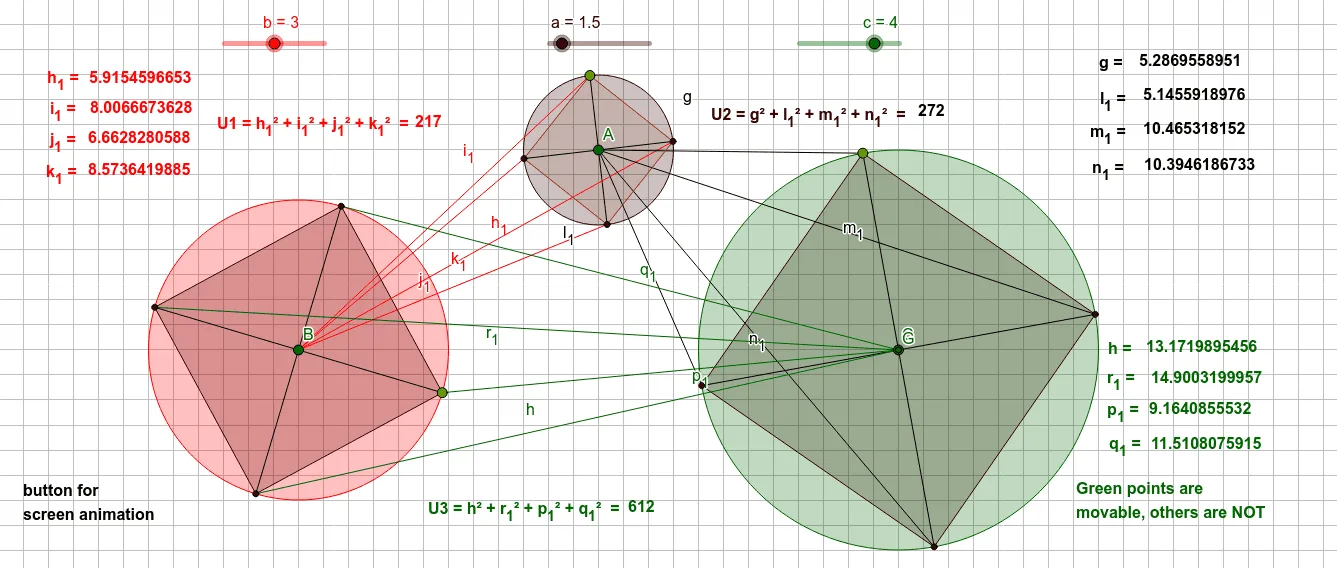
This example demonstrates how to construct three squares on a screen. Core mathematical concepts include the properties of squares, geometric transformations, and symmetry. Using GeoGebra commands such as Circle, Point, Segment, Rotate, etc., specific symmetrical squares can be constructed. Suitable for students in middle school and above to learn about geometric transformations and symmetry.
GeoGebra Commands & Parameters
Circle(A, a) → dCircle(B, b) → eCircle(C, c) → fPoint(e) → DPoint(d) → EPoint(f) → FSegment(B, D) → iSegment(A, E) → jSegment(C, F) → kRotate(D, 90°, B) → D'Angle(D, B, D') → αSegment(B, D') → lRotate(D', 90°, B) → D''Angle(D', B, D'') → βSegment(B, D'') → mRotate(D'', 90°, B) → D'''Angle(D'', B, D''') → γSegment(B, D''') → nPolygon(D', D, D''', D'') → q1, d', d_1, d''', d''Rotate(F, 90°, C) → F'Angle(F, C, F') → δSegment(C, F') → pRotate(F', 90°, C) → F''Angle(F', C, F'') → εSegment(C, F'') → qRotate(F'', 90°, C) → F'''Angle(F'', C, F''') → ζSegment(C, F''') → rPolygon(F, F', F'', F''') → q2, f_1, f', f'', f'''Rotate(E, 90°, A) → E'Angle(E, A, E') → ηSegment(A, E') → sRotate(E', 90°, A) → E''Angle(E', A, E'') → θSegment(A, E'') → tRotate(E'', 90°, A) → E'''Angle(E'', A, E''') → ιSegment(A, E''') → g_1Segment(B, E') → h_1Segment(B, E) → i_1Segment(B, E'') → j_1Segment(B, E''') → k_1Segment(A, F) → gSegment(A, F') → l_1Segment(A, F''') → m_1Segment(A, F'') → n_1Segment(C, D''') → hSegment(C, D) → p_1Segment(C, D') → q_1Intersect(p, q_1) → GSegment(C, D'') → r_1Polygon(E, E', E'', E''') → q3, e_1, e', e'', e'''
AI Drawing Prompt Reference
Draw three squares on a screen, each centered at a distinct point. Start by placing three center points and drawing circles around them. Pick a point on each circle as the initial vertex of a square. From each center, draw a segment to its initial vertex. Then rotate that vertex around its center three times by 90 degrees each, obtaining the four vertices of each square. Connect adjacent vertices to form the squares. Additionally, draw segments connecting certain vertices between different squares to show symmetry. The final figure consists of three squares of possibly different sizes and several connecting lines, illustrating geometric transformations and symmetry.
The prompt above was compiled from the original drawing commands and is for reference only.