
The Spindle Sphere: A 3D Construction with Rotation and Mirroring
Loading the math board and drawing, please wait…
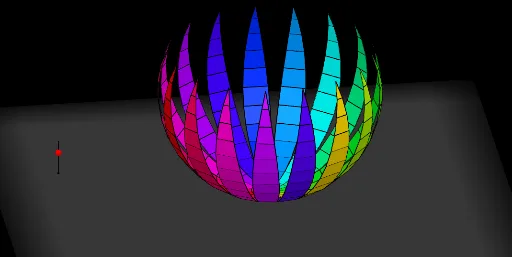
This GeoGebra example demonstrates a 'spindle sphere', a distinctive 3D surface resembling a spindle or olive shape, constructed by rotating line segments around an axis and applying mirroring and translation operations. The core mathematical concepts include solid geometry, spheres, surfaces of revolution, symmetry transformations (mirroring), translation, and parametric construction, with implicit roles of linear and polynomial functions in defining auxiliary curves or axes. The construction uses commands such as Line, Segment, Point, Sequence, Rotate, OrthogonalPlane, Mirror, Translate, Sphere, If, and Element, along with lists (list1, list2, list3) to manage multiple rotated copies. This example is suitable for high school or early university students learning 3D geometry and transformation-based construction, and serves as an advanced GeoGebra 3D tutorial for combining lists, sequences, and spatial transformations.
GeoGebra Commands & Parameters
Line((0, 0, 1), (0, 1, 1)) → cSequence(Rotate[(0, 0, 0), (-((i * 15°))), c], i, 0, 6) → list1Rotate(list1, (360 / m)°, zAxis) → list1'Line(Element[list1, 2], Element[list1', 2]) → l1_1Line((0, 0, 0), l1_1) → l0Sequence(Polygon[Element[list1, i], Element[list1', i], Element[list1', i + 1], Element[list1, i + 1]], i, 1, 6) → list2Segment(A, A + (0, 0, 0.5)) → aPoint(a) → PIf(z(P) ≥ 0.5, 0, (2 * (0.5 - z(P)))) → tTranslate(list2, Vector[(s * Vector[(0, 0, 0), (1, 0, 0)])]) → list2'Translate(l0, Vector[(s * Vector[(0, 0, 0), (1, 0, 0)])]) → l0'Sequence(Pyramid[Element[list2, i], (0, 0, 1)], i, 1, 6) → list3Translate(list3, Vector[(s * Vector[(0, 0, 0), (1, 0, 0)])]) → list3'Line(Element[list1, 3], Element[list1', 3]) → l2Line(Element[list1, 4], Element[list1', 4]) → l3Line(Element[list1, 5], Element[list1', 5]) → l4Line(Element[list1, 6], Element[list1', 6]) → l5Line(Element[list1, 7], Element[list1', 7]) → l6Rotate(Element[list3', 1], (t * 7.5°), l0') → dTranslate(l1_1, Vector[(s * Vector[(0, 0, 0), (1, 0, 0)])]) → l1'Translate(l2, Vector[(s * Vector[(0, 0, 0), (1, 0, 0)])]) → l2'Translate(l3, Vector[(s * Vector[(0, 0, 0), (1, 0, 0)])]) → l3'Translate(l4, Vector[(s * Vector[(0, 0, 0), (1, 0, 0)])]) → l4'Rotate(l1', (7.5° * t), l0') → l1''Rotate(Rotate[Element[list3', 2], (t * 7.5°), l0'], (t * 15°), l1'') → eRotate(Rotate[l2', (t * 7.5°), l0'], (t * 15°), l1'') → l2''Rotate(Rotate[Rotate[Element[list3', 3], (t * 7.5°), l0'], (t * 15°), l1''], (t * 15°), l2'') → fRotate(Rotate[Rotate[l3', (t * 7.5°), l0'], (t * 15°), l1''], (t * 15°), l2'') → l3''Rotate(Rotate[Rotate[Rotate[Element[list3', 4], (t * 7.5°), l0'], (t * 15°), l1''], (t * 15°), l2''], (15° * t), l3'') → gRotate(Rotate[Rotate[Rotate[l4', (t * 7.5°), l0'], (t * 15°), l1''], (t * 15°), l2''], (t * 15°), l3'') → l4''Rotate(Rotate[Rotate[Rotate[Rotate[Element[list3', 5], (t * 7.5°), l0'], (t * 15°), l1''], (t * 15°), l2''], (15° * t), l3''], (15° * t), l4'') → hTranslate(l5, Vector[(s * Vector[(0, 0, 0), (1, 0, 0)])]) → l5'Rotate(Rotate[Rotate[Rotate[Rotate[l5', (t * 7.5°), l0'], (t * 15°), l1''], (t * 15°), l2''], (t * 15°), l3''], (15° * t), l4'') → l5''Rotate(Element[list2', 1], (t * 7.5°), l0') → poly1Rotate(Rotate[Rotate[Rotate[Rotate[Rotate[Element[list3', 6], (t * 7.5°), l0'], (t * 15°), l1''], (t * 15°), l2''], (15° * t), l3''], (15° * t), l4''], (15° * t), l5'') → iRotate(Rotate[Element[list2', 2], (t * 7.5°), l0'], (t * 15°), l1'') → poly2Rotate(Rotate[Rotate[Element[list2', 3], (t * 7.5°), l0'], (t * 15°), l1''], (t * 15°), l2'') → poly3Rotate(Rotate[Rotate[Rotate[Element[list2', 4], (t * 7.5°), l0'], (t * 15°), l1''], (t * 15°), l2''], (15° * t), l3'') → poly4Rotate(Rotate[Rotate[Rotate[Rotate[Element[list2', 5], (t * 7.5°), l0'], (t * 15°), l1''], (t * 15°), l2''], (15° * t), l3''], (15° * t), l4'') → poly5Rotate(Rotate[Rotate[Rotate[Rotate[Rotate[Element[list2', 6], (t * 7.5°), l0'], (t * 15°), l1''], (t * 15°), l2''], (15° * t), l3''], (15° * t), l4''], (15° * t), l5'') → poly6OrthogonalPlane((0, 0, 1), zAxis) → m_1Translate(l6, Vector[(s * Vector[(0, 0, 0), (1, 0, 0)])]) → l6'Rotate(Rotate[Rotate[Rotate[Rotate[Rotate[l6', (t * 7.5°), l0'], (t * 15°), l1''], (t * 15°), l2''], (t * 15°), l3''], (15° * t), l4''], (15° * t), l5'') → l6''Rotate(Rotate[Rotate[Rotate[Rotate[Rotate[Rotate[m_1, (t * 7.5°), l0'], (t * 15°), l1''], (t * 15°), l2''], (15° * t), l3''], (15° * t), l4''], (15° * t), l5''], (7.5° * t), l6'') → nMirror(i, n) → i'Mirror(h, n) → h'Mirror(g, n) → g'Mirror(f, n) → f'Mirror(e, n) → e'Mirror(d, n) → d'Mirror(poly6, n) → poly6'Mirror(poly5, n) → poly5'Mirror(poly4, n) → poly4'Mirror(poly3, n) → poly3'Mirror(poly2, n) → poly2'Mirror(poly1, n) → poly1'Sequence(Rotate[list3, 15° + ((15° * 22) * i), zAxis], i, 0, 1) → list4Mirror(list4, m_1) → list4'Sequence(Rotate[list2, (15° * i), zAxis], i, 1, 23) → list5Mirror(list5, m_1) → list5'Sequence(Rotate[l1, i, zAxis], i, 0, (2 * π), (2 * π / p)) → l7Sphere((0, 0, 1), 0.982) → bElement(l7, A1) → B1Element(l7, A2) → B2Element(l7, A3) → B3Element(l7, A4) → B4Element(l7, A5) → B5Element(l7, A6) → B6Element(l7, A7) → B7Element(l7, A8) → B8Element(l7, A9) → B9Element(l7, A10) → B10Element(l7, A11) → B11Element(l7, A12) → B12Element(l7, A13) → B13Element(l7, A14) → B14Element(l7, A15) → B15Element(l7, A16) → B16Element(l7, A17) → B17Element(l7, A18) → B18Element(l7, A19) → B19Element(l7, A20) → B20Element(l7, A21) → B21Element(l7, A22) → B22Element(l7, A23) → B23Element(l7, A24) → B24Element(l7, A25) → B25Element(l7, A26) → B26Element(l7, A27) → B27Element(l7, A28) → B28Element(l7, A29) → B29Element(l7, A30) → B30Element(l7, A31) → B31Element(l7, A32) → B32Element(l7, A33) → B33Element(l7, A34) → B34Element(l7, A35) → B35Element(l7, A36) → B36Element(l7, A37) → B37Element(l7, A38) → B38Element(l7, A39) → B39Element(l7, A40) → B40Element(l7, A41) → B41Element(l7, A42) → B42Element(l7, A43) → B43Element(l7, A44) → B44Element(l7, A45) → B45Element(l7, A46) → B46Element(l7, A47) → B47Element(l7, A48) → B48Element(l7, A49) → B49Element(l7, A50) → B50Element(l7, A51) → B51Element(l7, A52) → B52Element(l7, A53) → B53Element(l7, A54) → B54Element(l7, A55) → B55Element(l7, A56) → B56Element(l7, A57) → B57
AI Drawing Prompt Reference
Create a 3D spindle-sphere (olive-like) surface. Start with a short line segment in space near the rotation axis: one end lies at height z=1 on a line parallel to y, and the segment extends upward by about 0.5 along z. Rotate this segment around the z-axis by equal angle steps to form a ring of rotated line copies, then connect corresponding neighboring copies to build polygonal surface patches, forming a shell. Construct additional pyramid-like side faces from the connected rings to give the solid’s characteristic outline. Apply a parameter-controlled translation along the x direction to shift the layered shell, and then rotate the translated layers around the bottom reference line with stepwise angle increments derived from the same parameters. Finally, mirror the resulting structure across an orthogonal plane defined through the z-axis to complete a symmetric spindle shape.
The prompt above was compiled from the original drawing commands and is for reference only.