
The Power of Super Symmetry
Loading the math board and drawing, please wait…
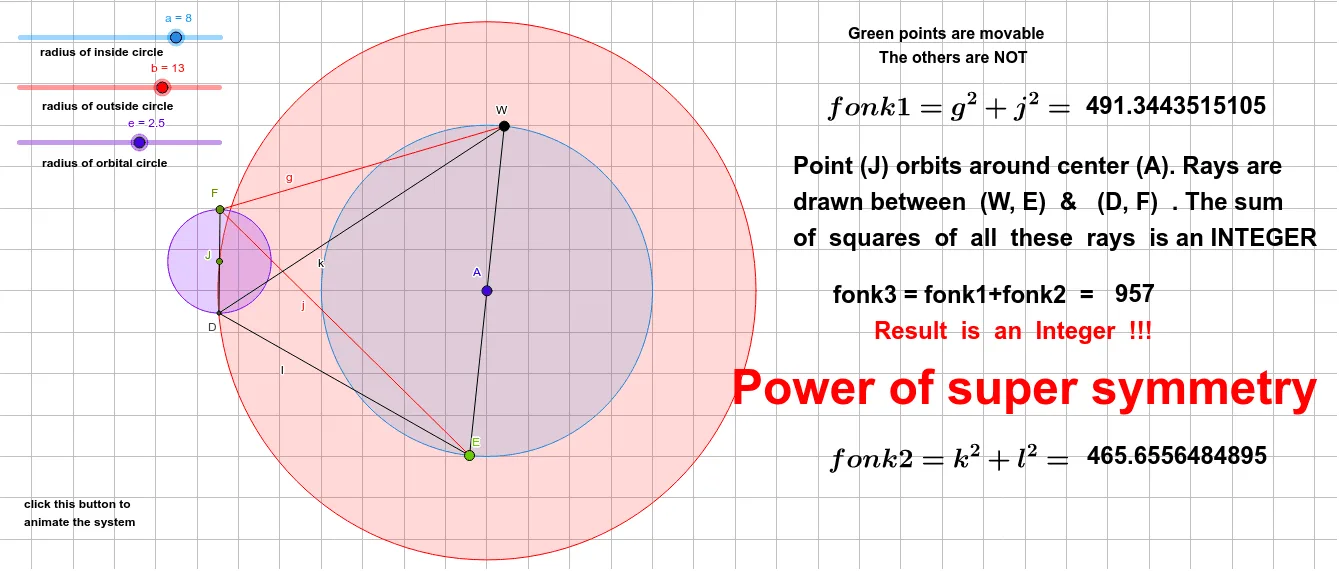
This example illustrates the concept of super symmetry, involving geometric mean and symmetry transformations. Using GeoGebra commands such as Circle, Point, Line, Intersect, Segment, and Rotate, a dynamic geometric figure is constructed. Suitable for high school and above students to learn about geometric transformations and symmetry.
GeoGebra Commands & Parameters
Circle(A, a) → cCircle(A, b) → dPoint(d) → JCircle(J, e) → pPoint(p) → FLine(F, J) → hIntersect(p, h, 2) → DSegment(F, D) → iPoint(c) → ERotate(E, 180°, A) → WSegment(E, W) → fSegment(F, W) → gSegment(F, E) → jSegment(D, W) → kSegment(D, E) → l
AI Drawing Prompt Reference
Draw a figure with two concentric circles, where the diameter of one circle is the radius of the other. Take a point J on the smaller circle and draw a circle p centered at J. Find another intersection point F on circle p. Connect F and J, and find the other intersection point D. Draw line segment FD. With F as the center and W as the symmetric point, draw symmetric line segments. Connect FD, FW, FE, DW, and DE to form a symmetric figure.
The prompt above was compiled from the original drawing commands and is for reference only.