
Tetrahedron in Cube
Loading the math board and drawing, please wait…
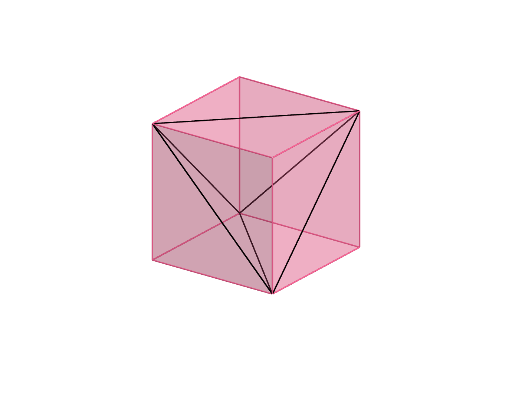
This example demonstrates the geometric construction of a tetrahedron embedded within a cube. Key math concepts include solid geometry, polygons, vector operations, and geometric construction. The construction uses GeoGebra commands/primitives like Prism and Segment, along with objects such as points A,B,C,D,E,a,F,G,H, faces, and edges. Suitable for high school students and above learning spatial geometry, visualization, and construction techniques.
GeoGebra Commands & Parameters
Prism(A, B, C, D, E) → a, F, edgeAB, edgeBC, edgeCD, edgeAD, edgeAE, edgeBF, edgeCG, edgeDH, edgeEF, edgeFG, G, edgeGH, edgeEH, H, faceABCD, faceABFE, faceBCGF, faceCDHG, faceADHE, faceEFGHSegment(E, D) → fSegment(G, B) → gSegment(G, E) → hSegment(D, B) → iSegment(E, B) → jSegment(D, G) → k
AI Drawing Prompt Reference
Draw a cube and embed a tetrahedron inside it. First, sketch the six faces of the cube. Then connect one vertex of the cube to the center of the opposite face to form three edges of the tetrahedron. Next, connect the other vertices of the cube to complete the remaining three edges of the tetrahedron. Finally, connect all the vertices of the tetrahedron to form its four triangular faces.
The prompt above was compiled from the original drawing commands and is for reference only.