
Tetrahedron Construction
Loading the math board and drawing, please wait…
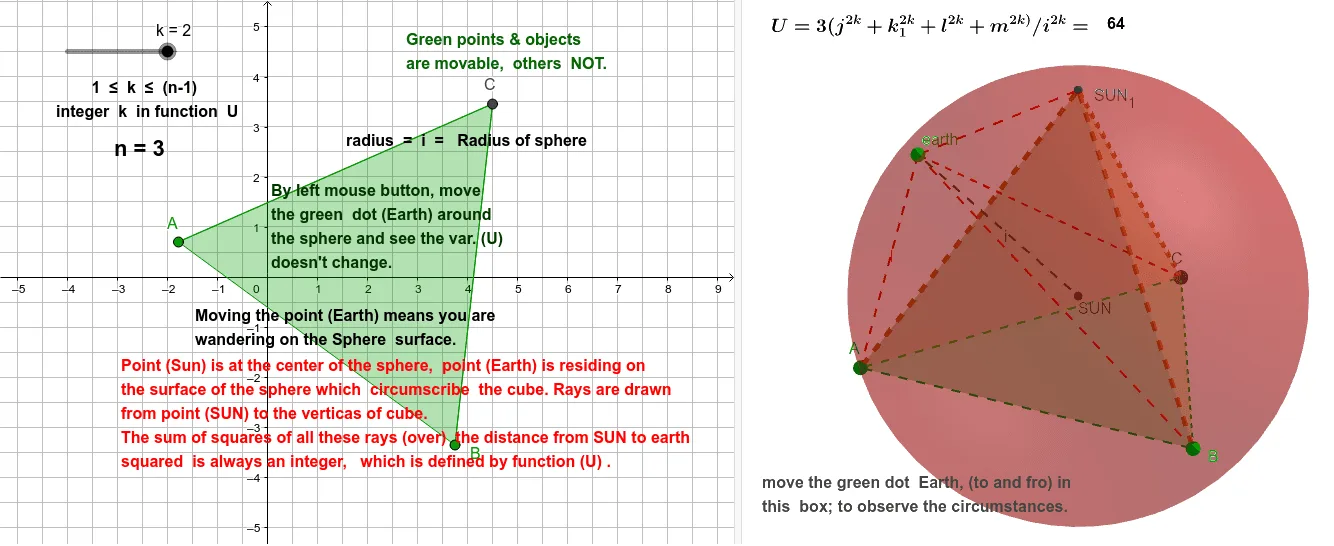
This example demonstrates the construction and properties of a tetrahedron, involving core mathematical concepts like polygons, solid geometry, spheres, centroids, and geometric transformations. Key GeoGebra commands used include Polygon, Tetrahedron, Barycenter, Sphere, PointIn, and Segment for building the tetrahedron and related elements. Suitable for high school and above students studying 3D geometry and spatial figures.
GeoGebra Commands & Parameters
Polygon(A, B, 3) → poly1, f, g, h, CTetrahedron(poly1, true) → T, SUN_1, faceACD, faceABD, faceBCD, edgeAD, edgeCD, edgeBDBarycenter({A, B, C, SUN_1}, {1, 1, 1, 1}) → SUNSphere(SUN, A) → aPointIn(a) → earthSegment(B, earth) → mSegment(A, earth) → lSegment(C, earth) → k_1Segment(SUN_1, earth) → jSegment(SUN, earth) → i
AI Drawing Prompt Reference
Draw a tetrahedron to illustrate core geometric concepts such as polygons, solid geometry, spheres, centroids, and geometric transformations. Start by constructing a triangle, then form a tetrahedron based on it, labeling its faces and edges. Next, find the centroid of the tetrahedron's vertices and draw a sphere centered at this point. Finally, connect the centroid to each vertex with line segments to show the relationship between the centroid and the vertices.
The prompt above was compiled from the original drawing commands and is for reference only.