
Tetrahedral Cones
Loading the math board and drawing, please wait…
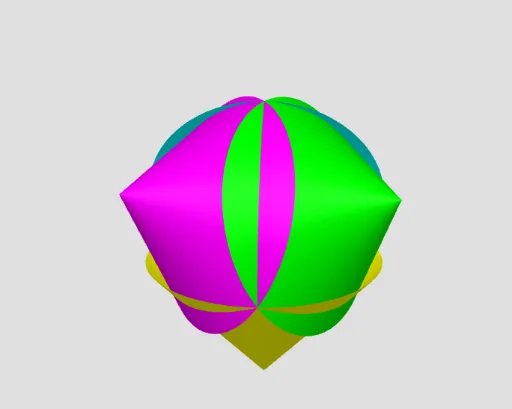
This example demonstrates the construction of tetrahedral cones. It involves concepts of tetrahedra and cones in solid geometry. Using GeoGebra commands such as Point, Rotate, Tetrahedron, etc., it dynamically shows the faces of a tetrahedron and the generation of cones. Suitable for high school or university solid geometry education.
GeoGebra Commands & Parameters
Point(xAxis) → ARotate(A, (2 * π / 3)) → A'Point(Circle[Midpoint[A, A'], (Distance[A, A'] * sqrt(3) / 2), Segment[A, A']]) → BTetrahedron(A, A', B) → a, C, edgeBC, edgeA'C, faceAA'B, faceABC, faceAA'C, faceA'BC, edgeAB, edgeAA', edgeA'B, edgeACCircle(A, A', B) → cCircle(A, A', C) → dCircle(B, A', C) → eCircle(A, B, C) → fCone(c, (-g)) → b, b_2, b_3Cone(d, g) → i, i_2, i_3Cone(e, (-g)) → l, l_2, l_3Cone(f, (-g)) → n, n_2, n_3
AI Drawing Prompt Reference
Draw a tetrahedral cone. Start by creating point A on the x-axis, then rotate to generate point A'. Next, create point B at a specific position on the perpendicular bisector of the line segment between A and A'. Use points A, A', and B to construct a tetrahedron and its faces and edges. Then, construct three circles using A, A', and B as centers, and generate four cones by rotating these circles both inward and outward.
The prompt above was compiled from the original drawing commands and is for reference only.