
Testing Similar Solids with Dilation and Intersections
Loading the math board and drawing, please wait…
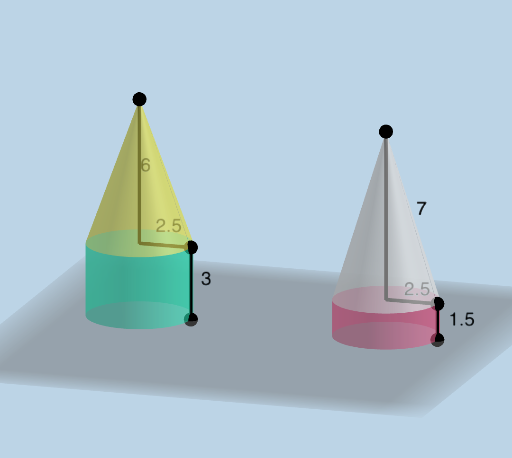
This example demonstrates how students can build their own 3D solids (e.g., cylinder/pyramid-like shapes) and then test whether two solids are similar. It focuses on the math of similarity transformations—especially dilation (scaling)—including the similarity ratio and consistent correspondence of features such as corresponding lengths (height/edges) and faces. Construction centers on using Dilate to generate a scaled version of the solids and Intersect to compute key intersection points/edges that define the visible boundaries and alignment of the shapes. GeoGebra primitives such as Point, Line, Segment, and Surface are used to create feature points, supporting lines/segments, and the faces/sides of the 3D objects. The activity is well-suited for middle to high school geometry lessons and for inquiry-based learning in solid geometry and transformations.
GeoGebra Commands & Parameters
Intersect(xAxis, yAxis) → APoint(Segment[(0, 0, 0), (6, 0, 0)]) → BPoint(Segment[(x(B), 0, 0), (x(B), 0, 10)]) → CPoint(Segment[D, (0, 0, 14)]) → ESegment(E, C) → fSegment(C, B) → gSegment(A, B) → hSurface(f, spin, zAxis) → aPoint(Segment[F, F + (Distance[A, B], 0, 0)]) → GPoint(Segment[(x(G), 0, 0), (x(G), 0, Distance[B, C])]) → H_{1}Point(Segment[I, (x(I), 0, z(E) - 0.1)]) → JSegment(J, H_{1}) → iSegment(H_{1}, G) → jSegment(F, G) → kSurface(g, spin, zAxis) → bLine(F, J) → lSurface(i, spin, l) → cSurface(j, spin, l) → dSegment(E, D) → HSegment(D, C) → rSegment(J, I) → pSegment(I, H_{1}) → qLine(E, J) → mIntersect(m, xAxis) → KDilate(c, check, K) → c'Dilate(d, check, K) → d'
AI Drawing Prompt Reference
Construct two similar 3D solids from circular-section boundaries: first set up perpendicular coordinate axes in 3D, create key feature points on the base and vertical edges, connect them with segments, and use rotation around the vertical axis to form two solid side surfaces (cylinder/pyramid-like). Determine important outline-defining intersection points by taking the intersection of a line through a contour curve with the horizontal axis. Treat that intersection as the similarity center and apply a dilation (scaling) to the two constructed surfaces to obtain corresponding scaled copies. Keep the original and dilated surfaces together so their aligned intersection/visible boundary features can be compared.
The prompt above was compiled from the original drawing commands and is for reference only.