
Tessellation from Rectangle (Step 3)
Loading the math board and drawing, please wait…
In collections
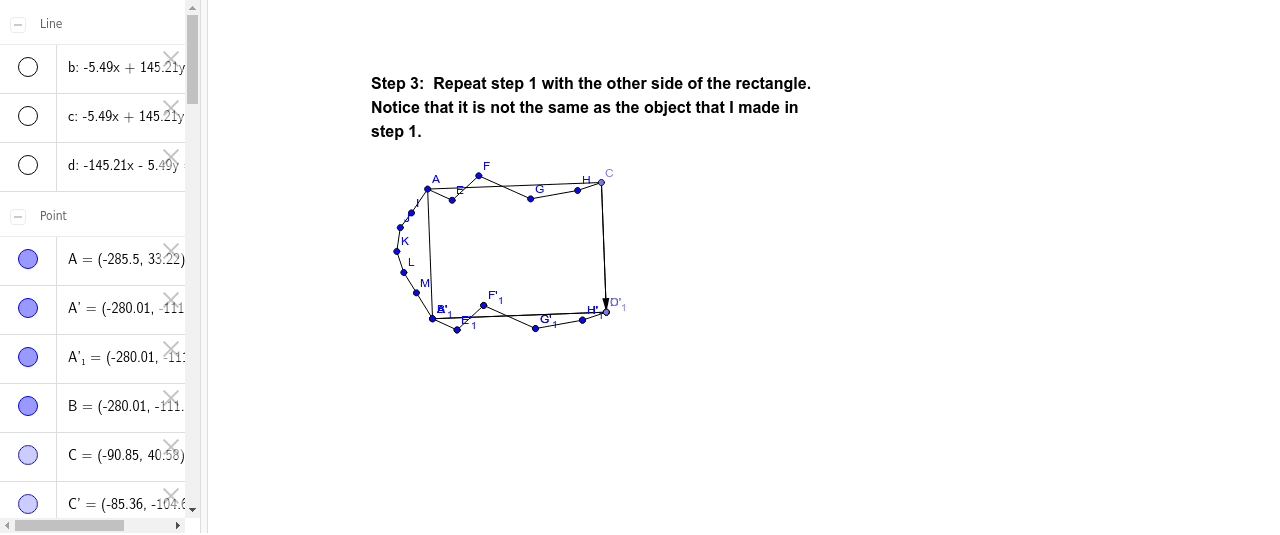
Tessellation from Rectangle using Translation
This example demonstrates constructing a fractal tessellation pattern using rectangles. Key math concepts include geometric construction, vector operations, coordinate geometry, and transformations. GeoGebra commands like Segment, OrthogonalLine, Intersect, Vector, and Translate are used to create the pattern. Suitable for high school and above students to explore fractal geometry and geometric transformations.
GeoGebra Commands & Parameters
Segment(A, B) → aOrthogonalLine(A, a) → bOrthogonalLine(B, a) → cPoint(b) → COrthogonalLine(C, b) → dIntersect(c, d) → DSegment(C, A) → eSegment(D, B) → fSegment(C, D) → gSegment(A, E) → hSegment(E, F) → iSegment(F, G) → jSegment(G, H) → kSegment(H, C) → lVector(C, D) → uTranslate(C, u) → C'Translate(A, u) → A'Segment(C', A') → e'Translate(A, u) → A'_1Translate(E, u) → E'Segment(A'_1, E') → h'Translate(E, u) → E'_1Translate(F, u) → F'Segment(E'_1, F') → i'Translate(F, u) → F'_1Translate(G, u) → G'Segment(F'_1, G') → j'Translate(G, u) → G'_1Translate(H, u) → H'Segment(G'_1, H') → k'Translate(H, u) → H'_1Translate(C, u) → C'_1Segment(H'_1, C'_1) → l'Segment(A, I) → mSegment(I, J) → nSegment(J, K) → pSegment(K, L) → qSegment(L, M) → rSegment(M, B) → s
AI Drawing Prompt Reference
Draw a fractal tessellation pattern using rectangles, starting with a rectangle and iteratively adding smaller rectangles by drawing perpendicular lines from the midpoints of the sides, connecting the intersections to create a complex, self-similar pattern that demonstrates geometric construction and transformations.
The prompt above was compiled from the original drawing commands and is for reference only.