
Symmetry in Random Movables
Loading the math board and drawing, please wait…
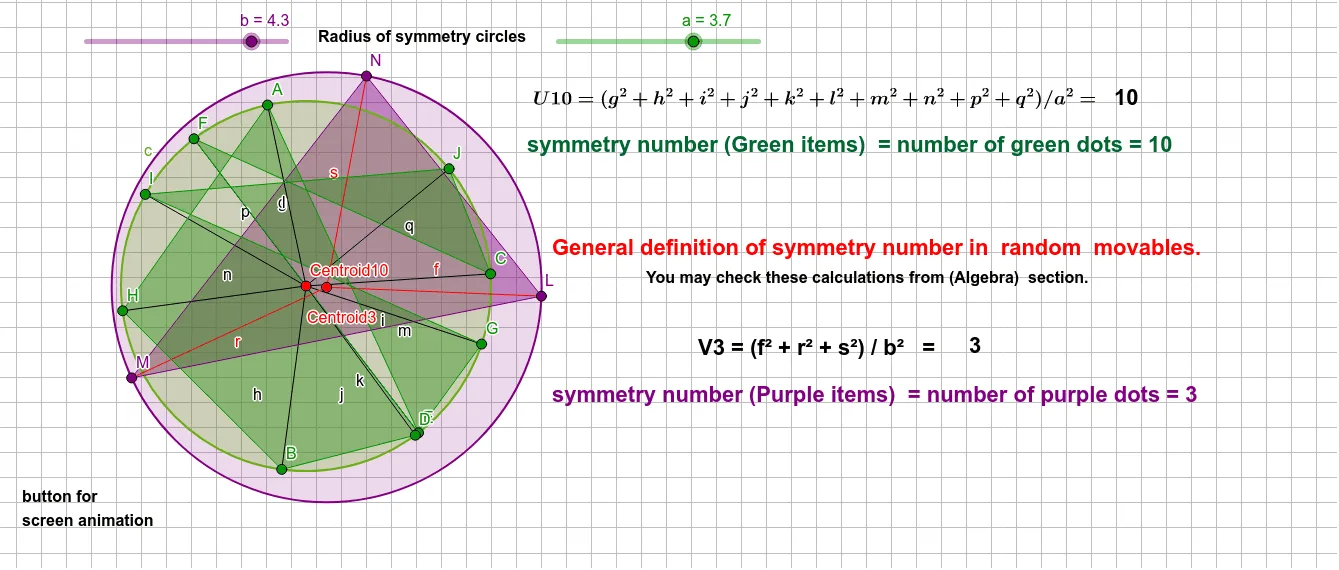
This example demonstrates the symmetry in random movables. It involves key mathematical concepts such as geometric transformations, geometric distribution, and geometric mean. Using GeoGebra commands like Circle, Point, Segment, Barycenter, and Polygon, the construction of symmetric figures is illustrated. Suitable for high school geometry education and learning.
GeoGebra Commands & Parameters
Circle(Centroid10, a) → cPoint(c) → ASegment(Centroid10, A) → gPoint(c) → JSegment(Centroid10, J) → qPoint(c) → ISegment(Centroid10, I) → pPoint(c) → HSegment(Centroid10, H) → nPoint(c) → GSegment(Centroid10, G) → mPoint(c) → FSegment(Centroid10, F) → lPoint(c) → ESegment(Centroid10, E) → kPoint(c) → DSegment(Centroid10, D) → jPoint(c) → CSegment(Centroid10, C) → iPoint(c) → BSegment(Centroid10, B) → hBarycenter({A, B, C, D, E, F, G, H, I, J}, {1, 1, 1, 1, 1, 1, 1, 1, 1, 1}) → Centroid3Point(c) → KSegment(Centroid10, K) → radiusCircle(Centroid3, b) → dPoint(d) → LPoint(d) → MPoint(d) → NSegment(L, Centroid3) → fSegment(M, Centroid3) → rSegment(N, Centroid3) → sPolygon(M, N, L) → t1, l_1, m_1, n_1Polygon(B, H, A, E, F, C, J, I, G, D) → poly1, b_1, d_1, h_1, a_1, e, f_1, c_1, j_1, ı, g_1
AI Drawing Prompt Reference
Draw a symmetric figure with a central point. Start by drawing a circle centered at a point, then connect this center to multiple points evenly distributed around the circle. Calculate the centroid of these points and draw a concentric circle with the same center. Finally, connect the points around the circle to form a polygon, and create a small triangle using the centroid and three points on the circle to demonstrate symmetry.
The prompt above was compiled from the original drawing commands and is for reference only.