
Surface Area Calculations of Rectangular Prisms
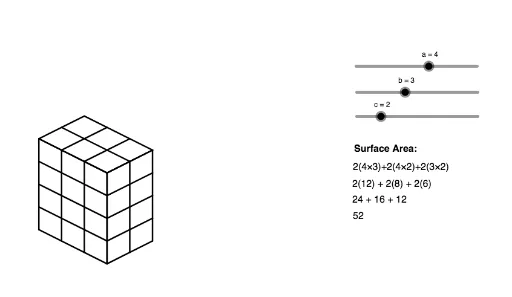
Loading the math board and drawing, please wait…
This example demonstrates how the surface area calculations of a rectangular prism change as its dimensions (length, width, height) are modified. It involves core mathematical concepts such as geometric computation, algebraic operations, and three-dimensional spatial understanding. The construction utilizes GeoGebra commands/objects like Sequence, variables a, b, c, lists list1-list6, and text objects text1-text5. It is suitable for middle school students and above for understanding solid geometry and surface area calculations, or for mathematical teaching demonstrations.
GeoGebra Commands & Parameters
Sequence(Segment[(n, a - n / 2), (n, ((-n)) / 2)], n, 0, b) → list1Sequence(Segment[(n + b, ((-b)) / 2 + n / 2), (n + b, ((-b)) / 2 + n / 2 + a)], n, 0, c) → list2Sequence(Segment[(0, a - n), (b, ((-b)) / 2 - n + a)], n, 0, a) → list3Sequence(Segment[(b, ((-b)) / 2 + n), (b + c, ((-b)) / 2 + n + c / 2)], n, 0, a) → list4Sequence(Segment[(n, ((-n)) / 2 + a), (n + c, c / 2 - n / 2 + a)], n, 0, b) → list5Sequence(Segment[(n, a + n / 2), (n + b, a + n / 2 - b / 2)], n, 0, c) → list6