
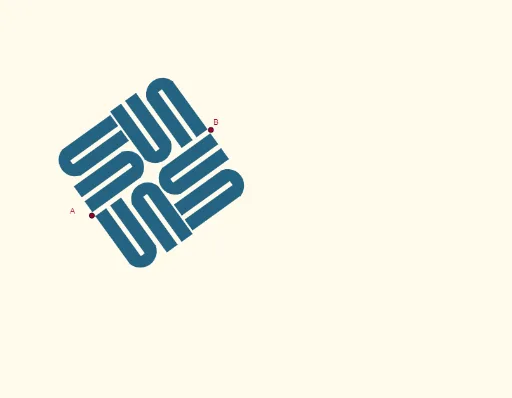
Sun Microsystems Logo Geometric Construction
Loading the math board and drawing, please wait…
This example demonstrates how to accurately draw the geometric shape of the Sun Microsystems logo using GeoGebra geometric construction tools. The core mathematical concepts involved include angles, geometric constructions, geometric transformations, vector operations, and function graphs. Key construction steps are derived from the command summary, utilizing commands and objects such as Line (straight line), LineBisector (angle bisector), Vector (vector), OrthogonalVector (orthogonal vector), Intersect (intersection), OrthogonalLine (perpendicular line), Rotate (rotation), Mirror (reflection), Midpoint (midpoint), Polygon (polygon), and CircleArc (arc). This is suitable for high school mathematics teaching, demonstrating the construction process and mathematical applications of complex geometric shapes.
GeoGebra Commands & Parameters
Line(A, B) → fLineBisector(A, B) → gVector(A, B) → uOrthogonalVector(u) → vIntersect(g, f) → CLineBisector(A, C) → hOrthogonalLine(A, f) → iRotate(B, 90°, C) → B'Rotate(B, (-(90°)), C) → B'_1OrthogonalLine(B', h) → jIntersect(i, j) → EMirror(E, f) → E'Mirror(E', g) → E''Mirror(E, g) → E'_1Mirror(j, f) → j'Midpoint(C, A) → FMidpoint(F, A) → GMidpoint(D, H) → IMirror(J, I) → J'OrthogonalLine(G, f) → kIntersect(j', k) → KLine(J', i) → lMirror(l, k) → l'Line(D, i) → mMirror(L, k) → L'Line(L, j') → nIntersect(n, l) → MPolygon(D, J', M, L) → q1, d, p, m_1, l_1CircleArc(N, L, L') → cMirror(D, k) → D'Mirror(J', k) → J''Mirror(M, k) → M'Mirror(L, k) → L'_1Polygon(D', J'', M', L'_1) → q1', d', j'', m', l'_1Mirror(D, C) → D'_1Mirror(J', C) → J''_1Mirror(M, C) → M'_1Mirror(L, C) → L'_2Polygon(D'_1, J''_1, M'_1, L'_2) → q1'_1, d'_1, j''_1, m'_1, l'_2Mirror(D', C) → D''Mirror(J'', C) → J'''Mirror(M', C) → M''Mirror(L'_1, C) → OPolygon(D'', J''', M'', O) → q1'', d'', j''', m'', o_1Mirror(c, C) → c'Midpoint(I, K) → POrthogonalLine(P, g) → qIntersect(q, h) → QMirror(D', Q) → D''_1Mirror(J'', Q) → J'''_1Mirror(M', Q) → M''_1Mirror(L'_1, Q) → RPolygon(D''_1, J'''_1, M''_1, R) → q1''_1, d''_1, j'''_1, m''_1, rMirror(D, Q) → D'_2Mirror(J', Q) → J''_2Mirror(M, Q) → M'_2Mirror(L, Q) → L'_3Polygon(D'_2, J''_2, M'_2, L'_3) → q1'_2, d'_2, j''_2, m'_2, l'_3Mirror(c, Q) → c'_1Mirror(D''_1, C) → SMirror(J'''_1, C) → TMirror(M''_1, C) → UMirror(R, C) → R'Polygon(S, T, U, R') → q2, s, t, u_1, r'Mirror(D'_2, C) → VMirror(J''_2, C) → WMirror(M'_2, C) → ZMirror(L'_3, C) → A_1Polygon(V, W, Z, A_1) → q3, v_1, w, z_1, a_1Mirror(c'_1, C) → eRotate(D'_1, 90°, B) → B_1Rotate(J''_1, 90°, B) → C_1Rotate(M'_1, 90°, B) → D_1Rotate(L'_2, 90°, B) → E_1Polygon(B_1, C_1, D_1, E_1) → q4, b_1, c_1, d_1, e_1Rotate(D'', 90°, B) → D'''Rotate(J''', 90°, B) → F_1Rotate(M'', 90°, B) → M'''Rotate(O, 90°, B) → O'Polygon(D''', F_1, M''', O') → q1''', d''', f_1, m''', o'Rotate(c', 90°, B) → c''Rotate(D, 90°, A) → D'_3Rotate(J', 90°, A) → J''_3Rotate(M, 90°, A) → M'_3Rotate(L, 90°, A) → L'_4Polygon(D'_3, J''_3, M'_3, L'_4) → q1'_3, d'_3, j''_3, m'_3, l'_4Rotate(D', 90°, A) → D''_2Rotate(J'', 90°, A) → J'''_2Rotate(M', 90°, A) → M''_2Rotate(L'_1, 90°, A) → G_1Polygon(D''_2, J'''_2, M''_2, G_1) → q1''_2, d''_2, j'''_2, m''_2, g_1Rotate(c, 90°, A) → c'_2Rotate(V, (-(90°)), B') → V'Rotate(W, (-(90°)), B') → W'Rotate(Z, (-(90°)), B') → Z'Rotate(A_1, (-(90°)), B') → H_1Polygon(V', W', Z', H_1) → q3', v', w', z', h_1Rotate(S, (-(90°)), B') → S'Rotate(T, (-(90°)), B') → T'Rotate(U, (-(90°)), B') → U'Rotate(R', (-(90°)), B') → R''Polygon(S', T', U', R'') → q2', s', t', u', r''Rotate(e, (-(90°)), B') → e'Rotate(D'_2, (-(90°)), B'_1) → I_1Rotate(J''_2, (-(90°)), B'_1) → J_1Rotate(M'_2, (-(90°)), B'_1) → K_1Rotate(L'_3, (-(90°)), B'_1) → L_1Polygon(I_1, J_1, K_1, L_1) → q5, i_1, j_1, k_1, aRotate(D''_1, (-(90°)), B'_1) → M_1Rotate(J'''_1, (-(90°)), B'_1) → N_1Rotate(M''_1, (-(90°)), B'_1) → O_1Rotate(R, (-(90°)), B'_1) → R'_1Polygon(M_1, N_1, O_1, R'_1) → q6, b, n_1, p_1, r'_1Rotate(c'_1, (-(90°)), B'_1) → q_1
AI Drawing Prompt Reference
Draw a complex geometric logo composed of symmetric elements. Start with a horizontal baseline and its perpendicular bisector, intersecting at a central point. Rotate one endpoint of the baseline by 90 degrees and -90 degrees around the center to create two vertical lines. Use angle bisectors and perpendicular lines to construct multiple symmetric points, then connect these points to form three identical quadrilaterals positioned above, below, and on both sides of the center. Outside the shape, draw a circular arc centered at a point, and mirror it about the center to get another arc. The overall figure has rotational symmetry, combining straight lines, perpendiculars, angle bisectors, polygons, and arcs, resembling the Sun Microsystems logo.
The prompt above was compiled from the original drawing commands and is for reference only.