
Stepwise Construction of a Cuboid with Reflection/Translation
Loading the math board and drawing, please wait…
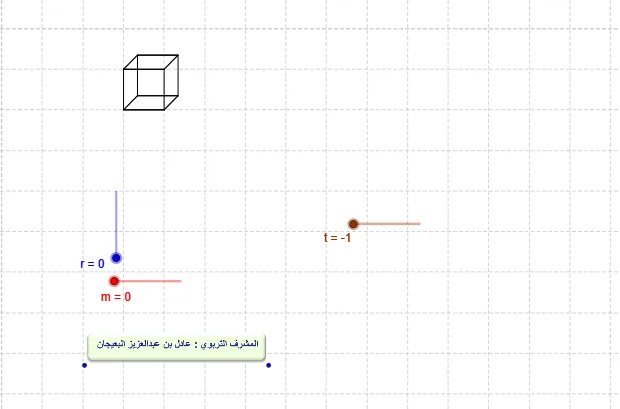
This GeoGebra example demonstrates how to build a cuboid step by step using planar polygon faces, then use geometric transformations to generate corresponding vertices/edges for the opposite sides. It highlights the 3D construction idea behind a cuboid: creating each face as a polygon, connecting edges via points, lines, and segments, and using vector-based transformations to replicate the structure. The core math concepts include solid geometry (cuboid face construction), transformation geometry with vectors and translation (Translate), and reflection/relocation to obtain matching geometry. Construction-wise, the model relies on Polygon to form face polygons (using vertices such as A, B, C, D, and their corresponding labeled points), Point/Line/Segment to define and connect key points and edges, Vector and Translate to move the base configuration to the needed positions, and Sequence to manage repeated or iterative elements (e.g., list1 and list2 and multiple prime-labeled point sets). Suitable for middle school through early university students for hands-on geometry construction, understanding transformations, and visual modeling.
GeoGebra Commands & Parameters
Polygon(A, B, C, D) → مضلع1, a, b, c, dLine(E, F) → ePoint(Circle[E, abs(n)]) → GSegment(E, G) → fPoint(f) → HVector(E, H) → uTranslate(A, u) → A'Translate(B, u) → B'Translate(C, u) → C'Translate(D, u) → D'Polygon(A', B', C', D') → مضلع1', a', b', c', d'Polygon(B', B, A, A') → مضلع2, b'_1, b_1, a_1, a'_1Polygon(D', C', C, D) → مضلع3, d'_1, c'_1, c_1, d_1Sequence(Polygon[A + (i, 0), B + (i, 0), C + (i, 0), D + (i, 0)], i, 0, m) → list1Sequence(Polygon[A' + (i, 0), B' + (i, 0), C' + (i, 0), D' + (i, 0)], i, 0, m) → list2Sequence(Polygon[B' + (i, 0), B + (i, 0), A + (i, 0), A' + (i, 0)], i, 0, m) → list3Sequence(Polygon[C' + (i, 0), C + (i, 0), D + (i, 0), D' + (i, 0)], i, 0, m) → list4Sequence(Polygon[A - (0, i), B - (0, i), C - (0, i), D - (0, i)], i, 1, r) → list6Sequence(Polygon[A' - (0, i), B' - (0, i), C' - (0, i), D' - (0, i)], i, 1, r) → list5Sequence(Polygon[A' - (0, i), A - (0, i), D - (0, i), D' - (0, i)], i, 1, r) → list7Sequence(Polygon[B' - (0, i), B - (0, i), C - (0, i), C' - (0, i)], i, 1, r) → list8Sequence(Polygon[B' - (0, i) + (m, 0), B - (0, i) + (m, 0), C - (0, i) + (m, 0), C' - (0, i) + (m, 0)], i, 1, r) → list9Sequence(Sequence[Polygon[B' - (0, i) + (j, 0), B - (0, i) + (j, 0), C - (0, i) + (j, 0), C' - (0, i) + (j, 0)], i, 1, r], j, 1, m) → list10Sequence(Sequence[Polygon[A' - (0, i) + (j, 0), A - (0, i) + (j, 0), D - (0, i) + (j, 0), D' - (0, i) + (j, 0)], i, 1, r], j, 0, m) → list11Sequence(Sequence[Polygon[A - (0, i) + (j, 0), B - (0, i) + (j, 0), C - (0, i) + (j, 0), D - (0, i) + (j, 0)], i, 1, r], j, 0, m) → list12Sequence(Sequence[Polygon[A' - (0, i) + (j, 0), B' - (0, i) + (j, 0), C' - (0, i) + (j, 0), D' - (0, i) + (j, 0)], i, 1, r], j, 0, m) → list13Sequence(Translate[list1, Vector[(-u) - ((0.34 * i), (0.35 * i))]], i, 0, t) → list14Sequence(Translate[list2, Vector[(-u) - ((0.34 * i), (0.35 * i))]], i, 0, t) → list15Sequence(Translate[list3, Vector[(-u) - ((0.34 * i), (0.35 * i))]], i, 0, t) → list16Sequence(Translate[list4, Vector[(-u) - ((0.34 * i), (0.35 * i))]], i, 0, t) → list17Sequence(Translate[list5, Vector[(-u) - ((0.34 * i), (0.35 * i))]], i, 0, t) → list18Sequence(Translate[list6, Vector[(-u) - ((0.34 * i), (0.35 * i))]], i, 0, t) → list19Sequence(Translate[list7, Vector[(-u) - ((0.34 * i), (0.35 * i))]], i, 0, t) → list20Sequence(Translate[list8, Vector[(-u) - ((0.34 * i), (0.35 * i))]], i, 0, t) → list21Sequence(Translate[list9, Vector[(-u) - ((0.34 * i), (0.35 * i))]], i, 0, t) → list22Sequence(Translate[list10, Vector[(-u) - ((0.34 * i), (0.35 * i))]], i, 0, t) → list23Sequence(Translate[list12, Vector[(-u) - ((0.34 * i), (0.35 * i))]], i, 0, t) → list24Sequence(Translate[list13, Vector[(-u) - ((0.34 * i), (0.35 * i))]], i, 0, t) → list25Sequence(Translate[list11, Vector[(-u) - ((0.34 * i), (0.35 * i))]], i, 0, t) → list26
AI Drawing Prompt Reference
Draw a cuboid by first defining a base face with points A, B, C, and D, then connecting these points with line segments to form a quadrilateral. Next, translate the base face to the opposite side using vector u to form another base face. Then, use the sequence command to generate a series of parallel planes to the base, dividing the cuboid into multiple parts. Finally, translate these planes to generate all the faces of the cuboid.
The prompt above was compiled from the original drawing commands and is for reference only.