
Stairs (Optical Illusion)
Loading the math board and drawing, please wait…
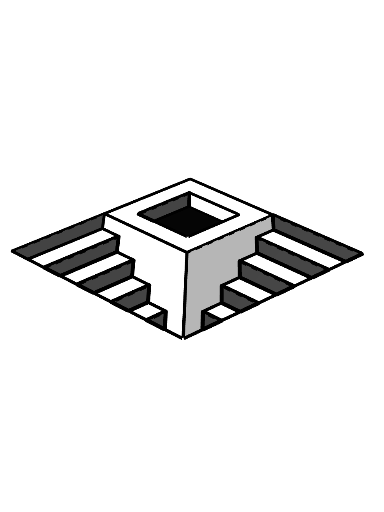
This GeoGebra example demonstrates a classic optical illusion of stairs, where a 2D arrangement of polygons creates the visual effect of a 3D staircase, tricking the viewer into perceiving continuous ascending or descending steps. Core mathematical concepts include polygons, rectangles, squares, solid geometry (perspective and projection), and dilation/transformation. Construction highlights: using GeoGebra commands Segment, Point, and Polygon, multiple points (A through V) and segments are created, and polygons (such as q1, l_1, m_1) are formed to build the stair steps; by adjusting point positions and segment connections, the illusion of depth is achieved. Suitable for middle or high school mathematics and geometry classes, this example helps explain optical illusions, polygon composition, spatial reasoning, and geometric transformations.
GeoGebra Commands & Parameters
Segment(E, B) → fSegment(E, F) → gSegment(F, G) → hSegment(G, B) → iSegment(H, I) → jSegment(I, J) → kSegment(J, K) → lSegment(K, H) → mPoint(j) → LPoint(k) → NPolygon(L, M, N, I) → q1, l_1, m_1, n, i_1Segment(E, A) → pSegment(O, P) → qSegment(Q, R) → rSegment(S, T) → sSegment(U, V) → tSegment(W, Z) → aSegment(A_1, B_1) → bSegment(C_1, D_1) → cSegment(E_1, F_1) → dSegment(F, D) → eSegment(G, C) → f_1Segment(D, C) → g_1Segment(A, D) → h_1Point(g_1) → H_1Segment(G_1, H_1) → j_1Point(g_1) → J_1Segment(I_1, J_1) → k_1Point(g_1) → L_1Segment(K_1, L_1) → n_1Point(g_1) → N_1Segment(M_1, N_1) → p_1Point(g_1) → P_1Segment(O_1, P_1) → q_1Point(g_1) → R_1Segment(Q_1, R_1) → r_1Point(g_1) → T_1Segment(S_1, T_1) → s_1Point(g_1) → V_1Segment(U_1, V_1) → t_1Segment(G, G_1) → a_1Segment(G_1, I_1) → b_1Segment(I_1, K_1) → c_1Segment(K_1, M_1) → d_1Segment(M_1, O_1) → e_1Segment(O_1, Q_1) → f_2Segment(Q_1, S_1) → g_2Segment(S_1, U_1) → h_2Segment(E, O) → i_2Segment(O, Q) → j_2Segment(Q, S) → k_2Segment(S, U) → l_2Segment(U, W) → m_2Segment(W, A_1) → n_2Segment(A_1, C_1) → p_2Segment(C_1, E_1) → q_2Polygon(G, G_1, H_1, C) → q2, g_3, t_2, a_2, c_2Polygon(I_1, K_1, L_1, J_1) → q3, b_2, d_2, e_2, f_3Polygon(M_1, O_1, P_1, N_1) → q4, h_3, o_1, i_3, j_3Polygon(S_1, T_1, R_1, Q_1) → q5, k_3, l_3, m_3, n_3Point(g_1) → W_1Segment(U_1, W_1) → s_2Polygon(U_1, V_1, W_1) → t1, w_1, u_1, v_1Point(h_1) → Z_1Polygon(A, P, O, E) → q6, a_3, p_3, o, e_3Polygon(R, T, S, Q) → q7, r_3, t_3, s_3, q_3Polygon(V, U, W, Z) → q8, v, u, w, z_1Polygon(B_1, A_1, C_1, D_1) → q9, b_3, c_3, d_3, f_4Segment(E_1, Z_1) → r_2Polygon(F_1, E_1, Z_1) → t2, g_4, h_4, i_4Segment(K, M) → j_4Polygon(H, K, M, L) → q10, h_5, k_4, m_4, l_4Polygon(F, D, G_1, G, W_1, U_1, S_1, Q_1, O_1, M_1, K_1, I_1) → poly1, f_5, b_4, c_4, g_5, d_4, n_4, p_4, q_4, r_4, s_4, t_4, a_4
AI Drawing Prompt Reference
Create an optical illusion of stairs using multiple rectangles and squares. Start by creating points E, B, F, G, H, I, J, K, L, M, N, and then connect these points to form multiple rectangles and squares, such as q1, l1, m1, to achieve a depth illusion effect through adjusting point positions and line segment connections.
The prompt above was compiled from the original drawing commands and is for reference only.