
Square and Rhombus Tiling
Loading the math board and drawing, please wait…
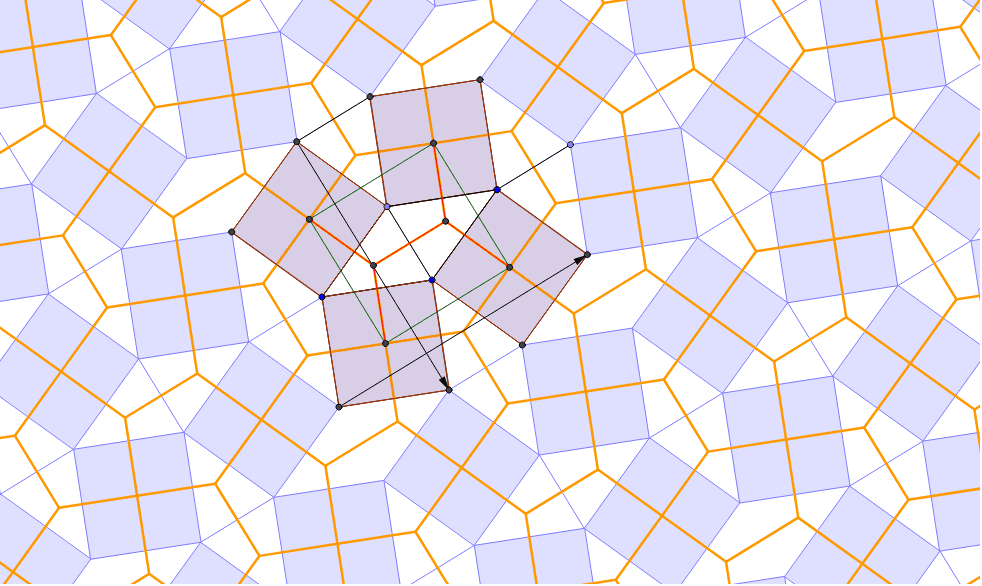
This example demonstrates the tiling pattern formed by combining squares and rhombuses. It involves core mathematical concepts such as polygons, symmetry, vector operations, and coordinate geometry. The construction utilizes GeoGebra commands like Segment, Circle, Point, Line, Intersect, Polygon, Midpoint, Rotate, Vector, and Sequence. It is suitable for high school mathematics education, helping students understand geometric transformations and the principles of tiling patterns.
GeoGebra Commands & Parameters
Segment(A, B) → a_2Circle(A, B) → c_2Point(c_2) → CLine(C, a_2) → d_2Segment(A, C) → b_2Line(B, b_2) → e_2Intersect(d_2, e_2) → DPolygon(C, D, 4) → poly2, l, m, n, p, G, HPolygon(D, B, 4) → poly3, q, r, s, t, I, JMidpoint(J, B) → ORotate(B, -90*°, O) → B'Rotate(C, -90*°, O) → C'Segment(C', B') → cPolygon(A, C, 4) → poly1, h_2, i, j, k, E, FSegment(E, H) → aSegment(C, B) → bPolygon(B, A, 4) → poly4, a_1, b_1, c_1, d_1, K, LSegment(C, D) → f_2Segment(B, D) → g_2Midpoint(F, C) → MMidpoint(G, C) → NMidpoint(K, B) → PVector(E, L) → uVector(K, J) → vSequence(Sequence[Translate[tile1, Vector[(n * u) + (m * v)]], n, -3, 3], m, -3, 3) → list1Segment(M, P) → g_1Segment(P, O) → h_1Segment(O, N) → i_1Segment(N, M) → j_1OrthogonalLine(M, h_2) → e_1OrthogonalLine(P, a_1) → f_1OrthogonalLine(N, l) → k_1OrthogonalLine(O, q) → l_1Intersect(e_1, f_1) → QIntersect(k_1, l_1) → RSegment(M, Q) → dSegment(P, Q) → eSegment(Q, R) → fSegment(N, R) → gSegment(O, R) → hRotate(set1, 90*°, O) → set2Rotate(set1, 180*°, O) → set3Rotate(set1, 270*°, O) → set4Sequence(Sequence[Translate[tile2, Vector[(n * u) + (m * v)]], n, -3, 3], m, -3, 3) → list2
AI Drawing Prompt Reference
Draw a tiling pattern composed of squares and rhombuses, showcasing symmetry and geometric transformations. Start by creating two squares and two rhombuses, then use rotation and translation to form a repeating tessellation. Ensure the pattern has high symmetry and clearly shows how the squares and rhombuses fit together.
The prompt above was compiled from the original drawing commands and is for reference only.