
Geometric Visualization of Natural Number Multiplication
Loading the math board and drawing, please wait…
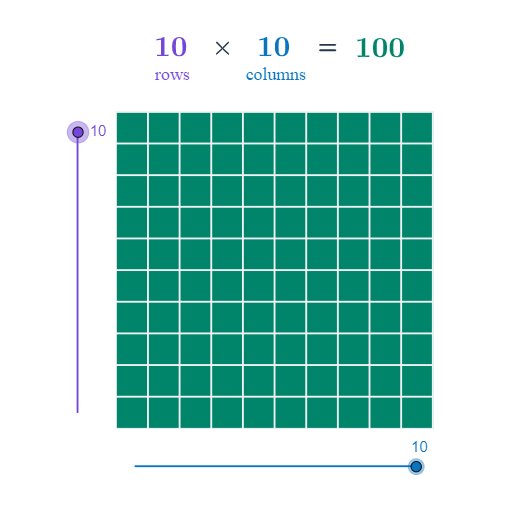
This example visualizes multiplication of natural numbers through a geometric construction, showing how numerical products can be represented by measurable geometric relationships in the plane. It emphasizes core ideas such as a geometric interpretation of multiplication, the geometric mean concept, and the use of structured shapes (e.g., trapezoids and general quadrilaterals) to encode multiplicative structure. The construction uses GeoGebra commands including Point, Segment, Line, Polygon, Circle, OrthogonalLine, Intersect, and Sequence to build key points, edges, auxiliary lines, and to locate derived points via intersections and circle/orthogonal constraints. It also organizes computed values with Columns and Rows into lists (list1, list2), then displays the computed result (result) using text labels for verification. The model incorporates symmetry and scatter-plot style checks to compare expected multiplication outcomes with the constructed geometry. Suitable for middle school to early high school lessons, exploratory math activities, and number–geometry bridging.
GeoGebra Commands & Parameters
Point(Circle[A, Columns]) → BSegment(A, B) → aOrthogonalLine(A, a) → bOrthogonalLine(B, a) → cCircle(A, Rows) → dIntersect(d, b, 2) → CLine(C, a) → eIntersect(c, e) → DPolygon(A, B, D, C) → poly1, a_1, b_1, d_1, c_1Sequence(Segment[A + (i * (1, 0)), C + (i * (1, 0))], i, 1, Columns) → list1Sequence(Segment[A + (i * (0, 1)), B + (i * (0, 1))], i, 1, Rows) → list2
AI Drawing Prompt Reference
Draw a geometric figure that visualizes multiplication of natural numbers. Start with a horizontal segment. Construct a circle centered at the left endpoint with radius equal to the number of rows. Let the circle intersect the vertical line through the left endpoint at a point above. Through that point, draw a line parallel to the horizontal segment, intersecting the vertical line through the right endpoint, forming a rectangle with the four vertices. Inside the rectangle, draw equally spaced vertical segments according to the number of columns, and equally spaced horizontal segments according to the number of rows, creating a grid. Finally, display the computed product as a text label near the figure, and optionally include scatter points or symmetry checks to verify the result.
The prompt above was compiled from the original drawing commands and is for reference only.