
Spiral Staircase
Loading the math board and drawing, please wait…
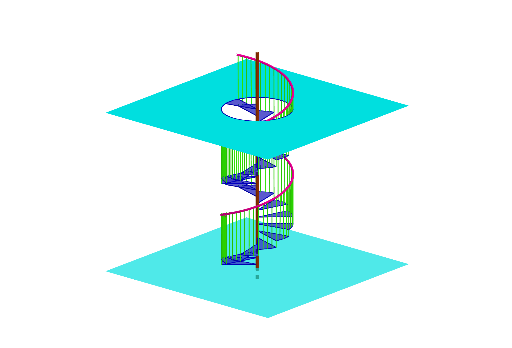
The Spiral Staircase is a mathematical example demonstrating geometric transformations and construction techniques. It showcases how basic shapes like circles and lines can be combined to form complex three-dimensional structures. Key mathematical concepts include rotation, circles, lines, and geometric construction. The construction involves using GeoGebra commands such as Intersect, Rotate, CircleSector, and Line. This example is suitable for middle school or high school students learning about geometric transformations and solid geometry.
GeoGebra Commands & Parameters
Intersect(zAxis, p_1) → BRotate(A, 30°, zAxis) → A'CircleSector(B, A, A') → pLine(A, zAxis) → iLine(A', zAxis) → jRotate(A, 7.5°, zAxis) → A'_{1}Rotate(A'_{1}, 7.5°, zAxis) → HRotate(H, 7.5°, zAxis) → H'Line(A'_{1}, zAxis) → lLine(H', zAxis) → mLine(H, zAxis) → nCurveCartesian(cos((3 * t)), sin((3 * t)), t, t, (-(((3 * pi)) / 4)), pi) → a_1Point(a_1) → FPoint(a_1) → GPoint(a_1) → IPoint(m) → JPoint(a_1) → KSegment(F, A) → aSegment(G, A'_{1}) → bSegment(I, H) → cSegment(J, H') → dSegment(K, A') → eVector(B, C) → uRotate(Translate[list1, u], 30°) → l1Rotate(Translate[p, u], 30°) → f1Rotate(Translate[f1, u], 30°) → f2Rotate(Translate[f2, u], 30°) → f3Rotate(Translate[f3, u], 30°) → f4Rotate(Translate[f4, u], 30°) → f5Rotate(Translate[f5, u], 30°) → f6Rotate(Translate[f6, u], 30°) → f7Rotate(Translate[f7, u], 30°) → f8Rotate(Translate[f8, u], 30°) → f9Rotate(Translate[f9, u], 30°) → f10Rotate(Translate[f10, u], 30°) → f11Rotate(Translate[f11, u], 30°) → f12Rotate(Translate[f12, u], 30°) → f13Rotate(Translate[f13, u], 30°) → f14Rotate(Translate[f14, u], 30°) → f15Rotate(Translate[f15, u], 30°) → f16Rotate(Translate[f16, u], 30°) → f17Rotate(Translate[f17, u], 30°) → f18Rotate(Translate[f18, u], 30°) → f19Rotate(Translate[f19, u], 30°) → f20Rotate(Translate[f20, u], 30°) → f21Rotate(Translate[f21, u], 30°) → f22Rotate(Translate[f22, u], 30°) → f23Sequence(Rotate[Translate[list1, Vector[(u * s)]], (30° * s)], s, 1, 22, 1) → m1Point(zAxis) → DPoint(zAxis) → ESegment(D, E) → gPointIn(h) → LPointIn(h) → MPointIn(h) → NPointIn(h) → OPolygon(L, O, N, M) → q1, l_1, o, n_1, m_1Intersect(zAxis, q) → PCircle(P, 1, zAxis) → kPointIn(q) → QPointIn(q) → RPointIn(q) → SPointIn(q) → TSegment(Q, R) → rSegment(R, T) → sSegment(T, S) → tSegment(Q, S) → f_1Point(list2) → UPoint(s) → VSegment(U, V) → g_1Surface(g_1, 360°, zAxis) → vMidpoint(R, Q) → WMidpoint(f_1) → ZMidpoint(t) → A_1Polygon(V, A_1, T) → t1, t_1, v_1, a_{2}Rotate(t1, -90°, g) → t1'Rotate(t1', -90°, g) → t1''Rotate(t1'', -90°, g) → t1'''CurveCartesian((k2 * cos((k1 * t))), (k2 * sin((k1 * t))), t + 0.1, t, (-(pi / 2.8)), (9 * pi / 8)) → f
AI Drawing Prompt Reference
Draw a spiral staircase by first creating a circle centered at the origin, then rotating it 30 degrees around the z-axis to get another circle, followed by drawing two lines through the origin, and rotating them 7.5 degrees around the z-axis multiple times to generate a series of circles and lines. Finally, use these circles and lines to create the outline of the spiral staircase.
The prompt above was compiled from the original drawing commands and is for reference only.