
Spherical Filogram: Sine Curves and Rotational Symmetry on a Sphere
Loading the math board and drawing, please wait…
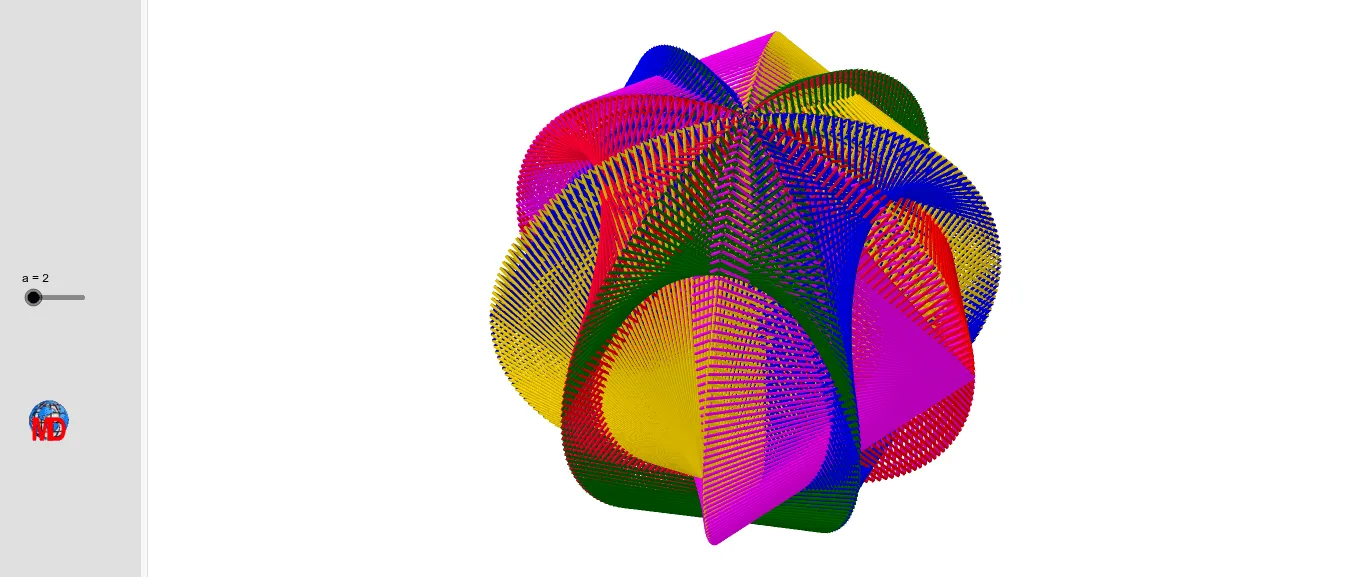
This example demonstrates a complex filament-like pattern generated on a sphere, using sine functions combined with rotations and reflections to create a symmetric network of curves in 3D space. Core mathematical concepts include spherical geometry, sine functions, rotational transformations, mirror symmetry, and parametric sequences. Construction highlights: GeoGebra commands such as Intersect, Circle, Point, Rotate, Angle, Sequence, and Mirror are used, involving numerous objects like points on the sphere, auxiliary circles, rotation axes, angle parameters, and multiple lists (Liste1 to Liste5) storing generated curve points. This example is suitable for high school or university students studying 3D geometric transformations, parametric curves, and symmetry, and can also serve as mathematical art or a visualization of sine functions in space.
GeoGebra Commands & Parameters
Intersect(xAxis, yAxis) → ACircle((0, 0, 0), 4, Vector[(0, 1, 0)]) → dPoint(xAxis) → BRotate(B, 72°, A) → B'Angle(B, A, B') → αRotate(Circle[(0, 0, 0), 4, Vector[(0, 1, 0)]], α) → eCircle(A, B) → cRotate(B', 72°, A) → B''Angle(B', A, B'') → βRotate(B'', 72°, A) → B'''Angle(B'', A, B''') → γRotate(B''', 72°, A) → CAngle(B''', A, C) → δIntersect(zAxis, d, 1) → DRotate(Circle[(0, 0, 0), 4, Vector[(0, 1, 0)]], (2 * α)) → fRotate(Circle[(0, 0, 0), 4, Vector[(0, 1, 0)]], (3 * α)) → gRotate(Circle[(0, 0, 0), 4, Vector[(0, 1, 0)]], (4 * α)) → hIntersect(d, e, 2) → EPoint(d, n / 360) → FPoint(e, (n - 180) / 360) → GSequence(Segment[Point[e, t / 360], Point[f, (270 - t) / 360]], t, 0, (2 * 180), a) → Liste2Sequence(Segment[Point[f, t / 360], Point[g, (270 - t) / 360]], t, 0, (2 * 180), a) → Liste3Sequence(Segment[Point[g, t / 360], Point[h, (270 - t) / 360]], t, 0, (2 * 180), a) → Liste4Sequence(Segment[Point[h, t / 360], Point[d, (270 - t) / 360]], t, 0, (2 * 180), a) → Liste5Mirror(Liste2, xOyPlane) → Liste2'Mirror(Liste3, xOyPlane) → Liste3'Sequence(Segment[Point[d, t / 360], Point[e, (270 - t) / 360]], t, 0, 360, a) → Liste1Mirror(Liste1, xOyPlane) → Liste1'Mirror(Liste5, xOyPlane) → Liste5'Mirror(Liste4, xOyPlane) → Liste4'Sequence(Point[d, t / 360], t, 0, 180, a) → l1Sequence(Segment[Point[d, t / 360], Point[e, (270 - t) / 360]], t, 0, 360, a) → l2
AI Drawing Prompt Reference
Draw a complex filament-like pattern on a sphere using sine functions combined with rotations and reflections to create a symmetric network of curves in 3D space. Start by creating points A and B on the sphere, then rotate B around A to generate a series of angle parameters. Use these parameters and rotation operations to create multiple circles and arcs, and finally generate symmetric shapes through mirroring.
The prompt above was compiled from the original drawing commands and is for reference only.