
Intersecting Three Cylinders and Their Cross-Section Curves
Loading the math board and drawing, please wait…
In collections
intersection: surface-surface, curve-curve
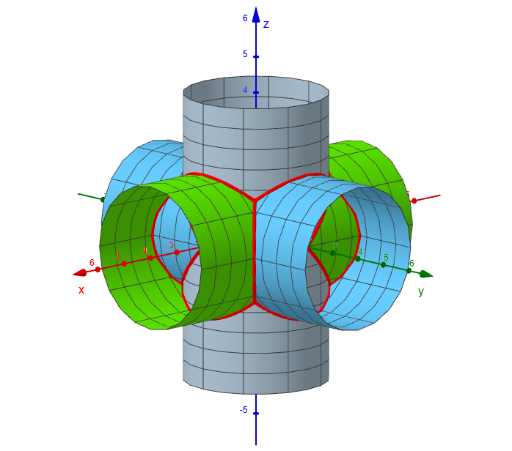
This example visualizes the “penetration”/overlap of three cylinders in 3D space and renders the resulting intersection (cross-section) curves, allowing students to inspect how complex spatial outlines emerge from intersecting surfaces. The key math concepts are solid geometry with cylindrical surfaces, curve-of-intersection (crossing curves) between 3D surfaces, and the use of rigid transformations—especially rotations and reflections—to build the symmetric or oriented configuration of the solids. Construction-wise, it leverages GeoGebra commands Surface and CurveCartesian to create the cylinder surfaces (zyl1, zyl2, zyl3) and to plot the intersection curves (k1–k4, l1–l2, m1–m2). Rotate and Mirror are used to reposition or generate additional cylinder-related parts so that the three-cylinder setup yields meaningful intersection curves. Text1 provides annotations for clarity. Suitable for secondary to undergraduate audiences learning spatial geometry, transformation-based construction, and the visualization of surface intersections.
GeoGebra Commands & Parameters
Surface(u, (2 * cos(v)), (2 * sin(v)), u, -4, 4, v, 0, (2 * pi)) → zyl1Surface((2 * cos(v)), u, (2 * sin(v)), u, -4, 4, v, 0, (2 * pi)) → zyl2Surface((2 * cos(v)), (2 * sin(v)), u, u, -4, 4, v, 0, (2 * pi)) → zyl3CurveCartesian((2 * cos(asind(t))), (2 * cos(asind(t))), (2 * t), t, -1, 1) → k1Rotate(k1, 90°, zAxis) → k2Rotate(k1, 180°, zAxis) → k3Rotate(k1, -90°, zAxis) → k4CurveCartesian((2 * cos(t)), (2 * sin(t)), (2 * sin(acosd(sin(t)))), t, 0, (2 * pi)) → l1Mirror(l1, xOyPlane) → l2CurveCartesian((2 * cos(t)), (2 * sin(t)), (2 * sin(t)), t, 0, (2 * pi)) → m1Rotate(m1, 90°, xAxis) → m2
AI Drawing Prompt Reference
Visualize three intersecting cylinders in 3D space, highlighting their intersection curves. Create three cylindrical surfaces and plot curves that intersect and rotate them to observe the complex spatial outlines. Use rotations and reflections to reposition the curves and add annotations for clarity.
The prompt above was compiled from the original drawing commands and is for reference only.