
Foucault Pendulum 3D Dynamics Simulation: Visualizing Earth's Rotation
Loading the math board and drawing, please wait…
In collections
El dominio del Tiempo (cinemática intuitiva)
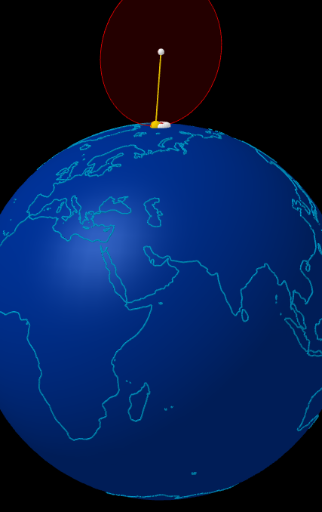
This GeoGebra applet dynamically demonstrates the precession of a Foucault pendulum in 3D, illustrating how Earth's rotation affects the swing plane. Key mathematical concepts include vector operations (Vector, UnitVector), rotation transformations (Rotate), solid geometry (Sphere for Earth model, OrthogonalPlane for reference plane), circular trajectories (Circle, PolyLine), and sequence animation (Sequence for continuous path rendering). Using commands like tangent and intersect, it visualizes how the pendulum's trajectory gradually shifts over time. Ideal for high school and university physics and mathematics modeling courses, helping students intuitively understand the Coriolis effect and the mathematical description of Earth's rotation, also suitable as a teaching case for solid geometry and vector applications.
GeoGebra Commands & Parameters
Sphere((0, 0, 0), (0.999 * 5)) → tierraVector((1; (-rot) + 180°; (-inclinacion))) → dirSphere((0, 0, 0), 5) → esferaCircle(PS, (5; arg(A); 0°), PN) → merATangent(A, merA) → tanA,UnitVector(tanA) → uARotate(A + uA, ((-k) * f), A, dirA) → BUnitVector(dirA) → uCircle(O, (0.994 * 2), nF) → cirFPoint(cirF) → MSegment(O, M) → hUnitVector((O - M) ⊗ nF) → nSequence(Rotate[A + (r * uA), (k * 15°), A, dirA], k, 0, 23) → HorasFRotate(reg, f, PN) → reg1Rotate(A, α, O, nF) → A1OrthogonalPlane(A, dirA) → planoAPolyLine(reg1) → polCircle(A, 0.2, dirA) → cIntersect(Segment[M - dirA, M], planoA) → M'Intersect(Segment[A1 - dirA, A1], planoA) → A1'Circle((0, 0, 0), 5, Line[PS, PN]) → ecuadorRotate(A, (-α), O, nF) → A2Intersect(Segment[A2 - dirA, A2], planoA) → A2'Segment(A, If[op1a, A2' + (0.02 * UnitVector[A2' - A]), A1' + (0.02 * UnitVector[A1' - A])]) → i
AI Drawing Prompt Reference
Draw a 3D Foucault pendulum to illustrate how Earth's rotation affects the swing plane. Start by drawing an Earth model, then create a vector indicating the pendulum's direction. Draw a reference plane and the equator on the Earth's surface. Use rotations and movements to simulate the pendulum's trajectory, and finally show how the swing plane changes over time.
The prompt above was compiled from the original drawing commands and is for reference only.