
Sphere through 4 random points
Loading the math board and drawing, please wait…
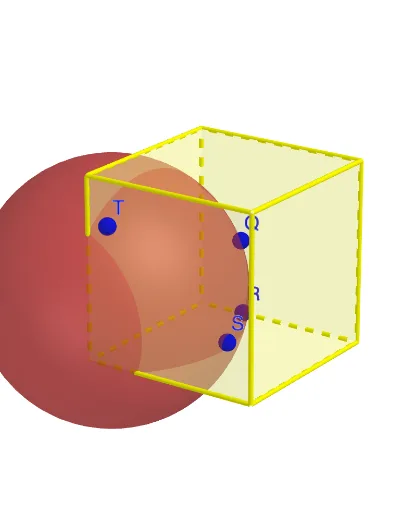
This example demonstrates the geometric principle of determining a unique sphere through four random points in space. It involves core math concepts like sphere equations, spatial geometry, stochastic processes, and probability statistics. Construction highlights include using GeoGebra commands like Point, Sphere, and Intersect, as detailed in the summary. Suitable for high school students and math enthusiasts exploring the intersection of spatial geometry and probability.
GeoGebra Commands & Parameters
Point(Circle[(1, 0, 0), Distance[(0, 0, 0), (1, 0, 0)], Segment[(0, 0, 0), (1, 0, 0)]]) → ACube((0, 0, 0), (1, 0, 0), A) → a, B, faceABFE, faceCDEF, edge2, edge1, edge4, edgeAB, edge3, edgeBF, edgeCF, edgeCD, C, edge5, edgeDE, edgeAE, edgeEF, D, E, F, face1, face3, face2, face4Circle(T, R, Q) → cCircle(Q, R, S) → dCircle(S, Q, T) → eCenter(e) → GCenter(d) → HCenter(c) → IPlane(T, S, G) → pOrthogonalLine(G, p) → fPlane(Q, T, I) → qOrthogonalLine(I, q) → gIntersect(f, g) → JSphere(J, R) → bVolume(b) → hDotPlot(data, true) → l1
AI Drawing Prompt Reference
Draw a sphere passing through four random points. Start by creating a circle between the origin and point (1,0,0), then build a cube based on this circle. Next, draw three circles with the cube's vertices and the circle's center as centers and the cube's edge length as radius. Find the centers of these three circles. Construct two planes using these centers and the origin, then draw two lines perpendicular to the origin on these planes. The intersection of these two lines is the center of the sphere. Draw the sphere with this center and the cube's edge length as radius, and calculate the sphere's volume.
The prompt above was compiled from the original drawing commands and is for reference only.