
Sorting Three Rational Numbers
Loading the math board and drawing, please wait…
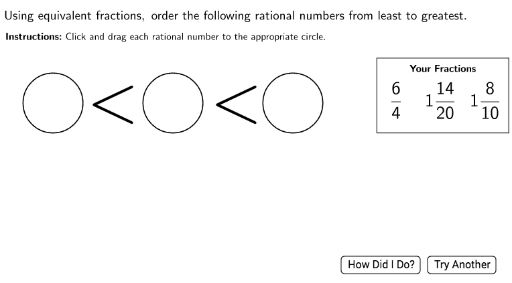
This example demonstrates how to sort three rational numbers. Key mathematical concepts include comparing and sorting rational numbers. Using GeoGebra commands such as Shuffle, Element, and CreateFraction, the process of sorting rational numbers is dynamically illustrated. Suitable for middle school math education to help students understand the properties and sorting methods of rational numbers.
GeoGebra Commands & Parameters
Shuffle(nums) → numsshuffledShuffle(factors) → factorsshuffledElement(factorsshuffled, 3) → factor3LaTeX(Text["\checkmark"]) → RightCheckLaTeX(Text["×"]) → WrongCheckCircle(Circ1Point, CircRadius) → Circ1OutlineCircle(Circ2Point, Circ2Radius) → Circ2OutlineCircle(Circ3Point, Circ2Radius) → Circ3OutlineShuffle(fraclocation) → fraclocationshuffledCircle(DragPoint1, MyRadius) → Drag1AreaCircle(DragPoint2, MyRadius) → Drag2AreaCircle(DragPoint3, MyRadius) → Drag3AreaLaTeX(Text["<"]) → LT1LaTeX(Text["<"]) → LT2LaTeX(Text["\dfrac{" + num1 + "}{" + den1 + "}"]) → frac1displayLaTeX(Text["\dfrac{" + num2 + "}{" + den2 + "}"]) → frac2displayLaTeX(Text["\dfrac{" + num3 + "}{" + den3 + "}"]) → frac3displayPolygon(A, B, C, D) → poly1, a_1, b_1, c, dLaTeX(Text["\textbf{Your\ Fractions}"]) → YourFractionsLaTeX(Text["\underbrace{\hspace{10cm}}"]) → LowerLeftBraceLaTeX(Text["\overbrace{\hspace{10cm}}"]) → UpperRightBraceLaTeX(Text["\underbrace{\hspace{10cm}}"]) → LowerRightBraceLaTeX(Text["\overbrace{\hspace{10cm}}"]) → UpperLeftBraceLaTeX(Text["\overbrace{\hspace{17cm}}"]) → UpperBraceLaTeX(Text["\underbrace{\hspace{17cm}}"]) → LowerBraceIf(CircSpace1(DragPoint1), frac1display, If[CircSpace1(DragPoint2), frac2display, frac3display]) → circ1displayIf(CircSpace2(DragPoint1), frac1display, If[CircSpace2(DragPoint2), frac2display, frac3display]) → circ2displayIf(CircSpace3(DragPoint1), frac1display, If[CircSpace3(DragPoint2), frac2display, frac3display]) → circ3displayLCM(LCM[den1, den2], den3) → commondenRandomElement({2, 2, 2, 3, 3, 3, 4, 5}) → multLaTeX(Text[max]) → MaxDisplayIf(FirstAttempt, 3, Random[0, 2]) → denTypeLaTeX(Text["Using\ equivalent\ fractions,\ order\ the\ following\ rational\ numbers\ from\ least\ to\ greatest."]) → Instructions1LaTeX(Text["\textbf{Instructions\text{:}}\ Click\ and\ drag\ each\ rational\ number\ to\ the\ appropriate\ circle."]) → Instruction2Mod(num1, den1) → propnum1Mod(num2, den2) → propnum2Mod(num3, den3) → propnum3RandomElement(types) → type1RandomElement(types) → type2Mod(commonnum1, commonden) → propcommon1Mod(commonnum2, commonden) → propcommon2Mod(commonnum3, commonden) → propcommon3
AI Drawing Prompt Reference
Illustrate the sorting of three rational numbers dynamically, with randomly generated fractions controlled by a slider, using circles and symbols to show relationships, guiding users to complete the sorting by dragging operations.
The prompt above was compiled from the original drawing commands and is for reference only.