
Interactive Practice: Adding Like-Fraction and Mixed Numbers
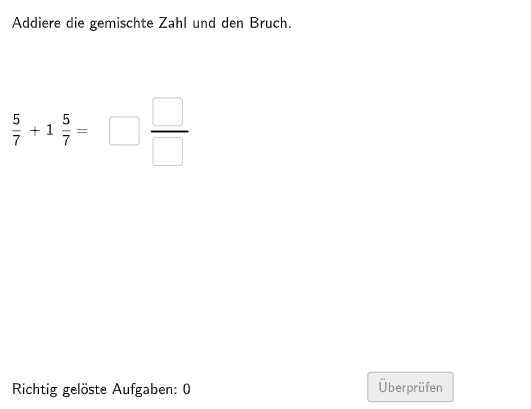
Loading the math board and drawing, please wait…
In collections
Erstes Rechnen mit Brüchen - Addieren
This GeoGebra example demonstrates and trains how to add (1) like fractions with the same denominator and (2) mixed numbers. It generates questions randomly, lets students enter their answers, and checks correctness so learners can follow the rule that the denominator stays the same while the numerators are added, with mixed-number handling as needed. Key math concepts include the addition algorithm for like fractions, representation and conversion of mixed numbers, and validation logic for generated numerators/denominators. Construction highlights from the provided build summary: Shuffle is used to randomize problem parameters; Element and Textfield manage interactive inputs (e.g., inputs for numerator/denominator components); If enables stepwise conditional checking (firstTrue and correct flags); Polygon and Segment support visual layout and framing of the task (Layout/gemischteZahlLay); Corner helps place annotations in the interface. Suitable for Grade 5–6 learners and for classroom practice or self-assessment on fraction operations.
GeoGebra Commands & Parameters
Shuffle(Sequence[Random[1, 5], i, 1, 100]) → randomNosForGemischteZahl1, {2, 4, 1, 4, 4, 4, 5, 2, 5, 5, 5, 1, 3, 3, 2, 2, 5, 3, 2, 5, 5, 1, 1, 5, 5, 4, 5, 4, 2, 2, 4, 1, 1, 5, 4, 5, 5, 2, 1, 3, 4, 4, 1, 4, 4, 2, 4, 1, 2, 1, 1, 5, 1, 5, 3, 5, 4, 2, 1, 3, 3, 2, 5, 3, 3, 2, 1, 4, 5, 4, 2, 5, 3, 1, 4, 4, 1, 2, 5, 5, 5, 1, 5, 3, 1, 3, 2, 2, 2, 5, 1, 1, 4, 3, 1, 1, 4, 1, 4, 5}Element(randomNosForGemischteZahl1, Mod[questionCount, 100] + 2) → gemischteZahl2Element(randomNosForGemischteZahl1, Mod[questionCount, 100] + 1) → gemischteZahl1Shuffle(Sequence[Random[1, 3], i, 1, 100]) → Layout, {3, 3, 2, 1, 1, 1, 3, 2, 3, 2, 3, 2, 3, 2, 1, 3, 3, 3, 3, 3, 1, 1, 1, 3, 3, 3, 2, 1, 3, 3, 3, 2, 2, 2, 3, 3, 2, 2, 3, 3, 2, 1, 3, 2, 1, 3, 1, 1, 2, 2, 1, 1, 2, 3, 1, 1, 1, 1, 3, 3, 3, 1, 2, 2, 1, 1, 1, 3, 2, 2, 2, 1, 1, 2, 1, 3, 2, 1, 2, 1, 3, 2, 2, 1, 2, 3, 3, 2, 3, 1, 1, 1, 1, 2, 2, 2, 1, 1, 2, 1}Element(Layout, Mod[questionCount, 100] + 2) → gemischteZahlLayElement(Layout, Mod[questionCount, 100] + 1) → layShuffle({2, 3, 4, 5, 6, 7, 8, 9, 10, 12, 15, 16, 24, 25, 2, 3, 4, 5, 6, 7, 8, 9, 10, 12, 15, 16, 24, 25, 2, 3, 4, 5, 6, 7, 8, 9, 10, 12, 15, 16, 24, 25, 2, 3, 4, 5, 6, 7, 8, 9, 10, 12, 15, 16, 24, 25, 2, 3, 4, 5, 6, 7, 8, 9, 10, 12, 15, 16, 24, 25, 2, 3, 4, 5, 6, 7, 8, 9, 10, 12, 15, 16, 24, 25, 2, 3, 4, 5, 6, 7, 8, 9, 10, 12, 15, 16, 24, 25}) → randomNosForNenner, {24, 7, 2, 7, 8, 12, 2, 4, 9, 4, 24, 15, 16, 10, 25, 7, 6, 3, 16, 15, 3, 12, 16, 5, 3, 2, 16, 12, 6, 15, 25, 7, 5, 16, 8, 10, 24, 25, 9, 24, 4, 2, 6, 8, 3, 4, 25, 3, 9, 5, 8, 12, 8, 15, 5, 24, 4, 3, 2, 6, 6, 7, 9, 7, 16, 2, 10, 6, 3, 9, 12, 12, 25, 4, 10, 10, 8, 24, 25, 10, 2, 5, 15, 25, 24, 12, 5, 5, 8, 16, 15, 7, 9, 6, 15, 4, 9, 10}Element(randomNosForNenner, Mod[questionCount, 100] + 1) → nennerShuffle(Sequence[Random[1, (3 * nenner) - 1], i, 1, 100]) → randomNosForZaehlerB1, {15, 12, 8, 15, 19, 15, 14, 11, 12, 5, 16, 18, 3, 16, 7, 4, 4, 18, 9, 1, 6, 17, 4, 14, 14, 6, 8, 4, 12, 18, 10, 10, 15, 18, 19, 17, 1, 16, 13, 16, 19, 18, 2, 8, 6, 17, 15, 18, 6, 3, 5, 1, 6, 14, 12, 8, 2, 7, 6, 12, 9, 19, 13, 16, 19, 7, 10, 1, 2, 18, 2, 12, 16, 3, 3, 7, 20, 1, 1, 20, 7, 13, 2, 20, 2, 4, 15, 3, 11, 4, 10, 16, 9, 4, 1, 8, 16, 19, 19, 4}Element(randomNosForZaehlerB1, Mod[questionCount, 100] + 2) → zaehlerB2Element(randomNosForZaehlerB1, Mod[questionCount, 100] + 1) → zaehlerB1Shuffle(Sequence[Random[1, nenner - 1], i, 1, 100]) → randomNosForZaehlerA1, {1, 5, 5, 2, 3, 4, 1, 5, 5, 5, 6, 1, 3, 5, 1, 3, 6, 6, 4, 4, 6, 5, 6, 2, 6, 6, 1, 5, 5, 5, 1, 5, 2, 4, 3, 4, 5, 1, 2, 5, 1, 5, 3, 4, 2, 2, 4, 3, 2, 2, 2, 2, 5, 5, 5, 6, 4, 2, 5, 4, 4, 5, 2, 3, 1, 1, 3, 1, 3, 5, 3, 2, 4, 1, 1, 4, 4, 1, 5, 1, 2, 3, 2, 5, 6, 6, 6, 5, 3, 5, 2, 3, 4, 6, 3, 4, 2, 3, 3, 5}Element(randomNosForZaehlerA1, Mod[questionCount, 100] + 2) → zaehlerA2Element(randomNosForZaehlerA1, Mod[questionCount, 100] + 1) → zaehlerA1If(lay ≟ 1, zaehlerA1, If[lay ≟ 2, zaehlerB1, If[lay ≟ 3, zaehlerA1]]) → zaehler1If(lay ≟ 1, If[Mod[zaehlerA1 + zaehlerA2, nenner] ≟ 0, zaehlerA2 + 1, zaehlerA2], If[lay ≟ 2, If[Mod[zaehlerB1 + zaehlerB2, nenner] ≟ 0, zaehlerB2 + 1, zaehlerB2], If[lay ≟ 3, zaehlerA2]]) → zaehler2If(lay ≟ 1 ∨ lay ≟ 2, (zaehler1 + zaehler2) / nenner, If[lay ≟ 3 ∧ gemischteZahlLay ≟ 1, (zaehler1 + zaehler2) / nenner + gemischteZahl1, If[lay ≟ 3 ∧ gemischteZahlLay ≟ 2, (zaehler1 + zaehler2) / nenner + gemischteZahl2, If[lay ≟ 3 ∧ gemischteZahlLay ≟ 3, (zaehler1 + zaehler2) / nenner + gemischteZahl1 + gemischteZahl2]]]) → DezimalzahlIf(lay ≟ 1 ∨ lay ≟ 2, floor((zaehler1 + zaehler2) / nenner), If[lay ≟ 3 ∧ gemischteZahlLay ≟ 1, floor((zaehler1 + zaehler2) / nenner) + gemischteZahl1, If[lay ≟ 3 ∧ gemischteZahlLay ≟ 2, floor((zaehler1 + zaehler2) / nenner) + gemischteZahl2, If[lay ≟ 3 ∧ gemischteZahlLay ≟ 3, floor((zaehler1 + zaehler2) / nenner) + gemischteZahl1 + gemischteZahl2]]]) → solGemischteZahlCorner(selectedAufgabe, 3) → CTextfield(aInput) → InputBox1Textfield(bInput) → InputBox2If((lay ≟ 1 ∨ lay ≟ 2) ∧ zaehler1 + zaehler2 < nenner, correct1 ∧ correct2, If[(lay ≟ 1 ∨ lay ≟ 2) ∧ zaehler1 + zaehler2 ≟ nenner ∨ Mod[zaehler1 + zaehler2, nenner] ≟ 0, correct1 ∧ correct2 ∧ correct4, If[(lay ≟ 1 ∨ lay ≟ 2) ∧ zaehler1 + zaehler2 > nenner, correct1 ∧ correct2 ∧ correct4 ∧ correct5 ∧ correct6, If[lay ≟ 3 ∧ zaehler1 + zaehler2 < nenner ∧ aInput < bInput, correct1 ∧ correct2 ∧ correct3, If[lay ≟ 3 ∧ zaehler1 + zaehler2 < nenner ∧ aInput ≥ bInput, correct1 ∧ correct2 ∧ correct3 ∧ correct4 ∧ correct5 ∧ correct6 ∨ aInput / bInput + cInput ≟ Dezimalzahl ∧ (correct4 ∧ correct5 ∧ correct6 ∨ cInput ≟ solGemischteZahl ∧ correct1 ∧ correct2 ∧ correct3), If[lay ≟ 3 ∧ zaehler1 + zaehler2 ≟ nenner, correct1 ∧ correct2 ∧ correct3 ∧ correct4 ∨ aInput / bInput + cInput ≟ Dezimalzahl ∧ (correct4 ∨ cInput ≟ solGemischteZahl ∧ correct1 ∧ correct2 ∧ correct3), If[lay ≟ 3 ∧ zaehler1 + zaehler2 > nenner, correct1 ∧ correct2 ∧ correct3 ∧ correct4 ∧ correct5 ∧ correct6 ∨ aInput / bInput + cInput ≟ Dezimalzahl ∧ (correct4 ∧ correct5 ∧ correct6 ∨ cInput ≟ solGemischteZahl ∧ correct1 ∧ correct2 ∧ correct3)]]]]]]) → correctPolygon(PtopLeftCornerFeedback, PtopRightCornerFeedback, PbottomRightCornerFeedback, PbottomLeftCornerFeedback) → rectangleCorrectGanzeZahl, ptopleftcornerfeedback, ptoprightcornerfeedback, pbottomrightcornerfeedback, pbottomleftcornerfeedbackIf(lay ≟ 3, PosInputBox1_1, PosInputBox2_1) → PosZaehlerTextfield(cInput) → InputBox3Segment(A, B) → bruchstrichTextfield(dInput) → InputBox4Textfield(eInput) → InputBox5Textfield(fInput) → InputBox6Segment(A_1, B_1) → bruchstrich2Polygon(PtopLeftCornerFeedback1, PtopRightCornerFeedback1, PbottomRightCornerFeedback1, PbottomLeftCornerFeedback1) → rectangleCorrectNenner, ptopleftcornerfeedback1, ptoprightcornerfeedback1, pbottomrightcornerfeedback1, pbottomleftcornerfeeback1Polygon(PtopLeftCornerFeedback2, PtopRightCornerFeedback2, PbottomRightCornerFeedback2, PbottomLeftCornerFeedback2) → rectangleCorrectZaehler, ptopleftcornerfeedback2, ptoprightcornerfeedback2, pbottomrightcornerfeedback2, pbottomleftcornerfeedback2Polygon(PtopLeftCornerFeedback3, PtopRightCornerFeedback3, PbottomRightCornerFeedback3, PbottomLeftCornerFeedback3) → rectangelCorrectGanzeZahl2, ptopleftcornerfeedback3, ptoprightcornerfeedback3, pbottomrightcornerfeedback3, pbottomleftcornerfeedback3Polygon(PtopLeftCornerFeedback4, PtopRightCornerFeedback4, PbottomRightCornerFeedback4, PbottomLeftCornerFeedback4) → rectangleCorrectZaehler2, ptopleftcornerfeedback4, ptoprightcornerfeedback4, pbottomrightcornerfeedback4, pbottomleftcornerfeedback4Polygon(PtopLeftCornerFeedback5, PtopRightCornerFeedback5, PbottomRightCornerFeedback5, PbottomLeftCornerFeedback5) → rectangleCorrectNenner2, ptopleftcornerfeedback5, ptoprightcornerfeedback5, pbottomrightcornerfeedback5, pbottomleftcornerfeedback5If(lay ≟ 3 ∧ Defined[(aInput * bInput)] ∧ aInput ≥ bInput ∨ (lay ≟ 1 ∨ lay ≟ 2) ∧ aInput ≥ bInput ∧ Defined[(aInput * bInput)], true, false) → showBoxesIf(showBoxes, PosInputBox2 + (-0.2, -1.5), PosInputBox1 + (0.8, -1.5)) → PosTextCorrectIf(lay ≟ 3, correct1 ∧ correct2 ∧ correct3, correct1 ∧ correct2) → BruchVorne
AI Drawing Prompt Reference
Create an interactive practice question for adding fractions. First, randomly generate two fractions with the same denominator but different numerators. Then, provide input boxes for the user to enter the numerators of the fractions and check if the inputs are correct. Next, generate another fraction with different numerator and denominator, and a mixed number. The user needs to input the integer and fractional parts of the mixed number, and check if the inputs are correct. Finally, calculate the result based on the user's inputs and mixed number, and display it in a rectangle. If the inputs are correct, the rectangle will show a correct prompt.
The prompt above was compiled from the original drawing commands and is for reference only.