
Percentage Increase or Decrease Demo
Loading the math board and drawing, please wait…
In collections
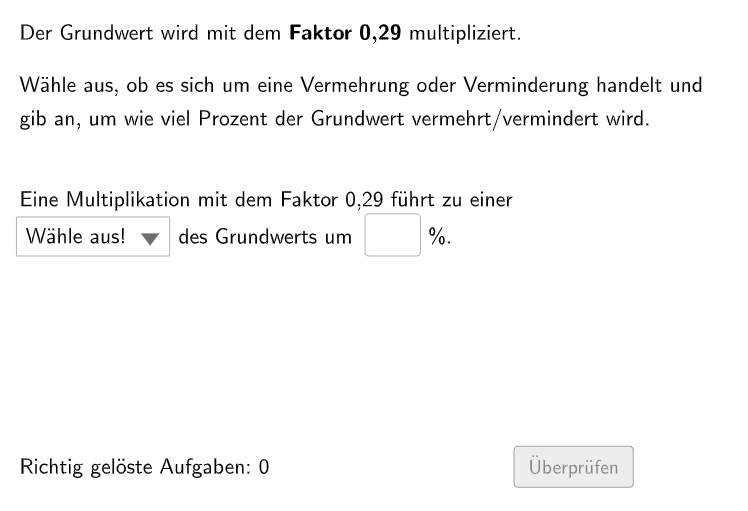
Prozentrechnung: Vermehrung und Verminderung
This example demonstrates the calculation process of percentage increase or decrease, visually showing quantity changes. Core math concepts include percentage calculations and change factors. Construction highlights use of GeoGebra commands like Shuffle, Element, Textfield, Corner, and objects such as counthint2, questionCount, Zkleiner1, Zgrößer1, etc., for dynamic question and answer display. Suitable for 7th-8th grade students practicing multi-step percentage problems.
GeoGebra Commands & Parameters
Shuffle(Sequence[0.01 + i, i, 0, 0.98, 0.01]) → Zkleiner1, {0.7300000000000004, 0.8800000000000006, 0.5000000000000002, 0.3200000000000001, 0.6700000000000004, 0.8500000000000005, 0.6600000000000004, 0.4400000000000002, 0.07, 0.11999999999999998, 0.49000000000000027, 0.6500000000000004, 0.5700000000000003, 0.8200000000000005, 0.04, 0.6300000000000003, 0.7500000000000004, 0.26000000000000006, 0.01, 0.6200000000000003, 0.35000000000000014, 0.19000000000000003, 0.17, 0.23000000000000007, 0.09999999999999999, 0.9200000000000006, 0.16, 0.6800000000000004, 0.2700000000000001, 0.03, 0.8000000000000005, 0.7400000000000004, 0.38000000000000017, 0.2800000000000001, 0.4100000000000002, 0.46000000000000024, 0.7700000000000005, 0.9700000000000006, 0.47000000000000025, 0.8600000000000005, 0.6100000000000003, 0.21000000000000005, 0.24000000000000007, 0.7800000000000005, 0.25000000000000006, 0.10999999999999999, 0.9600000000000006, 0.3000000000000001, 0.6400000000000003, 0.15, 0.3900000000000002, 0.9100000000000006, 0.2900000000000001, 0.3100000000000001, 0.5900000000000003, 0.09, 0.12999999999999998, 0.5200000000000002, 0.9000000000000006, 0.6900000000000004, 0.9400000000000006, 0.7200000000000004, 0.13999999999999999, 0.7900000000000005, 0.9900000000000007, 0.9500000000000006, 0.37000000000000016, 0.22000000000000006, 0.4000000000000002, 0.3300000000000001, 0.060000000000000005, 0.45000000000000023, 0.7000000000000004, 0.08, 0.05, 0.6000000000000003, 0.5300000000000002, 0.36000000000000015, 0.34000000000000014, 0.02, 0.5500000000000003, 0.8400000000000005, 0.4200000000000002, 0.9300000000000006, 0.20000000000000004, 0.5100000000000002, 0.4300000000000002, 0.5800000000000003, 0.8700000000000006, 0.7100000000000004, 0.5400000000000003, 0.8900000000000006, 0.7600000000000005, 0.18000000000000002, 0.9800000000000006, 0.5600000000000003, 0.8100000000000005, 0.8300000000000005, 0.48000000000000026}Shuffle(Sequence[1.01 + i, i, 0, 0.98, 0.01]) → Zgrößer1, {1.9300000000000006, 1.5100000000000002, 1.4100000000000001, 1.32, 1.12, 1.5700000000000003, 1.6500000000000004, 1.37, 1.8900000000000006, 1.5300000000000002, 1.14, 1.5800000000000003, 1.4900000000000002, 1.6400000000000003, 1.06, 1.7200000000000004, 1.7000000000000004, 1.05, 1.9700000000000006, 1.6200000000000003, 1.6800000000000004, 1.7600000000000005, 1.8500000000000005, 1.11, 1.6700000000000004, 1.8100000000000005, 1.1, 1.21, 1.16, 1.28, 1.15, 1.3900000000000001, 1.7900000000000005, 1.7400000000000004, 1.5400000000000003, 1.6000000000000003, 1.08, 1.5000000000000002, 1.4600000000000002, 1.4500000000000002, 1.04, 1.03, 1.09, 1.4700000000000002, 1.8200000000000005, 1.5900000000000003, 1.24, 1.26, 1.5600000000000003, 1.29, 1.8000000000000005, 1.9400000000000006, 1.9200000000000006, 1.02, 1.31, 1.9100000000000006, 1.7500000000000004, 1.6900000000000004, 1.34, 1.3, 1.19, 1.5500000000000003, 1.7700000000000005, 1.13, 1.35, 1.23, 1.6600000000000004, 1.9600000000000006, 1.4800000000000002, 1.8700000000000006, 1.9900000000000007, 1.07, 1.36, 1.8300000000000005, 1.6100000000000003, 1.9500000000000006, 1.8800000000000006, 1.4000000000000001, 1.4300000000000002, 1.7300000000000004, 1.3800000000000001, 1.17, 1.6300000000000003, 1.2, 1.9800000000000006, 1.8400000000000005, 1.7800000000000005, 1.9000000000000006, 1.25, 1.18, 1.7100000000000004, 1.5200000000000002, 1.4200000000000002, 1.22, 1.8600000000000005, 1.33, 1.01, 1.4400000000000002, 1.27}Shuffle(Join[{Zgrößer1, Zkleiner1}]) → ZZ, {0.2900000000000001, 0.03, 1.7400000000000004, 0.7100000000000004, 0.8400000000000005, 1.9100000000000006, 1.9200000000000006, 1.6100000000000003, 1.25, 1.22, 0.9200000000000006, 0.5000000000000002, 0.7700000000000005, 0.4000000000000002, 0.8600000000000005, 1.7000000000000004, 0.04, 1.6800000000000004, 1.9300000000000006, 0.3000000000000001, 1.04, 1.6200000000000003, 1.5700000000000003, 0.8100000000000005, 0.5900000000000003, 0.3300000000000001, 1.4000000000000001, 1.21, 1.19, 0.3100000000000001, 1.9000000000000006, 1.29, 0.24000000000000007, 0.7800000000000005, 0.6000000000000003, 0.5800000000000003, 1.32, 0.5600000000000003, 0.7300000000000004, 0.5200000000000002, 1.8400000000000005, 1.4500000000000002, 1.6500000000000004, 0.3900000000000002, 1.3900000000000001, 1.18, 0.7600000000000005, 1.6900000000000004, 1.8100000000000005, 1.5800000000000003, 1.5000000000000002, 1.5900000000000003, 1.7900000000000005, 1.8300000000000005, 1.05, 1.5400000000000003, 0.4400000000000002, 0.13999999999999999, 0.6800000000000004, 0.07, 1.27, 0.9400000000000006, 0.10999999999999999, 0.17, 1.2, 1.5200000000000002, 1.16, 1.6300000000000003, 0.9800000000000006, 1.26, 0.6900000000000004, 1.5600000000000003, 0.49000000000000027, 1.7700000000000005, 0.02, 0.6300000000000003, 0.16, 1.02, 1.6600000000000004, 1.8200000000000005, 1.4300000000000002, 1.11, 0.5700000000000003, 0.6600000000000004, 0.09, 0.060000000000000005, 0.7400000000000004, 0.5100000000000002, 0.7500000000000004, 1.03, 1.07, 0.9300000000000006, 0.15, 0.8200000000000005, 1.8600000000000005, 1.5300000000000002, 1.9900000000000007, 1.17, 0.08, 1.01, 0.12999999999999998, 0.47000000000000025, 1.4200000000000002, 1.28, 1.34, 0.48000000000000026, 0.23000000000000007, 0.9000000000000006, 0.9900000000000007, 1.6400000000000003, 1.4100000000000001, 1.8000000000000005, 1.23, 0.6500000000000004, 0.26000000000000006, 1.8900000000000006, 1.4800000000000002, 1.24, 1.14, 0.7000000000000004, 0.5500000000000003, 0.4200000000000002, 0.25000000000000006, 0.8000000000000005, 1.7800000000000005, 0.8300000000000005, 1.4600000000000002, 1.1, 0.21000000000000005, 0.46000000000000024, 0.6400000000000003, 0.8800000000000006, 0.9500000000000006, 0.9100000000000006, 0.9600000000000006, 1.9400000000000006, 1.6000000000000003, 1.9700000000000006, 0.3200000000000001, 1.4900000000000002, 1.35, 1.7600000000000005, 0.4300000000000002, 1.6700000000000004, 0.5300000000000002, 0.11999999999999998, 1.15, 1.9500000000000006, 1.37, 1.7500000000000004, 0.6200000000000003, 1.36, 1.7300000000000004, 0.20000000000000004, 0.8900000000000006, 1.4700000000000002, 0.5400000000000003, 0.09999999999999999, 1.9800000000000006, 1.9600000000000006, 1.3800000000000001, 0.18000000000000002, 1.31, 0.05, 1.5500000000000003, 1.5100000000000002, 1.4400000000000002, 1.12, 1.7200000000000004, 1.09, 0.38000000000000017, 0.7900000000000005, 0.35000000000000014, 0.6700000000000004, 0.9700000000000006, 0.36000000000000015, 0.22000000000000006, 0.2700000000000001, 0.4100000000000002, 0.34000000000000014, 1.08, 1.06, 1.3, 0.6100000000000003, 1.13, 0.01, 0.45000000000000023, 1.8700000000000006, 0.2800000000000001, 1.7100000000000004, 0.7200000000000004, 0.37000000000000016, 0.8700000000000006, 1.8500000000000005, 1.33, 1.8800000000000006, 0.8500000000000005, 0.19000000000000003}Element(ZZ, Mod[questionCount, 198] + 1) → ZZFaktorTextfield(input1) → InputBox1Corner(Text2, 2) → E2Text2
AI Drawing Prompt Reference
Create a visual demo layout for percentage increase or decrease practice. Include two sets of randomly selected adjustment factors: one representing a decrease factor range and the other representing an increase factor range, with a mechanism that picks the current factor by an index. Combine these into a single current “adjustment factor” used for the displayed question. Add an answer input field for the user to type the computed percentage result, and place a corner text label to show the question text or current prompt. Make the factor selection and displayed text update together across steps.
The prompt above was compiled from the original drawing commands and is for reference only.