
Slider Crank Mechanism
Loading the math board and drawing, please wait…
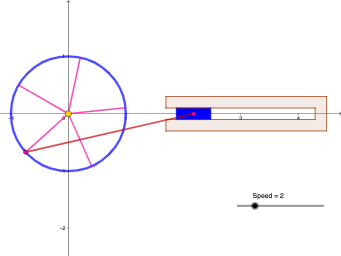
This example demonstrates the motion relationship of a slider crank mechanism, showcasing the联动 of the slider and crank to illustrate mechanical motion principles. Core mathematical concepts include rotation, function graph, reflection, frequency distribution, inequalities, and coordinate geometry. Construction highlights from the summary involve commands/objects like Intersect, Circle, Point, Rotate, Segment, and Polygon in GeoGebra. Suitable for high school physics and mathematics education, explaining mechanical principles and kinematics applications.
GeoGebra Commands & Parameters
Intersect(xAxis, yAxis) → ACircle(A, 1) → cPoint(c) → BRotate(B, α, A) → B'Circle(B', 3) → dIntersect(d, xAxis, 2) → CSegment(B', C) → fRotate(B', 72°, A) → B''Rotate(B'', 72°, A) → B'''Rotate(B''', 72°, A) → DRotate(D, 72°, A) → D'Segment(B'', A) → gSegment(A, B') → hSegment(A, D') → iSegment(A, D) → jSegment(B''', A) → kPolygon(F, I, H, E) → q1, f_1, i_1, h_1, ePolygon(G, K, M, O, P, N, L, J) → poly1, g_1, k_1, m, o, p, n, l, j_1
AI Drawing Prompt Reference
Draw a slider crank mechanism to demonstrate the联动 of the slider and crank. Start with the intersection of coordinate axes, draw a circle centered at this point with radius 1, and take a point on the circle. Rotate this point around the center to get multiple points, then draw circles with different radii centered at these points. Connect the intersections with the x-axis to form the mechanism, and further construct multiple polygons through rotations and line segments to illustrate mechanical motion principles and geometric relationships.
The prompt above was compiled from the original drawing commands and is for reference only.