
Geogebra Algebra and Geometry Interactive Demo
Loading the math board and drawing, please wait…
In collections
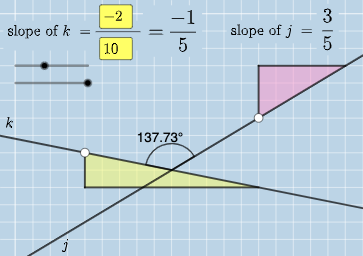
Exploring Perpendicular Lines in the Coordinate Plane
This example demonstrates the relationship between geometric figures like lines, angles, and ellipses with algebraic equations through interactive graphics; Core math concepts include coordinate geometry, trigonometry, function graphing, and parametric equations; Construction highlights the use of GeoGebra commands/objects such as Intersect, Angle, Textfield, Polygon, Segment, and FractionText; Suitable for high school and above learners to understand the integration of geometric construction and algebraic computation.
GeoGebra Commands & Parameters
Intersect(k, j) → CAngle(A, C, B) → αIntersect(k, eq3) → DAngle(A, D, B) → βIntersect(j, eq4) → EAngle(A, E, B) → γTextfield(a) → InputBox1Textfield(b) → InputBox2Textfield(c) → InputBox3Textfield(d) → InputBox4Polygon(A, F, G) → t1, g, a_1, fSegment(A, F) → hSegment(F, G) → iFractionText(a / b) → text4FractionText(c / d) → text5Polygon(B, H, I) → t2, i_1, b_1, h_1Segment(B, H) → lSegment(H, I) → m
AI Drawing Prompt Reference
Draw a geometric figure showing the relationship between lines, angles, and ellipses, expressed through algebraic equations. Include sliders to control parameters, demonstrating coordinate geometry, trigonometry, function graphing, and parametric equations. Start by finding intersections of lines, marking angles, then create ellipses and triangles using equations and segments, and finally display parameters and fractions in text boxes.
The prompt above was compiled from the original drawing commands and is for reference only.