
Slicing a Cone: Dynamic Cross-Sections and Geometric Exploration
Loading the math board and drawing, please wait…
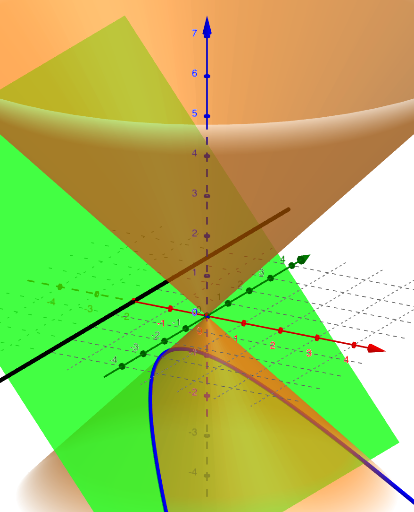
This example demonstrates how to dynamically generate cross-sections of a cone by rotating a cutting plane, visually showing how the intersection shape changes (circle, ellipse, parabola, or hyperbola) with different angles. The core mathematical concepts include conic sections in solid geometry, the intersection of a plane and a curved surface, and spatial rotation and projection. The construction uses GeoGebra commands such as Line to define the cutting axis, Rotate to rotate the plane, and IntersectPath to compute the intersection curve between the plane and the cone surface, with objects eq1, f, n, p, and c for parameter control. It is suitable for upper secondary or early university students to understand the geometric nature of conic sections, and also serves as a classroom demonstration tool for teachers to build intuitive 3D understanding of quadratic curve classification.
GeoGebra Commands & Parameters
Line((-2, 0, 0), (-2, 1, 0)) → fRotate(Plane[(1, 0, 0), f], n, f) → pIntersectPath(p, eq1) → c
AI Drawing Prompt Reference
Draw a cone with a rotatable plane that revolves around its axis, showing how the intersection curve changes from a circle to an ellipse, parabola, or hyperbola as the angle changes. Include a slider to control the rotation angle, display the axis of rotation, and the intersection curve, to illustrate the relationship between conic sections and cross-sections of a cone.
The prompt above was compiled from the original drawing commands and is for reference only.