
Sine Wave Pattern on a Cylinder
Loading the math board and drawing, please wait…
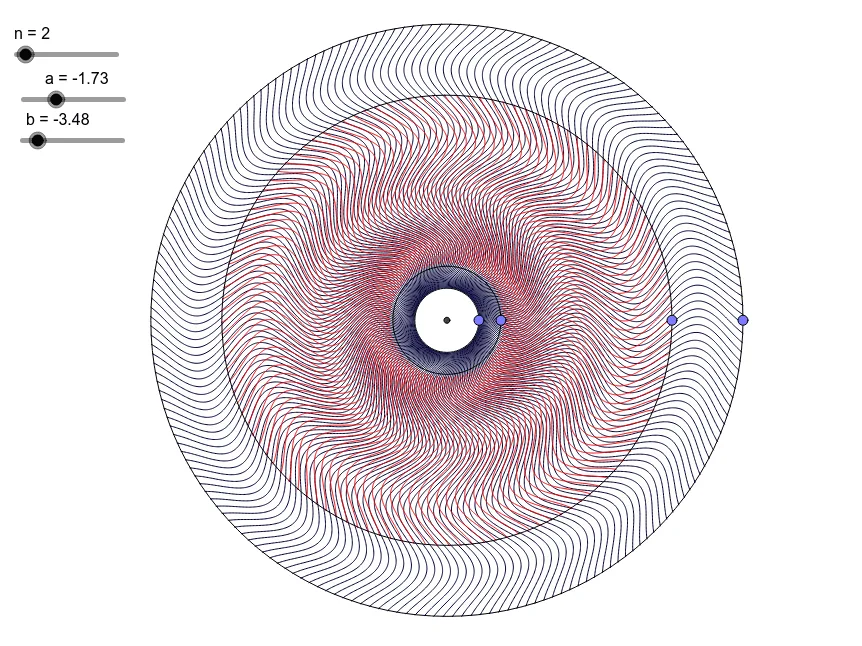
This example demonstrates the formation of a sine wave pattern on a cylindrical surface. It involves core mathematical concepts such as cylinder, similarity transformation, area, circumference, and 2D vectors. The construction utilizes GeoGebra commands and objects like Point, Intersect, Circle, CurveCartesian, and Sequence. Suitable for high school and above students to understand the integration of spatial geometry and function graphs.
GeoGebra Commands & Parameters
Point(xAxis) → EPoint(xAxis) → DIntersect(xAxis, yAxis) → APoint(xAxis) → CPoint(xAxis) → BCircle(A, B) → cCurveCartesian(t, (1 / n * sin((n * (t - x(B))) + a)), t, x(B), x(C)) → k_1Circle(A, C) → dCircle(A, D) → eCurveCartesian(t, (1 / n * sin((n * (t - x(D))) + b)), t, x(D), x(E)) → k_2Circle(A, E) → fSequence(Rotate[k_2, ((2 * k) * π / 200)], k, 1, 200) → L_2Sequence(Rotate[k_1, ((2 * k) * π / 120)], k, 1, 120) → L_1
AI Drawing Prompt Reference
Draw a sine wave pattern on a cylindrical surface by creating multiple points on the x-axis, drawing circles centered at these points, generating two sinusoidal curves, and rotating them around the cylinder's axes to form continuous wave-like patterns, illustrating the integration of spatial geometry and function graphs.
The prompt above was compiled from the original drawing commands and is for reference only.