
Pyramids and Cones
Loading the math board and drawing, please wait…
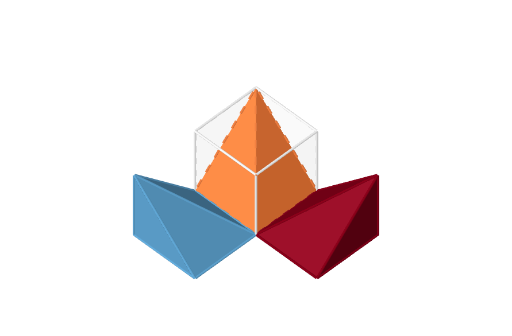
This example demonstrates the geometric construction and properties of pyramids and cones in three-dimensional space. It involves core mathematical concepts such as 3D vectors, cubes, volume calculation, quadratic functions, symmetry, similar triangles, and the Pythagorean theorem. The construction uses commands like Point, Segment, Cube, Pyramid, and Rotate, involving objects like points, segments, faces, and solids. It is suitable for high school students learning solid geometry, vectors, and spatial geometric transformations.
GeoGebra Commands & Parameters
Point(Circle[A, Increase]) → BSegment(A, B) → fPoint(Circle[B, Distance[A, B], Segment[A, B]]) → CCube(A, B, C) → b, D, faceCDHG_1, faceEFGH, edgeAD_1, edgeAB_1, edgeBC_1, edgeCD_1, edgeAE_1, edgeDH_1, edgeEH_1, edgeEF_1, E, edgeBF_1, edgeFG_1, edgeCG_1, edgeGH_1, F, G, H, faceABCD_1, faceADHE, faceABFE, faceBCGF_1Pyramid(A, B, C, D, E) → c, faceABCD, edgeAE, edgeBE_1, edgeCE_1, edgeDE_1, faceABE, faceBCE_1, faceCDE_1, faceADE, edgeAB, edgeBC_2, edgeCD_2, edgeADPyramid(B, C, G, F, E) → d, faceBCGF, edgeBE, edgeCE_2, edgeEG_1, edgeEF, faceBCE, faceCEG_1, faceEFG, faceBEF, edgeBC, edgeCG_2, edgeFG, edgeBFSegment(B, C) → gRotate(d, Fold, g) → d'Pyramid(C, D, H, G, E) → h, faceCDHG, edgeCE, edgeDE, edgeEH, edgeEG, faceCDE, faceDEH, faceEGH, faceCEG, edgeCD, edgeDH, edgeGH, edgeCGSegment(C, D) → iRotate(h, Fold, i) → h'
AI Drawing Prompt Reference
First, draw a cube. Then, add a point at one vertex of the cube. Next, draw a pyramid with a base that is one face of the cube and the point as its apex. Then, draw another pyramid with a base that is another face of the cube and another point as its apex. Finally, rotate both pyramids to different angles to form a three-dimensional figure. This figure shows the combination of the cube and pyramids and their spatial relationships.
The prompt above was compiled from the original drawing commands and is for reference only.