
Sine Spaghetti: Dynamic Visualization of Unit Circle and Sine Function
Loading the math board and drawing, please wait…
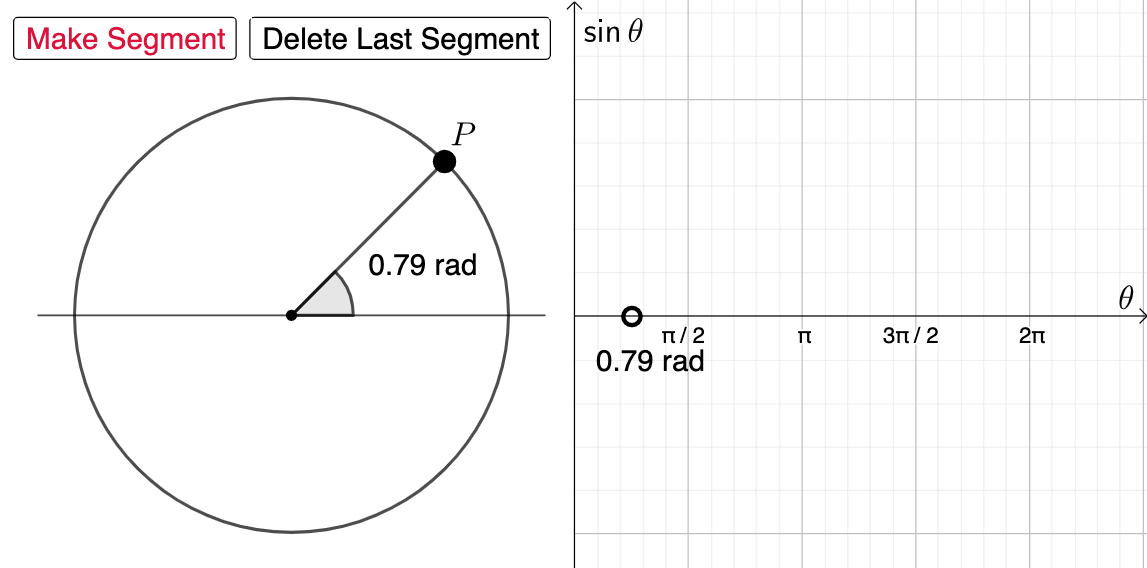
① This example demonstrates how the sine function is generated from the unit circle by connecting points on the circle to corresponding points on the sine graph with line segments, creating a 'spaghetti' effect. ② Core mathematical concepts include the unit circle, sine function, angle-radian correspondence, and parametric curve ideas. ③ Construction highlights: using GeoGebra commands such as Segment, Midpoint, Circle, Point, Intersect, and Angle, with objects A, B, f, C, c, D, E, α, buttons button1/button2, counter cnt, point P, function g, segment h, and text1. Buttons control animation to show how the sine value changes as the angle varies. ④ Suitable for high school or pre-calculus students learning trigonometry, and useful for classroom demonstrations or self-exploration to understand the periodic nature and unit circle definition of sine.
GeoGebra Commands & Parameters
Segment(A, B) → fMidpoint(f) → CCircle(C, 3) → cPoint(c) → DIntersect(c, f, 2) → EAngle(E, C, D) → αSegment(C, D) → g
AI Drawing Prompt Reference
Draw a graph of the unit circle and the sine function. Take a point on the unit circle and connect it to the corresponding point on the sine curve to create a spaghetti-like effect. Show the unit circle, the sine curve, the connecting line segments, and a movable angle control point. The graph should clearly illustrate the periodicity of the sine function and the definition of sine using the unit circle, suitable for demonstrations or self-exploration in learning trigonometry and sine functions.
The prompt above was compiled from the original drawing commands and is for reference only.