
Sinusoids of a Spirographic Curve
Loading the math board and drawing, please wait…
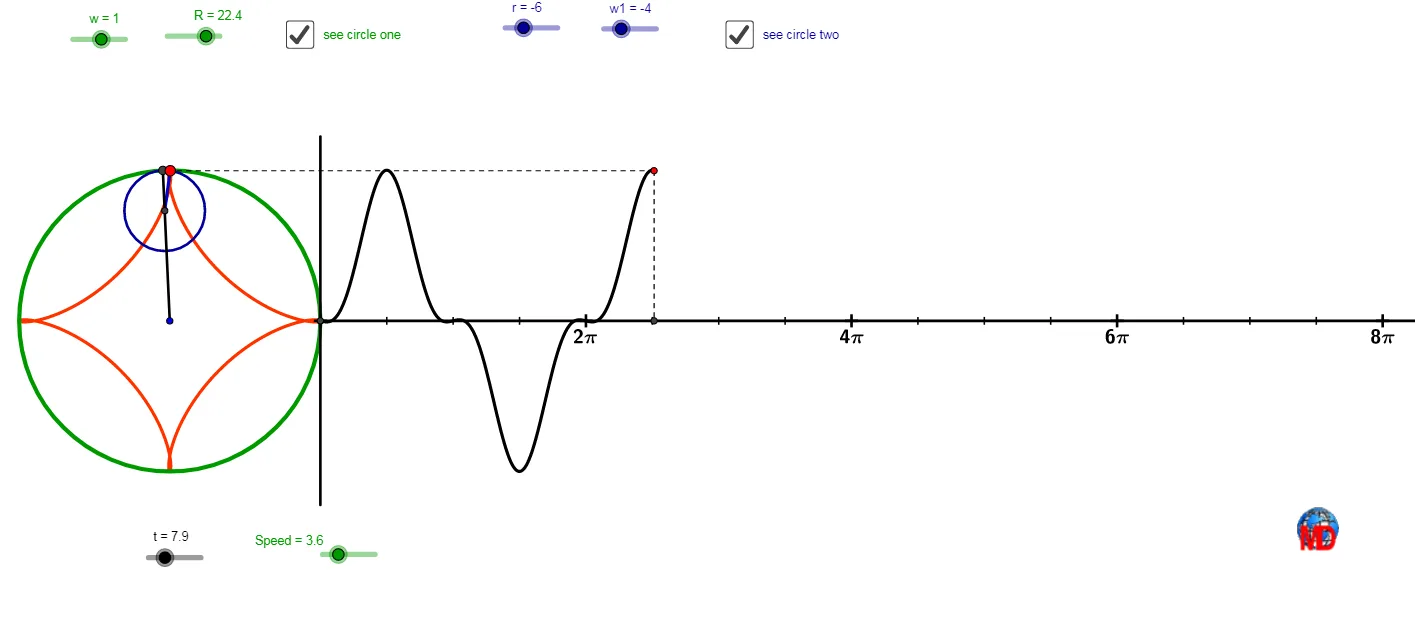
This example demonstrates how sinusoidal waveforms and tangent lines can be dynamically visualized along a spirographic curve defined by parametric equations. The core mathematical concepts include parametric curves, sine functions, tangents, rotations, sequences, and the influence of rational number ratios on the curve's shape. Construction highlights: using GeoGebra commands such as Line, Circle, Intersect, Point, Rotate, Ray, Segment, CurveCartesian, and Sequence to build the geometric framework; key objects include t, A, n, w, R, c, E, F, r, w1, B, d, B', a, C, e, B'', b, i, j, Speed, k, o, p, q, G, s, H, I, l, u, f, D, g, J, K, h, L, m, l1, with the Speed slider controlling animation. Suitable for high school or college students studying parametric equations, trigonometric functions, and geometric transformations, as well as for mathematics visualization and exploratory learning.
GeoGebra Commands & Parameters
Line(A, xAxis) → nCircle(A, R) → cIntersect(c, n) → E, FPoint(c) → BCircle(A, R + r) → dRotate(F, (t * w), A) → B'Ray(A, B') → aIntersect(d, a) → C,Circle(C, B') → eRotate(B', (t * w1), C) → B''Ray(C, B'') → bSegment(C, B'') → iSegment(A, B') → jCurveCartesian(x(A) + ((R + r) * (cos((w * i)) + cos((w1 * i)))), y(A) + ((R + r) * (sin((w * i)) + sin((w1 * i)))), i, 0, t) → kCurveCartesian(x(A) + ((R + r) * cos((w * i))) - (r * cos(((w1 + w) * i) + 3.141592653589793)), y(A) + ((R + r) * sin((w * i))) - (r * sin(((w1 + w) * i) + 3.141592653589793)), i, 0, t) → oRay(A, G) → sCurveCartesian(x(A) + ((R + r) * cos((w * i))) - (r * cos(((w1 + w) * i))), y(A) + ((R + r) * sin((w * i))) - (r * sin(((w1 + w) * i))), i, 0, t) → lCurveCartesian(x(G) + ((2 * π) * i), y(G) + ((R + r) * sin((w * i))) - (r * sin(((w1 + w) * i))), i, 0, t) → uSegment(I, H) → fPoint(i) → DSegment(I, D) → gIntersect(e, j) → J, KSegment(A, K) → hPoint(s) → LRay(G, L) → mSequence(G + (i, 0), i, 0, 160, 39.5 / 4) → l1Sequence(G + (i, 0), i, 0, 160, 39.5) → l2Sequence(Text[i / 2 + "π", l1(i + 1) - (2.5, 0.45), true, true], i, 4, 20, 4) → l4Segment(G + (0, R + 5), G - (0, R + 5)) → r_{1}Ray(A, K) → f_1Intersect(c, f_1) → M,Segment(A, M) → g_1Segment(A, C) → h_1Intersect(c, h_1) → N,Segment(A, N) → i_1
AI Drawing Prompt Reference
Create a parametric spirographic (sinusoidally modulated) curve in a coordinate plane. First set a geometric scaffold using two circles with the same center but different radii, and determine their intersection points with a reference line or rays to obtain rotation pivots. Then, for a parameter t, rotate selected points around the center and around the intermediate pivot using two angular speeds, producing rotated rays/segments that guide additional intersections. Use the resulting relationships to draw several related parametric traces whose x–y coordinates are formed by combining sine and cosine terms with two frequencies and a phase shift (sum/difference inside the trig arguments). Finally, include a reference trajectory and short segments formed from points sampled along the parameter to visualize how the waveform evolves as t increases.
The prompt above was compiled from the original drawing commands and is for reference only.