
Sine Function Geometry Exploration
Loading the math board and drawing, please wait…
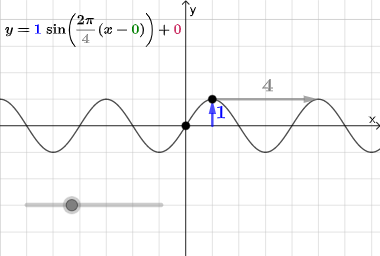
This example demonstrates the geometric properties and graphical phenomena of the sine function. Key mathematical concepts include trigonometry, geometric construction, and coordinate geometry. Construction involves GeoGebra commands such as Ray, PointIn, Vector, and Segment to build sine curves and related figures. Suitable for middle or high school mathematics learning to understand the relationship between the sine function and geometric concepts.
GeoGebra Commands & Parameters
Ray(D, D + (1, 0)) → iPointIn(x ≥ x(A) + 0.5) → BVector((0, y(F)), F) → uVector((x(F), 0), F) → vVector(Midpoint[F, H], G) → wVector(G, G + (per, 0)) → eSegment(F, H) → j
AI Drawing Prompt Reference
Draw a geometric construction related to the sine-function setting on a coordinate plane. Start by creating a ray from a reference point in the positive horizontal direction as a baseline. Place a point B to the right of a reference x-position, with its x-coordinate greater than that value by 0.5. From the point F, construct two vectors: one vector u from (0, y(F)) pointing to F, and another vector v from (x(F), 0) pointing to F. Use F and another point H to form the key segment j connecting F and H. Additionally, construct a vector w determined by the midpoint of F and H together with a given point G, and a horizontal-shift vector e from G to G plus a direction parallel to the x-axis, keeping these objects geometrically linked with the segment and vectors.
The prompt above was compiled from the original drawing commands and is for reference only.