
From Polar to Cartesian Coordinates
Loading the math board and drawing, please wait…
In collections
Trigonometry and Complex Numbers
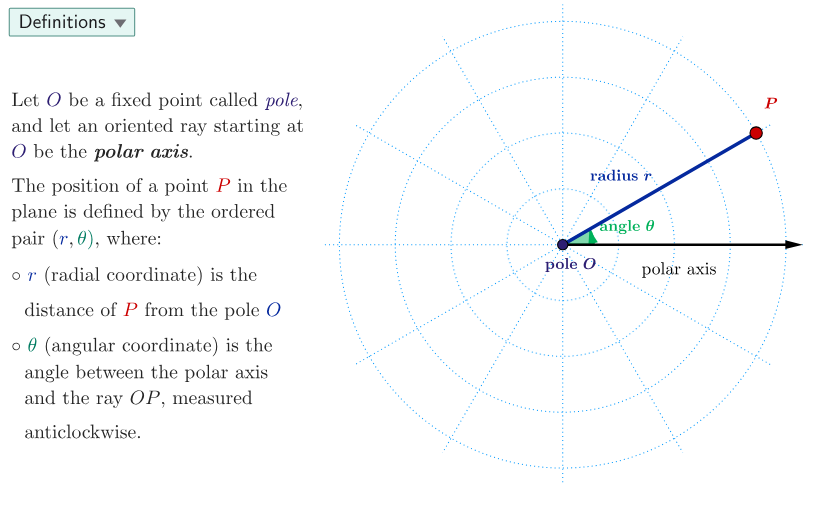
This example demonstrates the conversion between polar and Cartesian coordinates, highlighting the relationship between different coordinate systems. Key mathematical concepts include polar coordinates, Cartesian coordinates, trigonometric functions, and geometric construction. Construction involves using GeoGebra commands like Join, Point, Segment, Vector, Angle, and objects such as polarGrid, theta. Suitable for high school students or math enthusiasts learning about coordinate transformations and geometric constructions.
GeoGebra Commands & Parameters
Join(Sequence[Sequence[(r; θ), r, 0, 4, 1], θ, 0, (2 * pi), pi / 6]) → polarGridPoint(polarGrid) → PSegment(O, P) → segmRagVector(O, (4.3, 0)) → posXaxisAngle((4, 0), O, P) → thetaSelectedIndex(ddMenu) → isSegment((-4.3, 0), (4.3, 0)) → fakeXSegment((0, -4.3), (0, 4.3)) → fakeYSegment(P, Q) → segmPQSegment(O, Q) → segmOQPolygon({O, P, Q}) → t1
AI Drawing Prompt Reference
Create a diagram demonstrating the conversion between polar and Cartesian coordinates. Show a polar grid at the center with concentric circles radiating from the origin (radius from 0 to 4) and radial lines spaced at intervals of π/6. Place a point P on this grid and draw a directed line segment from the origin to P, clearly marking the polar radius r and angle θ. Add perpendicular line segments to indicate the x-axis and y-axis positions as reference. Connect the origin, point P, and its projection Q on the x-axis to form a right triangle, illustrating how polar coordinates (r, θ) transform into Cartesian coordinates (x, y) through geometric relationship.
The prompt above was compiled from the original drawing commands and is for reference only.