
Similar Triangles and Angle Relationships
Loading the math board and drawing, please wait…
In collections
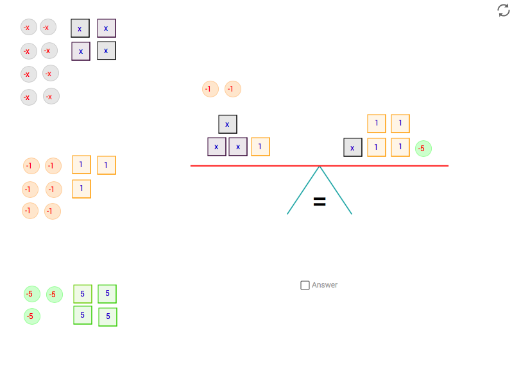
Solving equations by balancing
This example illustrates the angle relationships in similar triangles. It involves the properties of similar triangles and how to use the angle measurement tool in GeoGebra to analyze angles. The commands in the construction summary show the use of points, lines, and angle measurement tools. Suitable for students in middle school and above to learn about similar triangles.
GeoGebra Commands & Parameters
Angle(angle_c, angle_b, angle_a) → anglemeasurePolygon(C_1, C_2, 4) → x_c, c_1, c_2, c_3, c_4, C_3, C_4Polygon(A_1, A_2, 4) → x_a, a_1, a_2, a_4, a_3, A_3, A_4Polygon(P_1, P_2, 4) → x_P, p_1, p_2, p_4, p_3, P_3, P_4Point(xAxis) → foot1Segment(fulcrum, foot1) → leg_bPoint(xAxis) → foot2Segment(fulcrum, foot2) → leg_aCircle(fulcrum, 4) → circleLine(fulcrum, xAxis) → parallelIntersect(circle, parallel, 2) → balance1Intersect(circle, parallel, 1) → balance2Segment(balance1, balance2) → balanceSegment(angle_a, angle_b) → anglesegment_aSegment(angle_b, angle_c) → anglesegment_bRotate(balance1, tip, fulcrum) → balance1'Rotate(balance2, tip, fulcrum) → balance2'Segment(balance1', balance2') → balance'PointIn(x_c) → APointIn(x_P) → CPointIn(x_a) → PIf(equal > tipequal, ">", If[equal < tipequal, "<", "="]) → signCircle(O, 0.25) → oCircle(D, 0.25) → dPolygon(Q_1, Q_2, 4) → x_Q, q_3, q_1, q_2, q_4, Q_3, Q_4PointIn(x_Q) → QPolygon(F_1, F_2, 4) → x_F, f_2, f_1, f_3, f_4, F_3, F_4Polygon(E_1, E_2, 4) → x_E, e_2, e_1, e_3, e_4, E_4, E_3PointIn(x_F) → EPointIn(x_E) → FPolygon(H_1, H_2, 4) → x_H, h_2, h_1, h_3, h_4, H_3, H_4Polygon(G_1, G_2, 4) → x_G, g_2, g_1, g_3, g_4, G_3, G_4PointIn(x_H) → HPointIn(x_G) → GPolygon(J_1, J_2, 4) → x_J, j_2, j_1, j_3, j_4, J_3, J_4Polygon(I_1, I_2, 4) → x_I, i_2, i_1, i_3, i_4, I_3, I_4PointIn(x_J) → IPointIn(x_I) → JCircle(K, 0.25) → kCircle(L, 0.25) → lCircle(S, 0.25) → sCircle(U, 0.25) → uCircle(R, 0.25) → rCircle(T, 0.25) → tCircle(W, 0.25) → wCircle(V, 0.25) → vCircle(Y, 0.25) → y_1Circle(X, 0.25) → x_1Circle(Z2, 0.25) → z2Circle(Z, 0.25) → zPolygon(M_1, M_2, 4) → x_M, m_2, m_1, m_3, m_4, P_7, P_8PointIn(x_M) → MPolygon(C'_1, C'_2, 4) → x_{C'}, c'_2, c'_1, c'_3, c'_4, Q_7, Q_8PointIn(x_{C'}) → C'Polygon(A'_1, A'_2, 4) → x_{A'}, a'_2, a'_1, a'_3, a'_4, P_{11}, P_{12}PointIn(x_{A'}) → A'Polygon(D'_1, D'_2, 4) → x_{D'}, d'_2, d'_1, d'_3, d'_4, Q_{12}, Q_{13}PointIn(x_{D'}) → D'Polygon(B'_1, B'_2, 4) → x_{B'}, b'_2, b'_1, b'_3, b'_4, P_{15}, P_{16}PointIn(x_{B'}) → B'Polygon(E'_1, E'_2, 4) → x_{E'}, e'_2, e'_1, e'_3, e'_4, Q_{17}, Q_{18}PointIn(x_{E'}) → E'Circle(N, 0.25) → nCircle(B, 0.25) → bCircle(J2, 0.25) → j'Circle(L2, 0.25) → l'Circle(K2, 0.25) → k'Circle(M2, 0.25) → m'Polygon(I'_2, I'_1, 4) → x_2, i'_2, i'_1, i'_3, i'_4, P_6, P_{10}PointIn(x_2) → I'Polygon(G'_2, G'_1, 4) → x_3, g'_2, g'_1, g'_3, g'_4, Q_6, Q_{10}PointIn(x_3) → G'Polygon(F'_2, F'_1, 4) → x_4, f'_2, f'_1, f'_3, f'_4, P_5, P_9PointIn(x_4) → F'Polygon(H'_2, H'_1, 4) → x_5, h'_2, h'_1, h'_3, h'_4, Q_5, Q_9PointIn(x_5) → H'Textfield(unknown) → answer
AI Drawing Prompt Reference
Draw a geometric figure with several similar triangles, focusing on angle relationships. Start with a horizontal baseline, pick two points on it, and connect them to a common vertex to form two sides. Construct a circle and a line parallel to the baseline, find their intersections, and connect them to make a balance segment. Then, place multiple quadrilateral regions, each containing a random point, and draw small circles around these points as markers. Finally, measure three key angles and display a comparison sign (greater than, less than, or equal) based on their values, to illustrate the angle relationships in similar triangles.
The prompt above was compiled from the original drawing commands and is for reference only.