
Area of a Trapezium
Loading the math board and drawing, please wait…
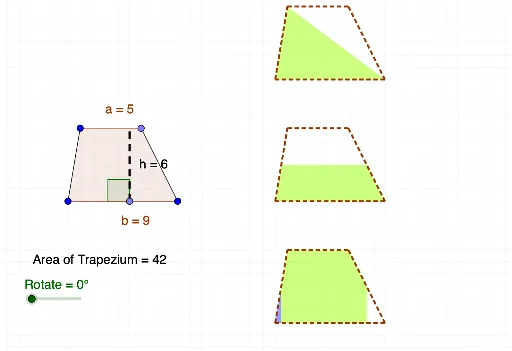
This example demonstrates the calculation and construction of the area of a trapezium. The key mathematical concepts include the trapezium area formula, similarity transformations, and geometric construction. The construction involves GeoGebra commands such as Segment, Line, Point, Polygon, OrthogonalLine, Intersect, Vector, Translate, Rotate, Midpoint, Angle, PointIn, etc. It is suitable for middle or high school mathematics learning to understand the relationship between trapezium area and geometric transformations.
GeoGebra Commands & Parameters
Segment(A, B) → fLine(C, f) → gSegment(A, C) → h_1Point(g) → DSegment(B, D) → iPolygon(A, C, D, B) → poly1, c, a, d, bPoint(f) → EOrthogonalLine(E, a) → h_2Intersect(h_2, a) → FSegment(E, F) → hVector(I, J) → vVector(G, H) → uTranslate(A, u) → A'Translate(C, u) → C'Translate(D, u) → D'Translate(B, u) → B'Polygon(A', C', D', B') → poly1', a', c', d', b'Translate(A', v) → A''Translate(C', v) → C''Translate(D', v) → D''Translate(B', v) → B''Polygon(A'', C'', D'', B'') → poly1'', a'', c'', d'', b''Translate(A, v) → A'_1Translate(C, v) → C'_1Translate(D, v) → D'_1Translate(B, v) → B'_1Polygon(A', C', B') → poly2, b'_2, a'_2, c'_2Polygon(C', D', B') → poly3, b'_3, c'_3, d'_2Rotate(B', (-Rotate), B') → B''_1Midpoint(D', B') → KRotate(C', (-Rotate), K) → C''_1Rotate(D', (-Rotate), K) → D''_1Rotate(B', (-Rotate), K) → B''_2Polygon(C''_1, D''_1, B''_2) → poly3', b''_2, c''_1, d''_1Midpoint(A'', C'') → LMidpoint(B'', D'') → MPolygon(A'', L, M, B'') → poly4, a''_1, l, m, b''_1Polygon(L, C'', D'', M) → poly5, l_1, c''_2, d''_2, m_1Rotate(L, (-Rotate), M) → L'Rotate(C'', (-Rotate), M) → C'''Rotate(D'', (-Rotate), M) → D'''Rotate(M, (-Rotate), M) → M'Polygon(L', C''', D''', M') → poly5', l', c''', d''', m'Midpoint(A'_1, C'_1) → NMidpoint(D'_1, B'_1) → ORotate(N, (-Rotate), N) → N'Rotate(A'_1, (-Rotate), N) → RRotate(O, Rotate, O) → O'Rotate(B'_1, Rotate, O) → SAngle(F, E, A) → αTranslate(A'', v) → A'''Translate(C'', v) → C'''_1Translate(D'', v) → D'''_1Translate(B'', v) → B'''Polygon(A''', C'''_1, D'''_1, B''') → poly1''', a''', c'''_1, d'''_1, b'''Midpoint(a''') → TMidpoint(d'''_1) → UOrthogonalLine(C'''_1, b''') → tOrthogonalLine(D'''_1, b''') → eOrthogonalLine(A''', c'''_1) → f_1OrthogonalLine(B''', c'''_1) → g_1OrthogonalLine(T, b''') → i_1OrthogonalLine(U, b''') → j_1Intersect(i_1, b''') → VIntersect(j_1, b''') → WPolygon(V, T, C'''_1, D'''_1, U, W) → poly9, v_1, t_1, c'''_2, d'''_2, u_1, wPolygon(A''', T, V) → poly10, v_2, a'''_1, t_2Polygon(W, U, B''') → poly11, b'''_1, w_1, u_2Rotate(A''', (-Rotate), T) → ZRotate(T, (-Rotate), T) → T'Rotate(V, (-Rotate), T) → V'Polygon(Z, T', V') → poly10', v', z_1, t'Rotate(W, Rotate, U) → W'Rotate(U, Rotate, U) → U'Rotate(B''', Rotate, U) → A_1Polygon(W', U', A_1) → poly11', a_1, w', u'Intersect(i_1, c'''_1) → B_1Polygon(B_1, D'''_1, U, W, A''', T) → poly12, b_1, d'''_3, u_3, w_2, a'''_2, t_3Polygon(C'''_1, B_1, T) → poly13, t_4, c'''_3, b_2Rotate(C'''_1, Rotate, T) → C_1Rotate(B_1, Rotate, T) → D_1Rotate(T, Rotate, T) → T'_1Polygon(C_1, D_1, T'_1) → poly13', t'_1, c_1, d_1Intersect(j_1, c'''_1) → E_1Polygon(B_1, T, A''', B''', U, E_1) → poly14, b_3, t_5, a'''_3, b'''_2, u_4, e_1Polygon(U, E_1, D'''_1) → poly15, d'''_4, u_5, e_2Rotate(U, (-Rotate), U) → U'_1Rotate(E_1, (-Rotate), U) → F_1Rotate(D'''_1, (-Rotate), U) → G_1Polygon(U'_1, F_1, G_1) → poly15', g_2, u'_1, f_2Polygon(V, T, C'''_1, E_1, U, B''') → poly16, v_3, t_6, c'''_4, e_3, u_6, b'''_3PointIn(poly1) → Pointpoly1Segment(T, U) → k
AI Drawing Prompt Reference
Draw a trapezium. The trapezium has two parallel sides and two non-parallel sides. First, draw the parallel sides, then the non-parallel sides to form the trapezium. Next, use geometric transformations such as translation and rotation to duplicate and reposition the trapezium. Finally, add auxiliary points like midpoints to illustrate the symmetry and geometric relationships of the trapezium.
The prompt above was compiled from the original drawing commands and is for reference only.