
Step Functions and Reflections
Loading the math board and drawing, please wait…
In collections
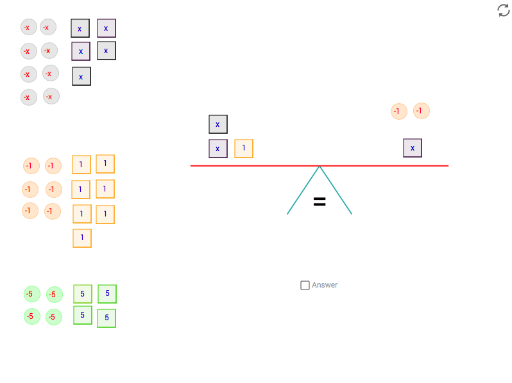
Solving equations by balancing
This example illustrates step functions and their graphical transformations, particularly reflections. It involves concepts of step functions, reflections, and congruence. Using GeoGebra commands such as Angle, Polygon, Point, Segment, etc., users can dynamically explore these mathematical concepts. Suitable for high school mathematics education and learning.
GeoGebra Commands & Parameters
Angle(angle_c, angle_b, angle_a) → anglemeasurePolygon(C_1, C_2, 4) → x_c, c_1, c_2, c_3, c_4, C_3, C_4Polygon(A_1, A_2, 4) → x_a, a_1, a_2, a_4, a_3, A_3, A_4Polygon(P_1, P_2, 4) → x_P, p_1, p_2, p_4, p_3, P_3, P_4Point(xAxis) → foot1Segment(fulcrum, foot1) → leg_bPoint(xAxis) → foot2Segment(fulcrum, foot2) → leg_aCircle(fulcrum, 4) → circleLine(fulcrum, xAxis) → parallelIntersect(circle, parallel, 2) → balance1Intersect(circle, parallel, 1) → balance2Segment(balance1, balance2) → balanceSegment(angle_a, angle_b) → anglesegment_aSegment(angle_b, angle_c) → anglesegment_bRotate(balance1, tip, fulcrum) → balance1'Rotate(balance2, tip, fulcrum) → balance2'Segment(balance1', balance2') → balance'PointIn(x_c) → APointIn(x_P) → CPointIn(x_a) → PIf(equal > tipequal, ">", If[equal < tipequal, "<", "="]) → signCircle(O, 0.25) → oCircle(D, 0.25) → dPolygon(Q_1, Q_2, 4) → x_Q, q_3, q_1, q_2, q_4, Q_3, Q_4PointIn(x_Q) → QPolygon(F_1, F_2, 4) → x_F, f_2, f_1, f_3, f_4, F_3, F_4Polygon(E_1, E_2, 4) → x_E, e_2, e_1, e_3, e_4, E_4, E_3PointIn(x_F) → EPointIn(x_E) → FPolygon(H_1, H_2, 4) → x_H, h_2, h_1, h_3, h_4, H_3, H_4Polygon(G_1, G_2, 4) → x_G, g_2, g_1, g_3, g_4, G_3, G_4PointIn(x_H) → HPointIn(x_G) → GPolygon(J_1, J_2, 4) → x_J, j_2, j_1, j_3, j_4, J_3, J_4Polygon(I_1, I_2, 4) → x_I, i_2, i_1, i_3, i_4, I_3, I_4PointIn(x_J) → IPointIn(x_I) → JCircle(K, 0.25) → kCircle(L, 0.25) → lCircle(S, 0.25) → sCircle(U, 0.25) → uCircle(R, 0.25) → rCircle(T, 0.25) → tCircle(W, 0.25) → wCircle(V, 0.25) → vCircle(Y, 0.25) → y_1Circle(X, 0.25) → x_1Circle(Z2, 0.25) → z2Circle(Z, 0.25) → zPolygon(M_1, M_2, 4) → x_M, m_2, m_1, m_3, m_4, P_7, P_8PointIn(x_M) → MPolygon(C'_1, C'_2, 4) → x_{C'}, c'_2, c'_1, c'_3, c'_4, Q_7, Q_8PointIn(x_{C'}) → C'Polygon(A'_1, A'_2, 4) → x_{A'}, a'_2, a'_1, a'_3, a'_4, P_{11}, P_{12}PointIn(x_{A'}) → A'Polygon(D'_1, D'_2, 4) → x_{D'}, d'_2, d'_1, d'_3, d'_4, Q_{12}, Q_{13}PointIn(x_{D'}) → D'Polygon(B'_1, B'_2, 4) → x_{B'}, b'_2, b'_1, b'_3, b'_4, P_{15}, P_{16}PointIn(x_{B'}) → B'Polygon(E'_1, E'_2, 4) → x_{E'}, e'_2, e'_1, e'_3, e'_4, Q_{17}, Q_{18}PointIn(x_{E'}) → E'Circle(N, 0.25) → nCircle(B, 0.25) → bCircle(J2, 0.25) → j'Circle(L2, 0.25) → l'Circle(K2, 0.25) → k'Circle(M2, 0.25) → m'Polygon(I'_2, I'_1, 4) → x_2, i'_2, i'_1, i'_3, i'_4, P_6, P_{10}PointIn(x_2) → I'Polygon(G'_2, G'_1, 4) → x_3, g'_2, g'_1, g'_3, g'_4, Q_6, Q_{10}PointIn(x_3) → G'Polygon(F'_2, F'_1, 4) → x_4, f'_2, f'_1, f'_3, f'_4, P_5, P_9PointIn(x_4) → F'Polygon(H'_2, H'_1, 4) → x_5, h'_2, h'_1, h'_3, h'_4, Q_5, Q_9PointIn(x_5) → H'Textfield(unknown) → answer
AI Drawing Prompt Reference
Draw an example illustrating step functions and their graphical transformations, particularly reflections. Include multiple quadrilaterals and circles, showing function reflections and transformations through rotation and connection of these shapes. Start by drawing two line segments as bases, then rotate a quadrilateral around one of them to get the reflected shape. Add other geometric elements like circles and points to emphasize the relationships of reflections and transformations.
The prompt above was compiled from the original drawing commands and is for reference only.