
Similar Right Triangles Animation
Loading the math board and drawing, please wait…
In collections
Unit 7 Similar Triangles
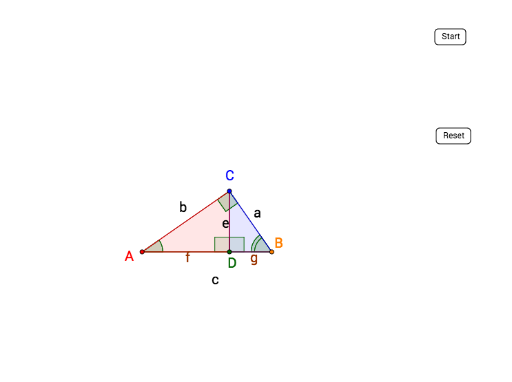
①This example demonstrates the relationship between two similar right triangles through an animated visualization, using transformations such as translation and rotation to dynamically show corresponding sides and angles. ②Core mathematical concepts include similar triangles, right triangles, proportional corresponding sides, equal corresponding angles, and geometric transformations (translation, rotation, reflection) affecting position and shape. ③Construction highlights: Based on the construction summary, GeoGebra commands such as Line, Intersect, OrthogonalLine, Segment, Polygon, Ray, Vector, Translate, Angle, AngularBisector, Rotate, Midpoint, and Mirror are used to create multiple triangles (poly1, poly2) and their transformed copies (poly1', poly2'), with sliders or animation controlling the transformation to illustrate similarity ratios and correspondences. ④Suitable for middle or high school students learning the criteria and properties of similar triangles, and as a dynamic teaching aid for geometric transformations, helping learners visually grasp the essence of similar figures.
GeoGebra Commands & Parameters
Line(PP, C) → a_1Intersect(a_1, xAxis) → AOrthogonalLine(C, a_1) → b_1Intersect(b_1, xAxis) → BSegment(C, A) → bSegment(C, B) → aSegment(A, B) → cOrthogonalLine(C, c) → dIntersect(d, c) → D_1Segment(C, D_1) → ePolygon(C, D_1, B) → poly1, b_2, c_1, d_1Polygon(C, D_1, A) → poly2, a_2, c_2, d_2Ray(A, C) → fRay(A, B) → gRay(C, B) → hVector(A, C') → uTranslate(C, u) → C'_1Translate(D_1, u) → D'Translate(A, u) → A'Polygon(C'_1, D', A') → poly2', a', c'_1, d'Vector(C, B') → vTranslate(C, v) → C'_2Translate(D_1, v) → D'_1Translate(B, v) → B'_1Polygon(C'_2, D'_1, B'_1) → poly1', b'_1, c'_2, d'_1Polygon(A, C, B) → poly3, b_3, a_3, c_3Vector(A, AA) → wTranslate(A, w) → A'_1Translate(C, w) → C'_3Translate(B, w) → B'_2Polygon(A'_1, C'_3, B'_2) → poly3', b'_2, a'_1, c'_3Angle(A'_1, C'_3, B'_2) → αAngle(B'_2, A'_1, C'_3) → βAngle(C'_3, B'_2, A'_1) → γAngle(C, B, A) → δAngularBisector(A', C'_1, D') → jAngularBisector(C'_1, D', A') → kIntersect(j, k) → ERotate(C'_1, (n * (180° - β)), E) → FRotate(D', (n * (180° - β)), E) → D''Rotate(A', (n * (180° - β)), E) → A''Polygon(F, D'', A'') → poly2'', a'', f_1, d''AngularBisector(D'_1, C'_2, B'_1) → lAngularBisector(C'_2, B'_1, D'_1) → mIntersect(l, m) → GAngle(A'_1, B, C) → εRotate(C'_2, (-((n * ε))), G) → HRotate(D'_1, (-((n * ε))), G) → DRotate(B'_1, (-((n * ε))), G) → JPolygon(H, D, J) → poly1'', j_1, h_1, i_1Midpoint(d'') → IMidpoint(i_1) → KOrthogonalLine(I, d'') → pOrthogonalLine(K, i_1) → qMirror(F, p) → F'Mirror(D'', p) → D'''Mirror(A'', p) → A'''Polygon(F', D''', A''') → poly2''', a''', f', d'''Mirror(H, q) → H'Mirror(D, q) → D'_2Mirror(J, q) → J'Polygon(H', D'_2, J') → poly1''', j', h', d'_2Angle(A, C, B) → ζAngle(C'_1, D', A') → ηAngle(B'_1, D'_1, C'_2) → θAngle(D_1, A, C) → ιAngle(D', A', C'_1) → κSegment(A, D_1) → rSegment(D_1, B) → sAngle(D'', A'', F) → λAngle(F, D'', A'') → μAngle(C, D_1, A) → νAngle(B, D_1, C) → ξAngle(A''', D''', F') → οAngle(F', A''', D''') → ρAngle(C'_2, B'_1, D'_1) → σAngle(J, D, H) → τAngle(H, J, D) → υAngle(H', D'_2, J') → ϕAngle(D'_2, J', H') → χ
AI Drawing Prompt Reference
Create an animated diagram showing two similar right triangles. Start with a horizontal baseline and construct a right triangle with its right angle at a point on the baseline, then draw the altitude to the hypotenuse to form two smaller right triangles. Translate one of these triangles to a new position, then rotate it about its incenter so that corresponding sides remain parallel and proportional. Translate the other triangle similarly and rotate it to keep corresponding angles equal. Use distinct colors for original and transformed triangles, and label the angles to show equality. Include a slider to control the rotation angle, visually demonstrating the proportional side ratios of similar triangles.
The prompt above was compiled from the original drawing commands and is for reference only.