
Dynamic Isosceles Triangle with Adjustable Apex Angle
Loading the math board and drawing, please wait…
In collections
Introduction to Geometry
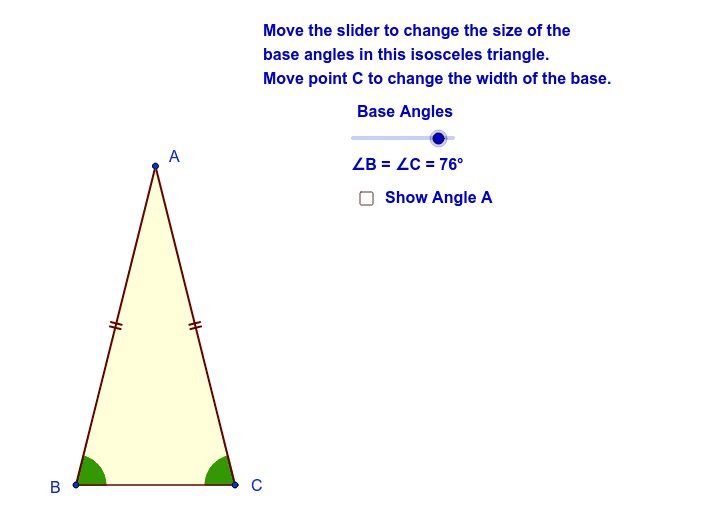
① This GeoGebra example demonstrates an isosceles triangle where the apex angle can be changed interactively while the triangle remains isosceles. ② Core math concepts include the definition and properties of isosceles triangles: equal legs, equal base angles, and the relationship between the apex angle and base angles. ③ Construction details: uses Point to define vertices, Rotate to generate symmetric points, Angle to measure angles, Line and Intersect to construct sides and intersections, and Polygon to form the triangle; objects include angles α, β, δ, ε, points A, B, C, D', E', segments a, b, c, d, e, polygon poly2, and multiple text labels. ④ Suitable for middle school geometry lessons to explore triangle properties dynamically, and as an introductory example for dynamic geometry software.
GeoGebra Commands & Parameters
Point(xAxis) → BPoint(xAxis) → CRotate(C, Angles, B) → E'Angle(C, B, E') → δRotate(B, -Angles, C) → D'Angle(D', C, B) → εLine(B, E') → dLine(C, D') → eIntersect(d, e) → APolygon(A, B, C) → poly2, c, a, bAngle(B, A, C) → α
AI Drawing Prompt Reference
Draw an isosceles triangle with an adjustable apex angle. Start by creating points B and C on the x-axis, then rotate C around B to generate point E', and measure angle ∠CBE' as δ. Next, rotate B around C to generate point D', and measure angle ∠DCB as ε. Draw line d through B and E', and line e through C and D'. The intersection of d and e is point A, the apex of the triangle. Finally, connect points A, B, and C to form the isosceles triangle, and label the apex angle as α.
The prompt above was compiled from the original drawing commands and is for reference only.