
Supplementary and Adjacent Angles
Loading the math board and drawing, please wait…
In collections
Besondere Winkelpaare
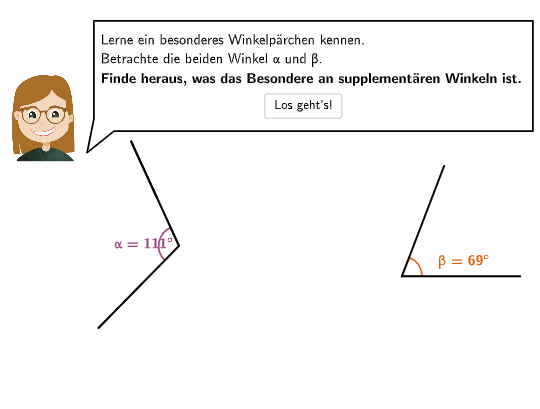
This example demonstrates the geometric relationship between supplementary and adjacent angles. Key math concepts include the definition of supplementary angles (sum of two angles is 180°), the definition of adjacent angles (share a vertex and one side), and angle size comparison. GeoGebra commands/objects used in construction: SpeechBubbleLeft, Circle, Point, Segment, OrthogonalLine, Intersect, Mirror, Arc, Angle, Vector, Rotate, Translate, SelectedIndex, CircleArc, Textfield. Suitable for 5-6th grade students to learn and understand angle classification, supplementary angles, and adjacent angles.
GeoGebra Commands & Parameters
SpeechBubbleLeft(PBubble - (0, 1), 12.4, 2.9) → poly1SpeechBubbleLeft(PBubble + (0, 0.55), 11, 1.3) → poly2SpeechBubbleLeft(PBubble, 5, 1) → poly3Circle(A, 3.4) → cPoint(c) → BSegment(A, B) → s11OrthogonalLine(A, s11) → perpLineIntersect(c, perpLine, 2) → MCOMMirror(B, A) → MSUPArc(c, B, MSUP) → supplArcPoint(supplArc) → B'Angle(B, A, B') → αSegment(A, B') → s12Circle(A, 2.3) → cExtMirror(B, cExt) → B'_{2}Segment(B, B'_{2}) → sv11Mirror(B', cExt) → B''_{1}Segment(B', B''_{1}) → sv12Vector(C, V) → uRotate(D, 180° - α, C) → D'Segment(C, D) → s21Segment(C, D') → s22Vector(A, V) → vTranslate(A, Vector[(transSli1 * v)]) → A'Translate(D', Vector[(transSli2 * u)]) → D''Translate(B, Vector[(transSli1 * v)]) → B'_{1}Angle(D'', V, B'_{1}) → angRotate(A', (rotAng * rotSli), V) → A''Translate(A, Vector[(transSli1 * v)]) → A'_{1}Translate(B', Vector[(transSli1 * v)]) → B''Rotate(B'', (rotAng * rotSli), V) → B'''Translate(B', Vector[(transSli1 * u)]) → B''_{2}Translate(B', Vector[(transSli1 * v)]) → B''_{3}Translate(B, Vector[(transSli1 * u)]) → B'_{3}Translate(B, Vector[(transSli1 * v)]) → B'_4Rotate(B, α - 15°, A) → BFTranslate(C, u) → C'Translate(C, u) → C'_{1}Translate(C, Vector[(transSli2 * u)]) → C'_{2}Translate(C, Vector[(transSli2 * u)]) → C'_{3}Translate(D, Vector[(transSli2 * u)]) → D'_{1}Point(s11) → EPoint(s21) → FRotate(A'_{1}, (rotAng * rotSli), V) → GRotate(B'_{1}, (rotAng * rotSli), V) → HRotate(B'_4, (rotAng * rotSli), V) → SRotate(B''_{3}, (rotAng * rotSli), V) → TSegment(G, H) → s11''Segment(A'', B''') → s12''Segment(C'_{2}, D'_{1}) → s21'Segment(C'_{3}, D'') → s22'Angle(D'_{1}, C'_{2}, D'') → βAngle(H, A', B''') → α'Angle(D'_{1} + (2, 0), A', B''' - (2, 0)) → γSelectedIndex(dropdown) → indexCircleArc(A', D'_{1} - (0.4, 0), B''') → dPoint(d) → arrowCirclePointSegment(A', arrowCirclePoint) → segCircleArc(A', D'_{1} - (0.23, 0), B''') → eMirror(arrowCirclePoint, e) → I'Segment(arrowCirclePoint, I') → seg2Angle(I', A', B''') → α''Angle(D'_{1}, A', I') → β'SpeechBubbleLeft(PBubble, 12.4, 1.9) → poly1_1Textfield(input1) → InputBox1Segment(arrowCircleMidpoint + (Distance[arrowCircleMidpoint, arrowCirclePoint] * (cos(Angle[arrowCircleMidpoint + (1, 0), arrowCircleMidpoint, arrowCirclePoint] + arrowCircleDistance + arrowCircleAngle), sin(Angle[arrowCircleMidpoint + (1, 0), arrowCircleMidpoint, arrowCirclePoint] + arrowCircleDistance + arrowCircleAngle))), arrowCircleMidpoint + (Distance[arrowCircleMidpoint, arrowCirclePoint] * (cos(Angle[arrowCircleMidpoint + (1, 0), arrowCircleMidpoint, arrowCirclePoint] + arrowCircleDistance + arrowCircleAngle), sin(Angle[arrowCircleMidpoint + (1, 0), arrowCircleMidpoint, arrowCirclePoint] + arrowCircleDistance + arrowCircleAngle))) + (arrowCircleLength * UnitOrthogonalVector[Vector[arrowCircleMidpoint, arrowCircleMidpoint + (Distance[arrowCircleMidpoint, arrowCirclePoint] * (cos(Angle[arrowCircleMidpoint + (1, 0), arrowCircleMidpoint, arrowCirclePoint] + arrowCircleDistance + arrowCircleAngle), sin(Angle[arrowCircleMidpoint + (1, 0), arrowCircleMidpoint, arrowCirclePoint] + arrowCircleDistance + arrowCircleAngle)))]])) → fSegment(arrowCircleMidpoint + (Distance[arrowCircleMidpoint, arrowCirclePoint] * (cos(Angle[arrowCircleMidpoint + (1, 0), arrowCircleMidpoint, arrowCirclePoint] - arrowCircleDistance - arrowCircleAngle), sin(Angle[arrowCircleMidpoint + (1, 0), arrowCircleMidpoint, arrowCirclePoint] - arrowCircleDistance - arrowCircleAngle))), arrowCircleMidpoint + (Distance[arrowCircleMidpoint, arrowCirclePoint] * (cos(Angle[arrowCircleMidpoint + (1, 0), arrowCircleMidpoint, arrowCirclePoint] - arrowCircleDistance - arrowCircleAngle), sin(Angle[arrowCircleMidpoint + (1, 0), arrowCircleMidpoint, arrowCirclePoint] - arrowCircleDistance - arrowCircleAngle))) - (arrowCircleLength * UnitOrthogonalVector[Vector[arrowCircleMidpoint, arrowCircleMidpoint + (Distance[arrowCircleMidpoint, arrowCirclePoint] * (cos(Angle[arrowCircleMidpoint + (1, 0), arrowCircleMidpoint, arrowCirclePoint] - arrowCircleDistance - arrowCircleAngle), sin(Angle[arrowCircleMidpoint + (1, 0), arrowCircleMidpoint, arrowCirclePoint] - arrowCircleDistance - arrowCircleAngle)))]])) → g
AI Drawing Prompt Reference
Create a geometric figure showing supplementary and adjacent angles: Draw a large circle and pick a point on it as the vertex, draw a line segment from the vertex to another point on the circle, then draw a perpendicular line through the vertex to intersect the circle at another point. Mirror the second point on the circle across the vertex to create a supplementary angle, draw the arc between these points and mark the angle. Inside the large circle, draw a smaller concentric circle and mirror points on the large circle across the small circle to create corresponding points. Translate some points using vectors and rotate certain points, then connect relevant points with line segments to demonstrate various positional relationships of supplementary and adjacent angles. Include multiple speech bubbles to label angle information and explanatory text.
The prompt above was compiled from the original drawing commands and is for reference only.