
Interactive Practice: Calculating the Area of a Parallelogram
Loading the math board and drawing, please wait…
In collections
Parallelogramm und Raute: Flächeninhalt
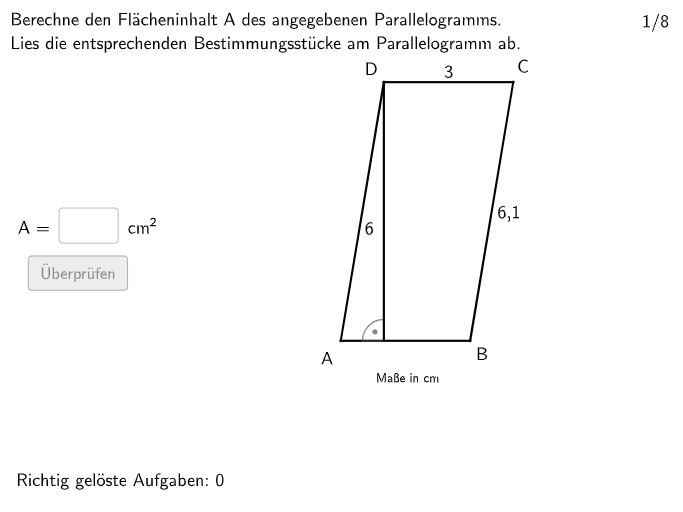
This GeoGebra example demonstrates how to calculate the area of a parallelogram through an interactive exercise. It focuses on the core mathematical concept of the parallelogram area formula (base times height) and its application to special quadrilaterals such as parallelograms, trapezoids, kites, and rhombi. The construction uses GeoGebra commands including Polygon to create the parallelogram, OrthogonalLine and Intersect to construct the height, Text and InputBox for user input and feedback, Shuffle and Rotate to randomize problem variations, If and Join for logical control, Circle and Angle for visual aids, and buttons like validate, showanswer, and showSolution to enable interactive checking. Suitable for students in grades 5-6 or early secondary school, this resource supports classroom practice and self-study, enhancing skills in applying and justifying area formulas.
GeoGebra Commands & Parameters
Textfield(input1) → InputBox1Textfield(input2) → InputBox2Shuffle({1, 2}) → ModusList, {1, 2}Shuffle(Sequence[i, i, 24, round((rad2 * 10))]) → Rad1List, {28, 25, 27, 24, 29, 26}Shuffle(Sequence[i, i, 1, 360]) → GradList, {295, 23, 288, 341, 194, 244, 24, 66, 308, 9, 274, 114, 214, 85, 35, 163, 178, 104, 47, 28, 128, 200, 105, 147, 316, 205, 6, 14, 172, 154, 267, 329, 249, 275, 179, 65, 42, 25, 73, 40, 79, 141, 33, 121, 313, 58, 253, 76, 211, 353, 266, 348, 224, 238, 113, 270, 101, 213, 86, 8, 248, 60, 228, 227, 340, 100, 212, 160, 44, 107, 115, 124, 317, 109, 90, 321, 27, 166, 272, 180, 309, 171, 280, 68, 239, 48, 284, 277, 129, 273, 196, 336, 217, 89, 318, 127, 332, 43, 246, 207, 258, 161, 83, 291, 243, 97, 12, 1, 360, 136, 328, 36, 330, 257, 55, 91, 279, 22, 235, 310, 87, 131, 138, 315, 61, 165, 93, 110, 38, 153, 236, 146, 53, 4, 148, 123, 116, 223, 289, 149, 201, 222, 209, 345, 290, 281, 255, 169, 301, 287, 184, 269, 69, 16, 202, 74, 314, 350, 240, 334, 215, 19, 234, 210, 191, 271, 198, 241, 164, 352, 5, 260, 117, 219, 188, 199, 15, 218, 263, 185, 286, 99, 343, 59, 133, 84, 338, 142, 344, 135, 203, 7, 285, 168, 134, 54, 21, 333, 92, 29, 187, 111, 259, 119, 226, 34, 11, 307, 37, 158, 331, 192, 102, 78, 220, 355, 346, 167, 319, 103, 3, 262, 189, 32, 72, 88, 195, 276, 62, 296, 322, 304, 51, 326, 155, 337, 177, 294, 323, 354, 251, 13, 170, 339, 264, 306, 325, 144, 186, 45, 122, 181, 256, 342, 10, 298, 293, 81, 230, 156, 75, 98, 204, 96, 80, 299, 2, 265, 94, 193, 31, 250, 311, 162, 173, 26, 175, 229, 245, 237, 283, 182, 358, 71, 312, 190, 225, 64, 139, 356, 30, 359, 126, 18, 49, 320, 125, 159, 140, 302, 347, 176, 118, 305, 268, 41, 206, 233, 70, 132, 143, 232, 52, 82, 261, 17, 208, 216, 120, 108, 67, 50, 57, 297, 197, 231, 335, 300, 351, 221, 183, 252, 150, 292, 95, 46, 77, 157, 278, 357, 247, 152, 56, 39, 63, 145, 137, 106, 327, 242, 20, 349, 303, 130, 282, 174, 324, 254, 151, 112}Rotate(DrehAnchor, grad°, M) → AShuffle(Join[{Sequence[i, i, 30, 40], Sequence[i, i, 75, 85]}]) → GradList2, {38, 33, 30, 82, 40, 31, 76, 80, 85, 37, 77, 78, 81, 34, 39, 79, 75, 36, 35, 84, 83, 32}Rotate(M, grad2°, A) → DRotate(M, grad2°, C) → B_{1}Polygon(B_{1}, C, D, A) → v1, m'_{1}, c_1, m', aOrthogonalLine(D, a) → fOrthogonalLine(D, m'_{1}) → gOrthogonalLine(C, a) → hOrthogonalLine(C, m') → iIntersect(h, a) → HöheaCPIntersect(i, m') → HöhebCPIntersect(g, m'_{1}) → HöhebDPIntersect(a, f) → HöheaDPIf(modus ≟ 1 ∧ Defined[Hoehea(1)], Length[Hoehea(1)], modus ≟ 1 ∧ (¬Defined[Hoehea(1)]), Length[Hoehea(2)], modus ≟ 2 ∧ Defined[Hoeheb(1)], Length[Hoeheb(1)], modus ≟ 2 ∧ (¬Defined[Hoeheb(1)]), Length[Hoeheb(2)]) → hwertrawShuffle(1…8) → ExNumList, {7, 1, 5, 2, 3, 8, 4, 6}Join({{2, 8}, ExNumList \ {2, 8}}) → ExNumListRealIf(exNum ∈ {1, 2, 7, 8}, (Angabea * Angabeh), (Angabeb * Angabeh)) → solPolygon(PtopLeftCornerFeedback, PtopRightCornerFeedback, PbottomRightCornerFeedback, PbottomLeftCornerFeedback) → rectangleCorrect, rectangleCorrectS3, rectangleCorrectS4, rectangleCorrectS2, rectangleCorrectS1Shuffle(Sequence[Random[0, 10], i, 1, 100]) → randomNosForX, {7, 6, 9, 4, 8, 2, 9, 3, 2, 9, 0, 8, 8, 5, 7, 5, 1, 0, 4, 3, 10, 3, 5, 5, 1, 5, 2, 9, 8, 5, 1, 4, 5, 0, 3, 0, 8, 7, 1, 2, 5, 6, 3, 4, 10, 2, 9, 5, 3, 8, 0, 6, 4, 6, 10, 7, 0, 8, 10, 10, 10, 8, 8, 4, 0, 6, 9, 4, 10, 2, 7, 3, 1, 4, 8, 7, 7, 10, 3, 1, 1, 5, 4, 8, 4, 5, 6, 10, 7, 9, 5, 8, 2, 5, 1, 6, 1, 4, 1, 6}Element(randomNosForX, Mod[questionCount, 100] + 1) → numXShuffle(Sequence[Random[0, 10], i, 1, 100]) → randomNosForY, {4, 1, 8, 5, 6, 0, 9, 8, 7, 3, 6, 8, 5, 5, 2, 1, 7, 3, 4, 3, 1, 10, 4, 7, 10, 9, 6, 3, 1, 8, 2, 0, 6, 2, 6, 6, 4, 4, 8, 2, 1, 0, 1, 5, 9, 0, 4, 9, 8, 0, 6, 6, 0, 6, 9, 4, 7, 3, 10, 2, 9, 8, 1, 3, 3, 0, 2, 1, 2, 10, 7, 0, 0, 0, 2, 0, 1, 1, 2, 4, 3, 7, 3, 8, 1, 9, 3, 6, 10, 6, 8, 8, 4, 5, 2, 9, 9, 1, 8, 0}Element(randomNosForY, Mod[questionCount, 100] + 1) → numYAppend(true, Sequence[If[randomNosForX(i) ≟ randomNosForX(i - 1), false, true], i, 2, 100]) → stayXAppend(true, Sequence[If[randomNosForY(i) ≟ randomNosForY(i - 1), false, true], i, 2, 100]) → stayYRemove(Sequence[If[stayX(i), randomNosForX(i), 0], i, 1, 100], Sequence[0, i, 1, 100]) → randomNosForXwithoutRepeatRemove(Sequence[If[stayY(i), randomNosForY(i), 0], i, 1, 100], Sequence[0, i, 1, 100]) → randomNosForYwithoutRepeatElement(randomNosForXwithoutRepeat, Mod[questionCount, Length[randomNosForXwithoutRepeat]] + 1) → numXwithoutRepeatElement(randomNosForYwithoutRepeat, Mod[questionCount, Length[randomNosForYwithoutRepeat]] + 1) → numYwithoutRepeatDefined(input1) → fixedCircle(M, rad2) → cCircle(M, rad1) → dAngle(M, A, D) → αAngle(M, C, B_{1}) → βText("\textsf{A}", F, false, true, 0, 0) → Text2Text("\textsf{B}", G, false, true, 0, 0) → Text3Text("\textsf{C}", E, false, true, 0, 0) → Text4Text("\textsf{D}", H, false, true, 0, 0) → Text5If(Defined[Segment[HöheaCP, C]], Midpoint[Segment[HöheaCP, C]], Midpoint[Segment[HöheaDP, D]]) → BeschhaIf(Defined[Segment[HöhebCP, C]], Midpoint[Segment[HöhebCP, C]], Midpoint[Segment[HöhebDP, D]]) → BeschhbText(Beschh, If[modus ≟ 1, J, I], false, true, 0, 0) → Text6If(modus ≟ 1, (awert * hwert), (bwert * hwert)) → solwertAngle(C, HöhebCP, D) → γAngle(D, HöheaDP, A) → δAngle(D, HöhebDP, B_{1}) → εAngle(C, HöheaCP, A) → ζRotate(ParaPB, alphakonst°, ParaPA) → L'Circle(ParaPA, bkonst) → eRay(ParaPA, L') → jIntersect(e, j) → ParaPD,If(x(ParaPA) < x(ParaPD), (x(ParaPD), y(ParaPA)), (x(ParaPA), y(ParaPD))) → ParaPHelper1Angle(ParaPB, ParaPA, ParaPHelper1) → ηAngle(ParaPD, ParaPHelper1, ParaPA) → θIf(x(ParaPD) < x(ParaPA), Segment[ParaPA, ParaPHelper1], Segment[ParaPD, ParaPHelper1]) → hoeheaSegment(ParaPA, ParaPD) → kOrthogonalLine(ParaPA, k) → lSegment(ParaPB, ParaPC) → mOrthogonalLine(ParaPB, m) → nIf(Defined[Intersect[l, Ray[ParaPB, ParaPC]]], Intersect[l, Ray[ParaPB, ParaPC]], Intersect[n, Segment[ParaPD, ParaPA]]) → ParaPHelper2If(Defined[Intersect[l, Ray[ParaPB, ParaPC]]], Segment[ParaPA, ParaPHelper2], Segment[ParaPB, ParaPHelper2]) → hoehebAngle(ParaPB, ParaPHelper2, ParaPD) → williwinglAngle(ParaPA, ParaPHelper2, ParaPB) → κMidpoint(ParaPA, ParaPB) → NMidpoint(ParaPC, ParaPB) → OMidpoint(ParaPA, ParaPD) → PMidpoint(ParaPD, ParaPC) → QText(Text9, R, false, true, 0, 0) → Text11Text(Text9, U, false, true, 0, 0) → Text12Text(Text10, S, false, true, 0, 0) → Text13Text(Text10, T, false, true, 0, 0) → Text14Midpoint(ParaPA, ParaPB) → VIf(exNum ∈ {1, 2, 7, 8}, Segment[ParaPD, ParaPC], Segment[ParaPB, ParaPC]) → HintStrecke
AI Drawing Prompt Reference
Draw a quadrilateral in the plane formed by four points, arranged as a parallelogram so that opposite sides are parallel and the figure can vary by rotating one side about a pivot. Construct the height by dropping perpendicular lines from appropriate vertices to the opposite sides, then mark the foot points and form the segment that represents the height. Add angle indicators at the key vertex regions between the base direction and the lines used for the height. Label the four vertices with simple text, and include input/feedback text areas for the user to enter lengths (base and height) and to show a computed solution or confirmation. Provide the diagram in two possible configuration modes by switching the correspondence used for the height construction.
The prompt above was compiled from the original drawing commands and is for reference only.