
Area of a Trapezoid (3): Dynamic Construction and Formula Derivation
Loading the math board and drawing, please wait…
In collections
Perimeter & Area
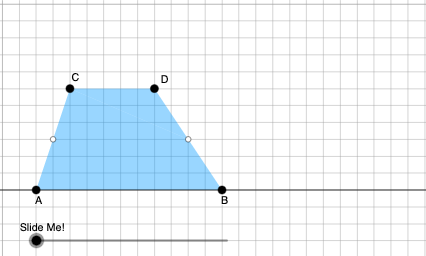
① This GeoGebra example dynamically demonstrates the derivation of the trapezoid area formula by transforming the trapezoid into a shape with known area using auxiliary lines, rotations, and translations. ② Core mathematical concepts include the trapezoid area formula, polygon area, geometric transformations (rotation, translation, dilation), and area conservation, with extensions to fractions, exponential functions, and combinatorics. ③ Construction highlights: using Point and Polygon to define vertices, OrthogonalLine and Intersect to create heights and intersection points, Dilate and Rotate for transformations, Midpoint, Segment, Vector, and Translate for auxiliary constructions, and If with Angle for dynamic conditions. Multiple objects (A, B, C, D, F', D', etc.) interact to visualize the area relationship. ④ Suitable for middle and high school students, ideal for geometry area lessons, dynamic exploration, and as a reference for teachers creating interactive materials.
GeoGebra Commands & Parameters
Point(Ray[A, A + (1, 0)]) → BPointIn(d) → CPolygon(A, B, C) → t1, f, a, bOrthogonalLine(C, g) → hIntersect(g, h) → C_{1}Point(Ray[C, C + (1, 0)]) → DDilate(C, If[0 < c ≤ 1, 1 - c, 0], D) → F'Dilate(D, If[1 < c ≤ 2, 2 - c, 0], C_{1}) → D'Rotate(C, If[2 < c ≤ 3, ((c - 2) * π), π], D) → F'_{1}Rotate(F', If[2 < c ≤ 3, ((c - 2) * π), π], D) → F''Angle(C, B, A) → βAngle(B, A, C) → γIf(γ ≟ π / 2, 12, 16) → oMidpoint(B, D) → EPolygon(A, B, E, C) → q1, a_1, b_1, e, c_1Polygon(E, D, C) → t2, c_2, e_1, d_1Dilate(D, If[0 < c ≤ 1, 1 - c, 0], E) → D'_{1}Segment(D, D'_{1}) → iRotate(D, If[1 < c ≤ 2, ((-(c - 1)) * π), (-π)], E) → D'_{2}Rotate(D'_{1}, If[1 < c ≤ 2, ((c - 1) * π), π], E) → FSegment(D'_{2}, F) → i'Segment(C, D) → jSegment(A, C) → kDilate(C, If[2 < c ≤ 3, 3 - c, 0], E) → C'Segment(C, C') → lRotate(E, If[4 < c ≤ 5, ((-(c - 4)) * π), (-π)], E) → E'Rotate(D, If[4 < c ≤ 5, ((-(c - 4)) * π), (-π)], E) → D'_{3}Rotate(C, If[4 < c ≤ 5, ((-(c - 4)) * π), (-π)], E) → C'_{1}Polygon(E', D'_{3}, C'_{1}) → t2', c'_{1}, e', d'_{3}Segment(C'_{1}, D'_{3}) → mSegment(D'_{3}, E) → nSegment(C'_{1}, E) → pAngle(E, C'_{1}, D'_{3}) → αOrthogonalLine(C, g) → qIntersect(g, q) → GMidpoint(C, G) → HDilate(C, If[6 < c ≤ 7, 7 - c, 0], H) → C'_{2}Segment(C, C'_{2}) → rDilate(H, If[7 < c ≤ 8, 8 - c, 0], G) → H'Segment(H, H') → sRotate(C, If[8 < c ≤ 9, ((-(c - 8)) * π), (-π)], H) → C'_{3}Rotate(C'_{2}, If[8 < c ≤ 9, ((-(c - 8)) * π), (-π)], H) → ISegment(C'_{3}, I) → r'Midpoint(k) → JDilate(E, If[9 < c ≤ 10, 10 - c, 0], H) → E'_{1}Dilate(J, If[9 < c ≤ 10, 10 - c, 0], H) → J'Segment(J, J') → tSegment(E, E'_{1}) → f_1Polygon(A, C'_{1}, E, J) → q2, a_2, g_1, e_2, j_1Polygon(E, C, J) → t3, j_2, e_3, c_3Rotate(E, If[11 < c ≤ 12, ((-(c - 11)) * π), (-π)], E) → E'_{2}Rotate(C, If[11 < c ≤ 12, ((-(c - 11)) * π), (-π)], E) → C'_{4}Rotate(J, If[11 < c ≤ 12, ((-(c - 11)) * π), (-π)], E) → J'_{1}Polygon(E'_{2}, C'_{4}, J'_{1}) → t3', j'_{1}, e'_{2}, c'_{4}Segment(J'_{1}, C'_{4}) → h_1Segment(C'_{4}, E) → i_1Segment(E, J'_{1}) → k_1Segment(A, J) → l_1Segment(J, C) → m_1OrthogonalLine(C'_{1}, g) → n_1Intersect(n_1, p_1) → KOrthogonalLine(J'_{1}, g) → q_1Intersect(q_1, g) → LDilate(J'_{1}, If[13 < c ≤ 14, 14 - c, 0], L) → MSegment(J'_{1}, M) → r_1Dilate(C'_{1}, If[13 < c ≤ 14, 14 - c, 0], K) → NSegment(C'_{1}, N) → s_1Polygon(A, L, J'_{1}, J) → q3, a_3, l_2, t_1, j_3Polygon(L, C'_{1}, J'_{1}) → t4, f_2, l_3, g_2Dilate(J'_{1}, If[15 < c ≤ 16, 16 - c, 0], J) → OVector(J'_{1}, O) → uTranslate(L, u) → L'Translate(C'_{1}, u) → PTranslate(J'_{1}, u) → QPolygon(L', P, Q) → t4', q_2, l', p_2Segment(P, O) → h_2Segment(O, L') → i_2Polygon(A, C'_{1}, K, J) → q4, a_4, k_2, k_3, j_4Polygon(C'_{1}, J'_{1}, K) → t5, k_4, m_2, n_2Translate(C'_{1}, u) → RTranslate(J'_{1}, u) → STranslate(K, u) → K'Polygon(R, S, K') → t5', k', r_2, s_2Segment(R, Q) → t_2Segment(R, K') → b_2
AI Drawing Prompt Reference
Create a dynamic geometry figure demonstrating the derivation of trapezoid area formula. Start with points A, B, C forming a trapezoid with base AB and vertex C, then draw the altitude from C to base AB. Mark the midpoint E of base AB and connect CE to split the trapezoid into two triangles. Use a slider to control step-by-step animation: first showing the trapezoid division, then transforming the trapezoid into a rectangle through rotation and translation, followed by angle rotation demonstrations, then more rotations, and finally additional constructions including midpoints and perpendicular bisectors. Include the original trapezoid, divided polygons, multiple dynamic points during transformation, and connecting line segments to visually show area conservation.
The prompt above was compiled from the original drawing commands and is for reference only.