
Setting Angles with a Set Square: Estimate and Verify
Loading the math board and drawing, please wait…
In collections
Wiederholung Winkel: Bezeichnung, Arten, Messen & Zeichnen
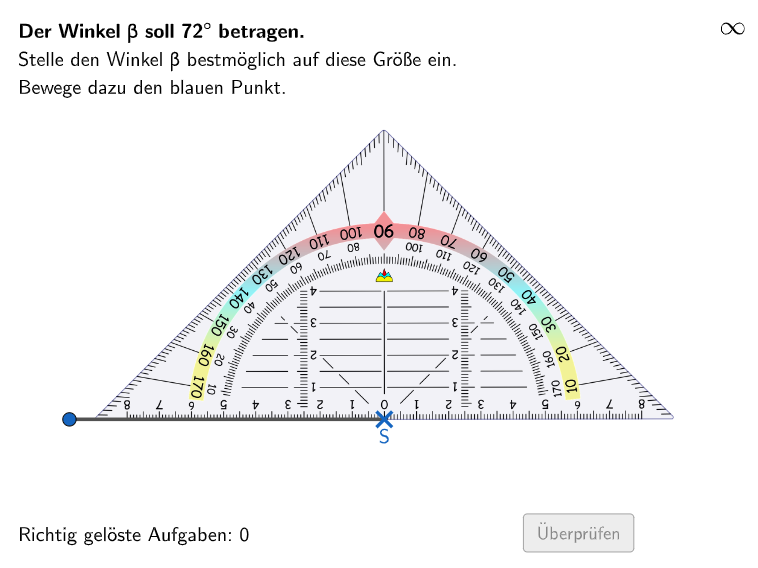
This interactive GeoGebra example demonstrates how to adjust a virtual set square (geodreieck) to match a randomly generated target angle, providing immediate feedback on the accuracy of the estimate. The core mathematical concept is angle measurement, estimation, and comparison, covering acute, right, and obtuse angles. The construction uses a variety of GeoGebra commands including Mirror, Random, CircleArc, Point, Angle, Ray, Line, Textfield, Polygon, Segment, Vector, Translate, and Rotate, creating interactive elements such as the draggable set square, random target angle (winkel), input fields, and validation buttons (btnValidate) that control answer checking and new problem generation. This resource is designed for students in grades 5-6 to develop intuitive understanding of angle sizes and estimation skills, suitable for classroom practice or independent learning.
GeoGebra Commands & Parameters
Mirror(B, E) → B'Random(1, 2) → winkelWahlCircleArc(E, B, B') → cPoint(c) → IPoint(c) → AAngle(B, E, A) → γAngle(I, E, B') → δRay(E, F) → hPoint(h) → GLine(G, B) → iTextfield(aInput) → InputBox1Textfield(bInput) → InputBox2Polygon(PtopLeftCornerFeedback, PtopRightCornerFeedback, PbottomRightCornerFeedback, PbottomLeftCornerFeedback) → rectangleCorrect, ptopleftcornerfeedback, ptoprightcornerfeedback, pbottomrightcornerfeedback, pbottomleftcornerfeedbackSegment(E, B) → fVector(E, G) → uTranslate(pic1, u) → pic1'Line(E, B) → gSegment(A, E) → jSegment(E, B') → kSegment(I, E) → lRotate(B', (-winkel), E) → B''Angle(B'', E, B') → αSegment(H, B'') → mRotate(B, winkel, H) → B'_{1}Angle(B, H, B'_{1}) → βSegment(H, B'_{1}) → nSegment(E, B') → lösSegment(E, B) → p
AI Drawing Prompt Reference
Create an instructional geometry figure for estimating and checking angles. Place a key vertex E, then draw rays forming a target angle γ determined by points B and A with respect to E, and another angle δ determined by points I, B′, and E. Construct B′ as the mirror of B across points B and E, then draw a circular arc through E using B and B′ and use the arc to place point I. Use line and segment elements connected to E and an additional point G to suggest a set-square-like guide, including a rotatable arm that can be turned about E so the adjusted angle α is created between B″ and B′. Reserve space below for two numeric input fields and for a validate/submit and new-problem control.
The prompt above was compiled from the original drawing commands and is for reference only.