
Explore Similar Right Triangles with Multiple Side Lengths
Loading the math board and drawing, please wait…
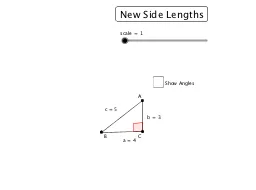
This interactive GeoGebra example dynamically demonstrates how corresponding side lengths in similar right triangles remain proportional. By adjusting a scale slider or side length controls, users can observe multiple similar right triangles with varying sizes while verifying that the ratios of corresponding sides stay constant. Core mathematical concepts include similarity criteria for triangles, proportional reasoning, the Pythagorean theorem, and right-triangle side relationships. The construction uses GeoGebra commands such as If, Point, Segment, Circle, Intersect, Polygon, and Angle, along with a scale slider and a toggle button to display alternative side lengths. Suitable for middle-to-high school students learning geometry, this resource supports inquiry-based exploration of similarity and ratio concepts in a dynamic visual environment.
GeoGebra Commands & Parameters
If(side_1 ≟ 3, 4, If[side_1 ≟ 2.5, 6, If[side_1 ≟ 4, 7.5, If[side_1 ≟ 1.75, 6, If[side_1 ≟ 9 / 5, 8, If[side_1 ≟ 12 / 5, 7, If[side_1 ≟ 11 / 5, 12, If[side_1 ≟ 16 / 5, 63 / 5]]]]]]]) → side_2Point(Circle[A, (side_1 * scale)]) → CSegment(A, C) → fCircle(A, (side_3 * scale)) → dCircle(C, (side_2 * scale)) → c_2Intersect(c_2, d, 2) → BPolygon(A, C, B) → poly1, b, a, cAngle(B, C, A) → αAngle(C, B, A) → βAngle(B, A, C) → γ