
Solving Similar Triangles Interactive Demo
Loading the math board and drawing, please wait…
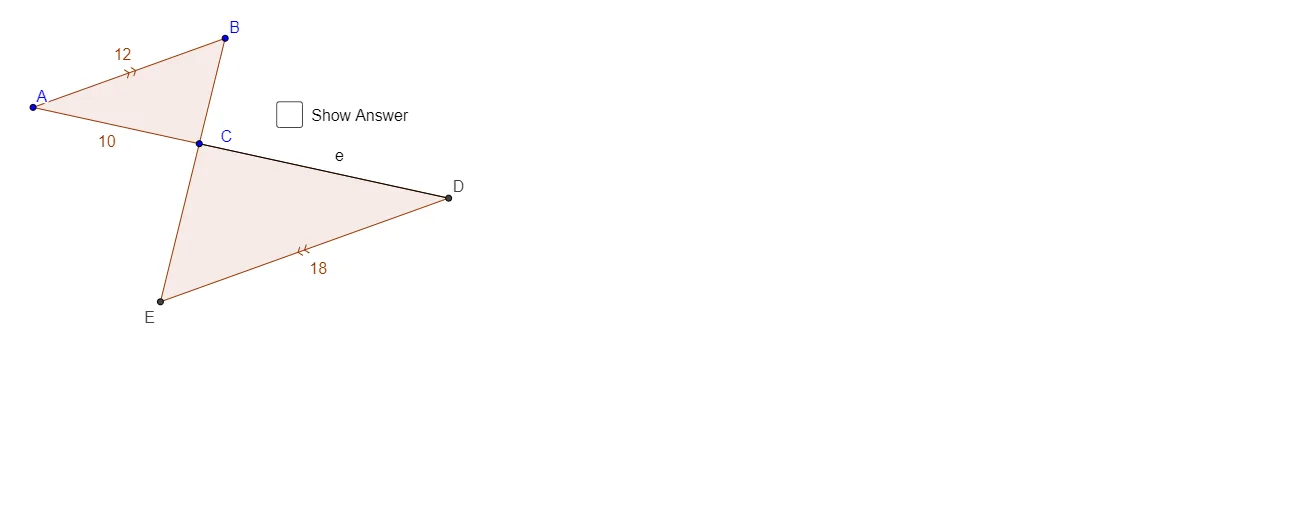
This GeoGebra example demonstrates solving problems involving similar triangles through an interactive dynamic construction. It visually illustrates the key properties of similar triangles: corresponding angles are equal and corresponding sides are proportional. The core mathematical concepts include similarity ratios, proportional reasoning, triangle angle sum, and applying similarity criteria (AA, SAS, SSS) to find unknown side lengths or angles. The construction uses GeoGebra commands such as Circle, Point, Ray, Polygon, Intersect, Line, and Segment to build multiple triangles, auxiliary lines, intersection points, and a slider for dynamic parameter adjustment. By moving the slider, users can observe how the side lengths of similar triangles change while maintaining proportional relationships. This resource is suitable for middle school to high school students learning geometry, and also serves as an effective teaching tool for instructors to demonstrate similarity theorems and for students to engage in exploratory learning.
GeoGebra Commands & Parameters
Circle(A, c) → dCircle(A, b) → e_4Point(d) → BPoint(e_4) → CRay(A, C) → aRay(B, C) → f_4Polygon(A, B, C) → poly1, c_1, a_1, b_1Circle(C, c' / (c / b)) → kIntersect(k, a, 1) → DLine(D, c_1) → mIntersect(m, f_4) → EPolygon(C, D, E) → poly2, e_1, c_2, d_1Segment(C, D) → p_2Segment(C, D) → e
AI Drawing Prompt Reference
On a plane, start with a fixed point A and construct two circles centered at A with given radii constraints so that they determine two points B and C on the circles. Draw rays from A through C and from B through C, forming triangle ABC. Use an angle/side similarity style setup by drawing a circle centered at C whose radius is defined by the ratio c′ = c/(c/b), then intersect it with the ray through the corresponding direction to locate point D. Through D, draw a line parallel in direction to the referenced side, intersect this line with the ray from B toward C to get point E. Finally, draw triangle CDE by connecting C, D, and E, highlighting segment CD as the key corresponding side.
The prompt above was compiled from the original drawing commands and is for reference only.