
Shortest Path Between Points on Adjacent Faces of a Cube
Loading the math board and drawing, please wait…
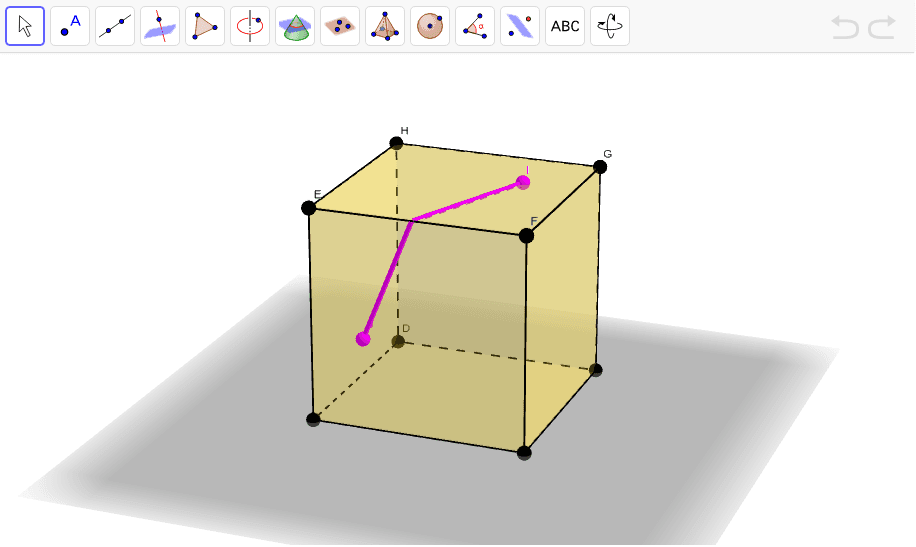
This applet illustrates the shortest path between points on two adjacent faces of a cube. By dragging the red points, you can change the path. The construction uses commands like Intersect, Point, and Vector. Suitable for middle school and above students to learn geometric construction and optimization.
GeoGebra Commands & Parameters
Intersect(yAxis, zAxis) → APoint(xAxis) → BPoint(Circle[B, Distance[A, B], Segment[A, B]]) → CCube(A, B, C) → a, D, faceCDHG, faceEFGH, edgeAD, edgeAB, edgeBC, edgeCD, edgeAE, edgeDH, edgeEH, edgeEF, E, edgeBF, edgeFG, edgeCG, edgeGH, F, G, H, faceABCD, faceADHE, faceABFE, faceBCGFPointIn(faceEFGH) → IPointIn(faceABFE) → JOrthogonalPlane(J, edgeEF) → bOrthogonalPlane(I, edgeEF) → cIntersect(edgeEF, b) → KIntersect(edgeEF, c) → LOrthogonalPlane(J, edgeBF) → dIntersectPath(c, d) → eOrthogonalPlane(I, edgeFG) → fIntersectPath(f, d) → gIntersect(e, faceABFE) → MSegment(J, M) → hSegment(M, L) → iSegment(L, I) → jVector(L, K) → uSegment(J, N) → kSegment(N, I) → l