
Shifting Patterns
Loading the math board and drawing, please wait…
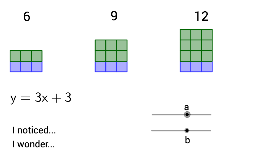
This example demonstrates the relationship between a linear function and the number of squares in a geometric pattern, highlighting the connection between algebraic functions and geometric transformations. It involves core math concepts like linear functions, sequences, and geometric transformations. Constructed using GeoGebra commands such as Sequence, lists, text, and sliders, it is suitable for middle school and above to explore how function parameters affect geometric figures and understand the interplay between functions and shapes.
GeoGebra Commands & Parameters
Sequence(Polygon[(i, -1), (i + 1, -1), 4], i, 0, b - 1, 1) → list3Sequence(Polygon[(i + 8, -1), (i + 9, -1), 4], i, 0, b - 1, 1) → list1Sequence(Polygon[(i + 16, -1), (i + 17, -1), 4], i, 0, b - 1, 1) → list2Sequence(Polygon[(i, 0), (i + 1, 0), 4], i, 0, a - 1, 1) → list4Sequence(Sequence[Polygon[(i + 8, j), (i + 9, j), 4], i, 0, a - 1, 1], j, 0, 1, 1) → list5Sequence(Sequence[Polygon[(i + 16, j), (i + 17, j), 4], i, 0, a - 1, 1], j, 0, 2, 1) → list6
AI Drawing Prompt Reference
Draw a coordinate plane with three groups of unit squares. On the left, place a row of b squares along the x-axis starting at x=0, with their bottom edges on y=-1. In the middle, place another row of b squares starting at x=8, also on y=-1. On the right, place a third row of b squares starting at x=16, on y=-1. Above the left row, add a row of a squares on y=0. Above the middle row, add two rows of a squares on y=0 and y=1. Above the right row, add three rows of a squares on y=0, y=1, and y=2. All squares are adjacent, forming a stepped pattern that rises to the right, illustrating how the number of squares relates to a linear function.
The prompt above was compiled from the original drawing commands and is for reference only.